
• Skip to primary navigation
  • Skip to main content
Dean Dorton – CPAs and Advisors
  • Services
        • Audit & Assurance
          • Audits, Reviews & Compilations
          • ESG Programs & Reporting
          • Internal Audit
          • International Financial Reporting
          • Lease Accounting Managed Services
          • Peer Review Services
          • SOC Reporting
        • Family Office
        • Consulting & Advisory
          • Business Valuation Services
          • Forensic Accounting
          • Litigation Support
          • Matrimonial Dissolution
          • Merger & Acquisition
          • SEC Services
          • Succession Planning
          • Transaction Advisory Services
          • Whistleblower Hotline
        • Outsourced Accounting
        • Private Wealth
        • Healthcare Consulting
          • Finance
          • Health Systems Operational Transformation
          • Medical Billing and Credentialing
          • Risk Management & Compliance
          • Strategy and Strategy Implementation
          • Technology & Data Analytics
        • Tax
          • Business Tax
          • Cost Segregation Studies
          • Credits and Incentives
          • Estates and Trusts
          • Individual Tax
          • International Tax
          • SEC Provision and Compliance
          • State and Local Tax
        • Technology & Cybersecurity
          • Accounting Software
          • Cybersecurity
            • Cybersecurity Assessments
            • Cybersecurity Scorecard Assessment
            • Security Awareness Training
            • Virtual Information Security Office
          • Data Analytics & AI
          • IT Audit & Compliance
            • Cybersecurity Maturity Model Certification (CMMC)
            • Data Privacy Laws
            • SOC Reporting
          • IT Infrastructure & Cloud Solutions
            • Automation
            • Backup and Disaster Recovery
            • Cloud Strategy
            • Data Center
            • Enterprise Network
            • Network Security
            • Phone and Video Conferencing
            • User Identity Management Solutions
            • Webex
          • Managed IT Services
  • Industries
        • Construction
        • Distilleries and Craft Breweries
        • Energy and Natural Resources
        • Equine
        • Financial Institutions
        • Government
        • Healthcare
        • Higher Education
        • Life Sciences
        • Manufacturing and Distribution
        • Nonprofit
        • Real Estate
  • Insights
    • Articles
    • Guides
    • Case Studies
  • Events
  • Company
        • News
        • Our Team
        • Experiences
        • Careers
          • College Students
          • Experienced Professionals
        • Locations
        • Lexington, KY

          250 West Main Street
          Suite 1400
          Lexington, KY 40507
          859-255-2341

        • Louisville, KY

          435 North Whittington Parkway
          Suite 400
          Louisville, KY 40222
          502-589-6050

        • Louisville, KY

          700 North Hurstbourne Parkway
          Suite 115
          Louisville, KY 40222
          502-589-6050

        • Ft. Wright, KY

          810 Wright’s Summit Parkway
          Suite 300
          Fort Wright, KY 41011
          859-331-3300

        • Cincinnati, OH

          312 Walnut Street
          Suite 3330
          Cincinnati, OH 45202
          859-331-3300

        • Blue Ash, OH

          9987 Carver Rd
          Suite 120
          Blue Ash, OH 45242
          513-891-5911

        • West Chester, OH

          9025 Centre Pointe Drive
          Suite 310
          West Chester, OH 45069
          513-985-62405

        • Indianapolis, IN

          5975 Castle Crk Pkwy Dr N
          Suite 400
          Indianapolis, IN 46250
          317-469-0169

        • Raleigh, NC

          4130 Parklake Avenue
          Suite 400
          Raleigh, NC 27612
          919-782-9265

  • Contact Us

dynamics gp

Article 03.26.2025 Autumn Hines

The madness doesn’t just happen on college basketball courts—it also happens when your finance team is stuck using a legacy on-premises accounting system like Microsoft Dynamics GP. If your accounting playbook is filled with outdated software, manual processes, and desperate workarounds, you’re in for a season of frustration. Let’s break down why running your business on legacy accounting software is the real full-court press of inefficiency.

The Shot Clock is Running Out

Modern cloud-based accounting solutions are running a fast break, while Dynamics GP is dragging through a slow-motion half-court offense. Every second spent on manual data entry, slow reconciliations, or system crashes is eating away at your ability to execute a winning financial strategy. With Microsoft shifting focus away from Dynamics GP in favor of cloud-based solutions, the shot clock is ticking—how much longer can you afford to play this outdated game?

Too Many Turnovers

Relying on Dynamics GP is like a team that just can’t stop giving the ball away. Manual data entry? That’s a bad pass. Limited automation? That’s an unforced error. Lack of real-time reporting? That’s like playing without a scoreboard. Without the agility of modern cloud-based accounting systems, every extra step increases the risk of costly mistakes and slows down your ability to make fast, informed decisions.

Getting Blocked at Every Turn

Trying to integrate Dynamics GP with modern financial tools is like trying to drive the lane against a seven-foot shot blocker—it’s just not happening. Dynamics GP was built for an era where standalone systems were the norm, meaning its compatibility with new cloud-based applications is clunky at best. Cloud-based accounting solutions, on the other hand, offer seamless integrations, allowing you to move the ball with efficiency and precision.

Your Bench is Running Thin

One of the biggest issues with Dynamics GP? The dwindling number of IT professionals who know how to maintain and support it. It’s like relying on a star player who’s past their prime with no solid backups in sight. As Microsoft gradually phases out support and fewer experts can troubleshoot problems, your organization is left vulnerable to unexpected downtime and expensive fixes.

Cloud Accounting is the Championship Move

If you want to stay competitive, it’s time to upgrade to a cloud-based accounting solution. Automated workflows, real-time reporting, best-in-class security, and seamless integrations mean you can execute a championship-level financial strategy. No more desperate last-second shots—just efficient, accurate, and strategic financial management.

Final Buzzer: It’s Time to Move

Sticking with Dynamics GP is the real bracket buster—filled with unnecessary struggles, defensive stops, and missed opportunities. If you’re ready to break free from outdated processes and start playing like a championship contender, it’s time to make your move. Don’t let your accounting team get stuck in the past—make the switch before the final buzzer sounds on your outdated system!
Filed Under: Accounting Software Tagged With: Accounting Software, Cloud Accounting, dynamics gp

Article 12.1.2020 Dean Dorton

Unless you are using Microsoft Dynamics GP (GP) for payroll, or you just want to be on the bleeding edge of technology, most GP users will choose to upgrade their software somewhat infrequently. They will usually stay within a version or two of the most recent. It is wise to stay on a current version of GP so that you can receive any important updates to the software. Clients that utilize the payroll module in GP are required to stay on a supported version in order to receive year end and tax table updates. Most other clients can comfortably have a little more discretion when to upgrade. Unless there are new features that would greatly aid their business process activity in the system, they may only upgrade to conform to new server operating system requirements or other requirements from third-party or connected software.

Why should I care about 1099 form changes now?

While allowing GP to fall into an unsupported version is not the best approach, it usually doesn’t cause a lot of panic. That is, until the IRS decides to make a major change to the way that 1099s are reported. Effective for tax year 2020, the IRS has changed the way non-employee compensation should be reported.  This was previously reported on 1099-MISC Box 7. Non-employee compensation will now be reported on 1099-NEC Box 1. There are few 1099 form changes, but one that affects most users is the non-employee compensation change. You can find all of the 1099 form changes on the IRS website here: https://www.irs.gov/forms-pubs/about-form-1099-nec.

What about software updates?

The good news is that Microsoft has released an update that will automatically fix all of the 1099 form and box changes for you. For GP 18, an update was released in early October of this year that fixed the 1099 forms and boxes. This is release 18.3.1173. This October release will also be included in the 2020 payroll year end update file (18.3.1200). There was not an October update for GP 2016. However, the 2020 payroll year end update for GP 2016 (16.00.0864) will also have fixes for all of the 1099 forms and boxes. You MUST be on GP 18 or GP 2016 to receive this update. Support for GP 2015 ended in April 2020.

What if my Dynamics GP is not upgraded?

Until your GP upgrade is complete, you will need to continue to use GP as before, entering all non-employee compensation into 1099-MISC box 7.

If you need to print 1099s out of GP and are not currently on GP 18.3.1173 or GP 16.00.0864, please contact the Dean Dorton Microsoft Dynamics GP team at erpsupport@ddaftech.com and we’ll work with you to get upgraded. Note, you must also be current with your Microsoft annual enhancement fee to be eligible to install any GP updates.  If you are on a version of GP older than GP 18 or GP 2016, we will work with you to put together an upgrade plan to get you on a current version.

What if I still cannot upgrade in time and need to print 1099 forms?

If you need to print 1099s and it is not possible to upgrade GP in time, you could use GP to retain the 1099 amounts and then use a third-party software such as tax1099.com. There are several of those 1099 filing software solutions available. If you would prefer or if you need help, Dean Dorton has team members that can assist you with printing and/or filing your 1099s. You can connect with us at erpsupport@ddaftech.com to schedule time to discuss how we can help.

Learn more about Dean Dorton’s Accounting Software services and products:

Accounting Software

Dean Dorton ERP Team
erpsupport@ddaftech.com

Filed Under: Accounting & Tax, Accounting Software, Microsoft Dynamics GP, Services, Technology Tagged With: 1099, 1099 form, dynamics gp, Microsoft Dynamics GP

Article 09.2.2020 Dean Dorton

Dynamics GP, originally known as Great Plains Software Dynamics, is an enterprise accounting software solution that started in the early 1990s and still has a large, dedicated following today.  With nearly 30 years of experience, over 50,000 companies using it and an ecosystem of thousands of companies that have developed add-on applications, Dynamics GP remains one of the statistical leaders in mid-market accounting software.  But statistics don’t tell the whole story, so let’s look a little deeper.

Dynamics GP was first born back in the early 1990s in Fargo, North Dakota under the name Dynamics, created by Great Plains Software.  It created an amazing following based on a solid product that was quickly evolving with new features and functions.  It also didn’t hurt that Great Plains was soon lead by Doug Burgum, a charismatic, intelligent extrovert who was a superb leader.  The software grew and grew, as did the customer base, and it gained awards and a stellar reputation.  So much so that soon after it went public, in the late 1990s, it was acquired by Microsoft – along with a handful of other accounting software products.

In addition to Great Plains, Microsoft also acquired Solomon (via a previous Great Plains acquisition), Navision and Axapta, giving the company a total of four lower-to-upper mid-market accounting software platforms.  For years, Microsoft tried to create one common code base, Project Green.  That effort eventually folded and Microsoft went back to the drawing board for a new project called “365.”  Over the last several years, Microsoft has devoted much of its attention to 365 products from Office to Windows to Dynamics.

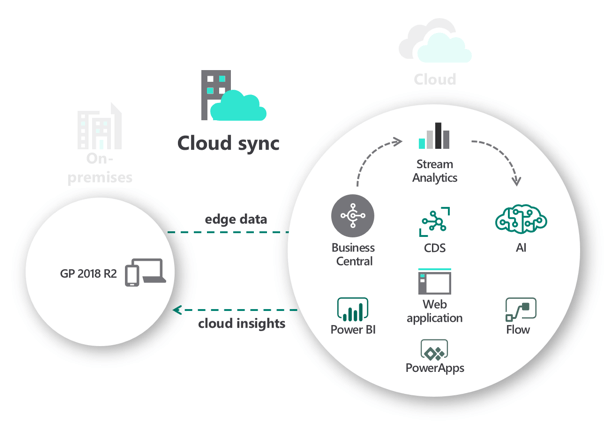
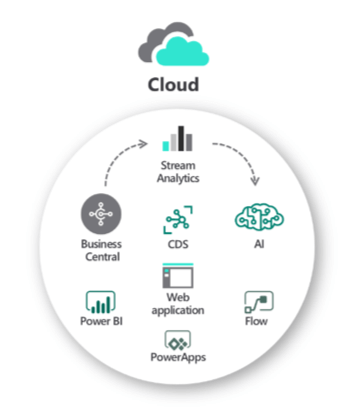
So where does that leave Dynamics GP today?  In this day of cloud software with anywhere, anytime access a primary concern of most modern organizations, a primarily on-premise system isn’t what they are looking for.  Microsoft has tried to create a web client for Dynamics GP, but it’s missing many features and many of the thousands of third-party developers have not adapted their add-on solutions to work in the ill-fated web client.  You can host Dynamics GP on Amazon or Azure or many other vendors, but you still have downtime for upgrades and all the other complications that accompany and, often, the cost of hosted Dynamics GP equals or exceeds the cost of many cloud solutions, Dynamics 365 Business Central especially. Current Dynamics GP users have three options inside the Microsoft Dynamics family going forward and we explore those options briefly.

  • On-Premise
  • Cloud Sync
  • Cloud

First, let’s explore the most obvious choice, On-Premise.  This option is the one Dynamics GP end-users have chosen for years without even knowing it. In other words, it’s the status quo.  Microsoft has pledged a decade of support for all versions of Dynamics GP.  That means you have, as of this writing, some level of support for Dynamics GP through 2029 at a minimum, so you do not have to move off Dynamics GP if you really like it.  Many companies still have on-premise network infrastructure and technicians that manage other systems, so what’s one more?  And, on-premise data is mostly still the best when it comes to flexible, custom reporting using tools like SQL Reporting and many others.

Second, for those that want to test the waters of the cloud, there is a cloud-sync option where you keep using Dynamics GP as you always have but synchronize some data with the cloud in Dynamics 365.  With this option, you keep everything you love about Dynamics GP but you get the benefits of reports and analytics in the cloud.  Access your pertinent data from the cloud – anywhere and anytime – but skip the implementation of a new system.  This may be a perfect option for companies who want more functionality or remote information access but aren’t yet ready to leave Dynamics GP.

Third, Dynamics GP organizations have the option of fully migrating to Dynamics 365 Business Central. This is a great option, but the biggest caution is that it is NOT Dynamics GP cloud.  Business Central is based on – closely resembles – the Dynamics NAV product, a different accounting software solution as mentioned above. For Dynamics GP users, this is not a simple upgrade, but a new implementation of the software.  Business Central is, however, a great next option for Dynamics GP users as it has similar functionality and is a full cloud offering so you no longer need to worry about backups or upgrades or other maintenance.  Business Central also offers a great deal of new functionality for Dynamics GP users around inter-company, financial reporting, and inventory.  Take a look today to see if it’s the right choice for your organization.

In summary, Dynamics GP is now very much considered a “legacy” accounting system as it’s mostly targeted at companies that want to host their data at their site.  That’s NOT a bad thing by itself, though.  Many companies still have the hardware infrastructure to support an on-premise accounting system so the work involved isn’t unusual.  But, the cloud is here to stay and provides a great deal of benefits that on-premise systems will never be able to offer.  Business Central users, for example, get anywhere, anytime access and have more options for data integration and reporting tools, like Microsoft Power BI, to make data dissemination a more personal experience.

For more information about Business Central 365 or our other accounting software solutions, contact us below!

Philip Massey, CPA
Director of Software Consulting Services
erpsales@ddaftech.com • 919.875.9635

Explore Dynamics Business Central 365

Filed Under: Accounting Software, Microsoft Dynamics 365, Services, Technology Tagged With: business central 365, Cloud Accounting, dynamics gp

Article 09.26.2019 Dean Dorton

The announcement has trickled to users that Microsoft Dynamics GP is launching a new release on October 1st, 2019!

Typically, past releases included the year portion at the end of the release, but going forward, there will be no date.  For example, there will be no Dynamics GP 2019 R2- the releases will just be called “Microsoft Dynamics GP”.

Users are excited that there are almost forty new features and enhancement coming out with this release. For details about all the changes,  Microsoft has announced a plan to post a blog series called “Feature of the Day” to update users of the individual enhancements in detail. This blog can be found HERE.

Modern Lifecycle Policy

Another major change is that this product will now be a part of the Modern Lifecycle Policy, which covers products and services that are serviced and supported continuously. This policy is also used by Office 365 and Dynamics 365.
Under this policy, the product or service remains in support IF the following criteria are met:

  1. Customers must stay current as per the servicing and system requirements published for the product or service.
  2. Customers must be licensed to use the product or service.
  3. Microsoft must currently offer support for the product or service.

Enhancements and Features

Some of the most notable changes in features and enhancements can be found below:

Dynamics GP release
Dean Dorton is a Certified Microsoft Dynamics GP Partner and a Sage Intacct Premier Partner. If you have any questions, please visit our Contact page. 

Filed Under: Accounting and Financial Outsourcing, Accounting Software, Microsoft Dynamics GP, Services Tagged With: dynamics gp, GP Release, October, Release

Article 12.11.2018 Dean Dorton

Are you ready to end 2018 on a smooth note and make sure you and your finance team are prepared to set sail with success in the new year?

For Microsoft Dynamics Great Plains users, year-end close preparation is a big must for all companies and it is important that you take the proper steps to finalize all closing procedures.

Here are 6 areas to focus on when it comes to getting ready for year-end closing procedures:

  • General Ledger
  • Payroll
  • Inventory
  • Accounts Receivable
  • Accounts Payable
  • Analytical Accounting

On Tuesday, December 18th @ 2 PM EST, Massey Consulting, a Dynamics GP Reseller and Certified Microsoft Gold Partner will be sharing best practices and resources for a victorious year-end close!

Filed Under: Accounting Software, Microsoft Dynamics GP, Services Tagged With: dynamics gp, Procedures, Year-End Close

Article 08.29.2018 Dean Dorton

Imagine this… A day at the office where you and your finance team don’t have to scurry around, trying to import and export critical data between multiple systems. What about this? You aren’t stuck behind your computer for countless hours, re-keying the same data over and over again in different systems.

If your business uses ConnectWise as your main CRM, you can now seamlessly integrate all the data with your accounting system- either MS Dynamics GP or Sage Intacct. Massey’s mConnect integrator tool makes this possible.

With mConnect, you have real-time integration between your operations system, ConnectWise, and your ERP. The solution empowers your accounting system and ConnectWise to work together by identifying and sharing customer-focused information, making it all customizable for your needs. All data is visible where you need it and when you need it.

mConnect helps businesses:

  • Keep invoices up-to-date by automating the collections process
  • Customize their needs and integrate only the records THEY want
  • Automatically synchronize customers, vendors, and products inside accounting
  • Import sales invoices, procurements, and expense reports.

“Without mConnect, system users would have to manually import and export data from each system in order to synchronize and share information between the accounting, sales, invoicing, order processing, receivables and inventory functions,” said Philip Massey, CPA and President of Massey Consulting.

“mConnect simplifies and automates these tasks, making information readily available and decreasing the possibility for errors that occur as a result of manual re-keying of data.”

Filed Under: Accounting Software, mConnect, Microsoft Dynamics GP, Sage Intacct, Services Tagged With: connectwise, dynamics gp, integration, mConnect, Sage Intacct, scribe

  • Page 1
  • Page 2
  • Page 3
  • Interim pages omitted …
  • Page 5
  • Go to Next Page »
PAY INVOICE SUBMIT RFP
  • Services
    • Outsourced Accounting
    • Audit & Assurance
    • Tax
    • Consulting & Advisory
    • Technology & Cybersecurity
    • Family Office
    • Wealth Management
  • Industries
  • Company
  • Locations
  • Careers
  • Insights
  • Events
  • Contact Us
SUBSCRIBE TO INSIGHTS
email Dean Dorton - CPAs And Advisors On Email facebook Dean Dorton - CPAs And Advisors On Facebook twitter twitter linkedin Dean Dorton - CPAs And Advisors On LinkedIn youtube Dean Dorton - CPAs And Advisors On YouTube

The matters discussed on this website provide general information only. The information is neither tax nor legal advice. You should consult with a qualified professional advisor about your specific situation before undertaking any action.

© 2026 Dean Dorton Allen Ford, PLLC. All Rights Reserved

  • Privacy Policy
  • Terms Of Use
  • Accessibility