• Skip to primary navigation
  • Skip to main content
Dean Dorton – CPAs and Advisors
  • Services
        • Audit & Assurance
          • Audits, Reviews & Compilations
          • ESG Programs & Reporting
          • Internal Audit
          • International Financial Reporting
          • Lease Accounting Managed Services
          • Peer Review Services
          • SOC Reporting
        • Family Office
        • Consulting & Advisory
          • Business Valuation Services
          • Forensic Accounting
          • Fractional CFO
          • Litigation Support
          • Matrimonial Dissolution
          • Merger & Acquisition
          • SEC Services
          • Succession Planning
          • Transaction Advisory Services
          • Whistleblower Hotline
        • Outsourced Accounting
        • Private Wealth
        • Healthcare Consulting
          • Finance
          • Health Systems Operational Transformation
          • Medical Billing and Credentialing
          • Risk Management & Compliance
          • Strategic Growth for Private Practices
          • Strategy and Strategy Implementation
          • Technology & Data Analytics
        • Tax
          • Business Tax
          • Cost Segregation Studies
          • Credits and Incentives
          • Estates and Trusts
          • Individual Tax
          • International Tax
          • SEC Provision and Compliance
          • State and Local Tax
        • Technology & Cybersecurity
          • Accounting Software
          • Cybersecurity
            • Cybersecurity Assessments
            • Cybersecurity Scorecard Assessment
            • Security Awareness Training
            • Virtual Information Security Office
          • Data Analytics & AI
          • IT Audit & Compliance
            • Cybersecurity Maturity Model Certification (CMMC)
            • Data Privacy Laws
            • SOC Reporting
          • IT Infrastructure & Cloud Solutions
            • Automation
            • Backup and Disaster Recovery
            • Cloud Strategy
            • Data Center
            • Enterprise Network
            • Network Security
            • Phone and Video Conferencing
            • User Identity Management Solutions
            • Webex
          • Managed IT Services
  • Industries
        • Construction
        • Distilleries and Craft Breweries
        • Energy and Natural Resources
        • Equine
        • Financial Institutions
        • Government
        • Healthcare
        • Higher Education
        • Life Sciences
        • Manufacturing and Distribution
        • Nonprofit
        • Real Estate
  • Insights
    • Articles
    • Guides
    • Case Studies
  • Events
  • Company
        • News
        • Our Team
        • Experiences
        • Careers
          • College Students
          • Experienced Professionals
        • Locations
        • Lexington, KY

          250 West Main Street
          Suite 1400
          Lexington, KY 40507
          859-255-2341

        • Louisville, KY

          435 North Whittington Parkway
          Suite 400
          Louisville, KY 40222
          502-589-6050

        • Louisville, KY

          700 North Hurstbourne Parkway
          Suite 115
          Louisville, KY 40222
          502-589-6050

        • Ft. Wright, KY

          810 Wright’s Summit Parkway
          Suite 300
          Fort Wright, KY 41011
          859-331-3300

        • Cincinnati, OH

          312 Walnut Street
          Suite 3330
          Cincinnati, OH 45202
          859-331-3300

        • Blue Ash, OH

          9987 Carver Rd
          Suite 120
          Blue Ash, OH 45242
          513-891-5911

        • West Chester, OH

          9025 Centre Pointe Drive
          Suite 310
          West Chester, OH 45069
          513-985-6240

        • Indianapolis, IN

          5975 Castle Crk Pkwy Dr N
          Suite 400
          Indianapolis, IN 46250
          317-469-0169

        • Raleigh, NC

          4130 Parklake Avenue
          Suite 400
          Raleigh, NC 27612
          919-782-9265

  • Contact Us

Microsoft Dynamics GP

Article 12.1.2020 Dean Dorton

Unless you are using Microsoft Dynamics GP (GP) for payroll, or you just want to be on the bleeding edge of technology, most GP users will choose to upgrade their software somewhat infrequently. They will usually stay within a version or two of the most recent. It is wise to stay on a current version of GP so that you can receive any important updates to the software. Clients that utilize the payroll module in GP are required to stay on a supported version in order to receive year end and tax table updates. Most other clients can comfortably have a little more discretion when to upgrade. Unless there are new features that would greatly aid their business process activity in the system, they may only upgrade to conform to new server operating system requirements or other requirements from third-party or connected software.

Why should I care about 1099 form changes now?

While allowing GP to fall into an unsupported version is not the best approach, it usually doesn’t cause a lot of panic. That is, until the IRS decides to make a major change to the way that 1099s are reported. Effective for tax year 2020, the IRS has changed the way non-employee compensation should be reported.  This was previously reported on 1099-MISC Box 7. Non-employee compensation will now be reported on 1099-NEC Box 1. There are few 1099 form changes, but one that affects most users is the non-employee compensation change. You can find all of the 1099 form changes on the IRS website here: https://www.irs.gov/forms-pubs/about-form-1099-nec.

What about software updates?

The good news is that Microsoft has released an update that will automatically fix all of the 1099 form and box changes for you. For GP 18, an update was released in early October of this year that fixed the 1099 forms and boxes. This is release 18.3.1173. This October release will also be included in the 2020 payroll year end update file (18.3.1200). There was not an October update for GP 2016. However, the 2020 payroll year end update for GP 2016 (16.00.0864) will also have fixes for all of the 1099 forms and boxes. You MUST be on GP 18 or GP 2016 to receive this update. Support for GP 2015 ended in April 2020.

What if my Dynamics GP is not upgraded?

Until your GP upgrade is complete, you will need to continue to use GP as before, entering all non-employee compensation into 1099-MISC box 7.

If you need to print 1099s out of GP and are not currently on GP 18.3.1173 or GP 16.00.0864, please contact the Dean Dorton Microsoft Dynamics GP team at erpsupport@ddaftech.com and we’ll work with you to get upgraded. Note, you must also be current with your Microsoft annual enhancement fee to be eligible to install any GP updates.  If you are on a version of GP older than GP 18 or GP 2016, we will work with you to put together an upgrade plan to get you on a current version.

What if I still cannot upgrade in time and need to print 1099 forms?

If you need to print 1099s and it is not possible to upgrade GP in time, you could use GP to retain the 1099 amounts and then use a third-party software such as tax1099.com. There are several of those 1099 filing software solutions available. If you would prefer or if you need help, Dean Dorton has team members that can assist you with printing and/or filing your 1099s. You can connect with us at erpsupport@ddaftech.com to schedule time to discuss how we can help.

Learn more about Dean Dorton’s Accounting Software services and products:

Accounting Software

Dean Dorton ERP Team
erpsupport@ddaftech.com
Filed Under: Accounting & Tax, Accounting Software, Microsoft Dynamics GP, Services, Technology Tagged With: 1099, 1099 form, dynamics gp, Microsoft Dynamics GP

Article 06.19.2018 Dean Dorton

A new version of Microsoft Dynamics GP has been released. Let’s get into what’s been updated from previous versions.

Workflow 4.0

Workflow 4.0 extends and enhances it substantially from previous versions of Dynamics GP. The new functions include:

  • Reminder emails. You are now able to set a notification for anyone who hasn’t reacted to their assigned task within a given time frame (set by you).
  • Copying workflow steps. This one should be popular: You are now able to copy steps within a workflow and rename them. This allows you to move steps from one workflow to another of the same type. Since this also lets you copy any substeps in the workflow, the efficiency boost for anyone who has to deal with several similar or identical workflows is potentially huge.
  • Workflow reports. Very simply, history reports for workflows are now available. These can be filtered by workflow type, approvers, status, and approval dates.
  • More fields for the Payables transaction workflow. There is now a field to name a vendor account, two for comments, one for a vendor class ID, and one to mark payment priority. (To access these, go to the Extended fields list option in Work Maintenance, then select the new fields you want included). There is also a new account description field PO Workflow emails and more vendor EFT/Bank Information fields.
  • New workflows now exist to control the addition of general ledger accounts, purchase receiving transactions and purchasing invoices. General ledger account workflows can be initiated from any part of the system for new accounts or any accounts currently in a workflow state.

BI Enhancements

The Business Intelligence enhancements include a new content pack, downloadable from the Dynamics blog here. The Power BI Desktop application is a powerful tool in the Dynamics GP software suite; this content pack is a new effort by Microsoft to help users get the most out of it. It includes sample reports using financial, sales, purchasing, and inventory data, showing how these reports draw on data relationships built between GP tables, as well as displaying filters that let you focus on particular data subsets.

BI enhancements are based on the updated OData service, adding support for version 4.

Financials Enhancements

Upgrades to financials revolve around making business with your customers and vendors more efficient.

  • You can now print a statement for a single customer from their specific Customer Inquiry window. It will use the statement format assigned in Receivables Setup.
  • You now have the option to make payments on individual invoices. Alternately, you can choose a single payment per vendor. The system defaults to generating a single payment per vendor when you build payment batches; making a change is as easy as going to Vendor Maintenance and picking a different option.
  • The Payment Option ID field now allows you to save the settings for a payments batch, making the batch process substantially more efficient in the long term.
  • If you want to give different users the same level of access, you can now quickly copy user access settings in the User Access to Trx Dimensions window and apply them to whoever else needs them.
  • Payables Management Checks windows are now renamed to reflect the fact payments can come through credit cards, EFTs, or other methods.

HR/Payroll Enhancements

HR users benefit from Dynamics GP’s improved ability to deal with inactive records. Any changes in payroll setup, including pay codes, deductions, benefits, and shift codes, can be rolled down to inactive employee records rather than specifically going to inactive records to make those changes. Likewise, inactive records can have company and employee benefits and deductions restricted.

In addition, garnishment reports can now be turned off when posting, which is a nice quality of life change for companies that have a relatively high number of garnishments on their books. Finally, when existing department codes are changed, all relevant data tables will be automatically updated with the new department code. Even if department codes do not need to be changed often, this is a huge benefit for the times when it does happen, as it ensures the suite continues running smoothly rather than needing a potentially large number of manual changes first.

Dynamics GP is a centerpiece for thousands of firms; these are just a portion of the upgrades that improve its functionality and ease life for those firms’ employees. If you’re looking to upgrade your version of Dynamics, or you need new software to help run your accounting firm, contact us today.

Filed Under: Accounting Software, Microsoft Dynamics 365, Services Tagged With: Microsoft Dynamics GP, new features

Article 01.12.2018 Dean Dorton

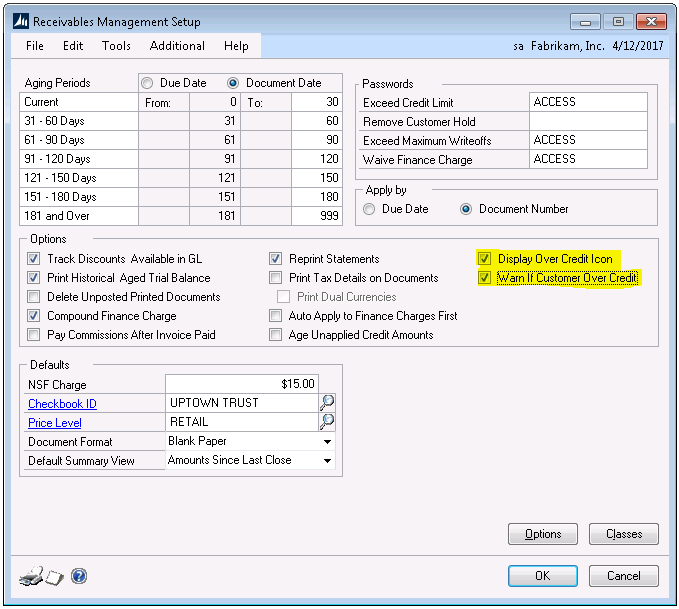
Managing your customer’s credit limit in Dynamics GP became even easier with the Dynamics GP 2015 R2 release.  Two new options were introduced that now give you the ability to display an over the credit limit warning icon as well as set up a warning pop-up window if a customer is over their credit limit.

To access these two new options, Display Over Credit Icon and Warn if Customer Over Credit,  you will need to be on Dynamics GP 2015 R2 and also enable the options on the Receivables Management Setup (Tools>Setup>Sales>Receivables) window (Figure 1).

dynamics gp

Figure 1

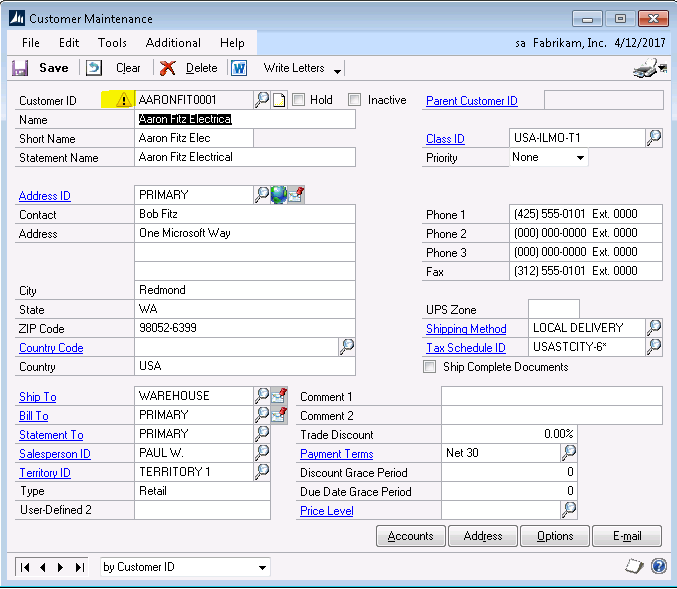
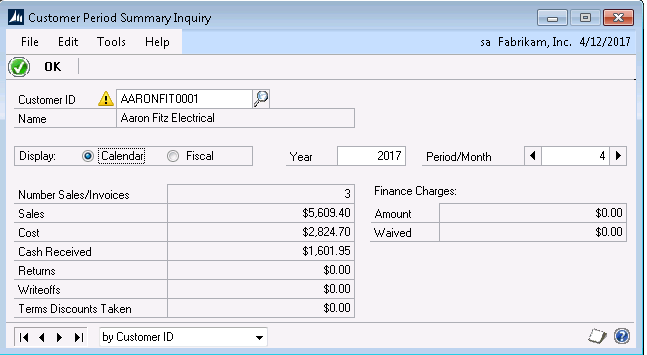
The Display over Credit Icon option will display a visual icon in multiple windows to alert you that the customer is over their credit limit.  Notice in Figure 2 below there is a yellow warning icon next to the customer number on the customer card.  This warning icon will show up throughout GP when the customer number is entered (see Figure 3).

Figure 2

Figure 3

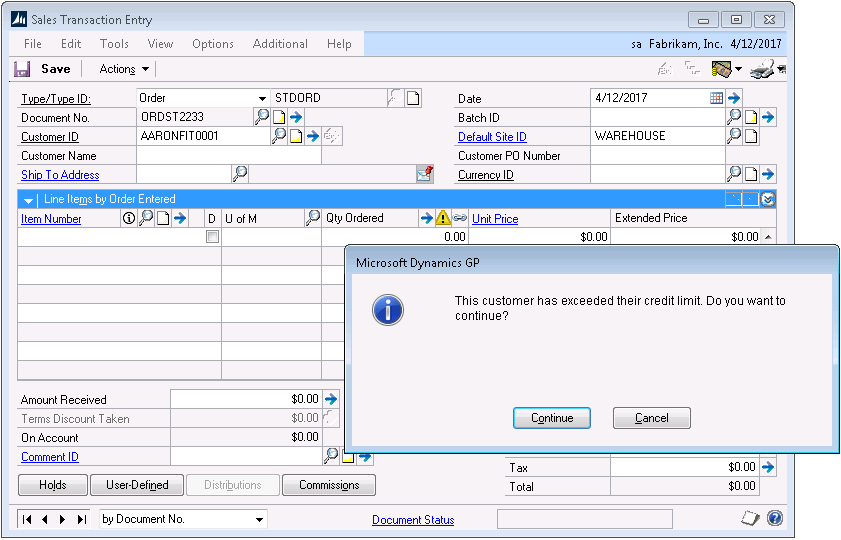
The second option, Warn if Customer Over Credit, will allow a warning message box to pop up once a credit limit is passed.  As shown in Figure 4 below the warning message is displayed as soon as the customer ID is entered in Sales Transaction Entry.  

Figure 4

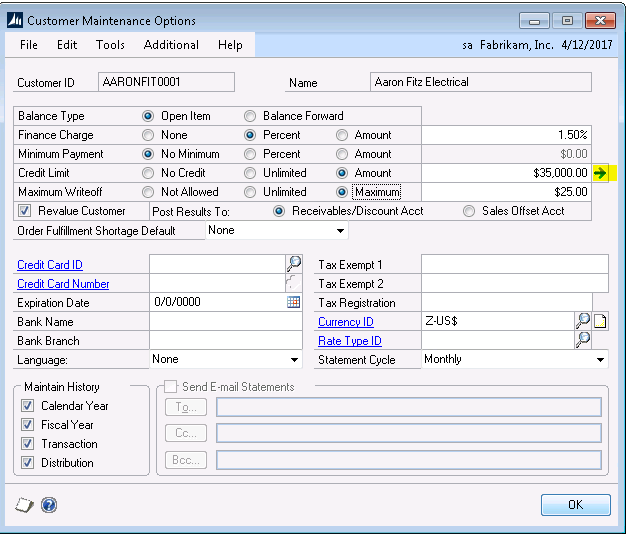
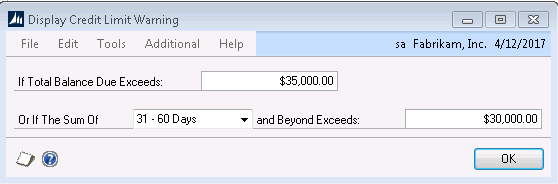
You also have the option to configure the credit limit warning window to warn you if a new transaction that is being entered would put a customer over their credit limit once that transaction amount is added to the open balances for that customer.  To configure the credit limit warning, click the blue arrow to the right of the customer credit limit amount on the customer maintenance options window (Figure 5). On the Display Credit Limit Warning window, you can choose to set up a warning if the total balance exceeds the customer’s credit limit OR if the sum of receivables in a particular aging bucket and beyond exceeds a dollar amount.  In the example shown in Figure 6, we have set the alert to notify us if the customer exceeds their $35,000 credit limit OR if the sum of their transactions exceeds $30,000 in the 31-60 and beyond aging buckets.

Figure 5

Figure 6

Both credit limits warnings options by default are not enabled.  Once enabled, it is a system-wide option that can be turned on and off at any time.  

If you have additional questions on how to setup and configure the credit limit warning options, please reach out to Support@MasseyConsulting.net

Filed Under: Accounting Software, Microsoft Dynamics GP, Services Tagged With: accounting solutions, alerts, credit limits, dynamics gp, Microsoft Dynamics GP

Article 10.25.2017 Dean Dorton

Whether you just went paperless, or have been relying on the cloud for years to support your business, you understand that with multiple systems comes redundant re-keying.  You also know that with every duplicate manual entry, your company faces a greater potential for human error to erode the accuracy of your most critical data.

As experts in accounting and the cloud, we understand the pains of duplicate work and how it can wreak havoc in your reports, client relations, and audits.  In response to this common problem, the Massey team designed mConnect.

ABOUT mCONNECT

The mConnect solution unites two best-in-class cloud platforms, ConnectWise and Sage Intacct, by creating a seamless pathway for behind-the-scenes automated integration.  With mConnect, data can travel back and forth between ConnectWise and Sage Intacct quickly and effortlessly, which means your company saves time, reduces frustration, conserves resources, and ensures accuracy.

Some additional benefits of mConnect include:

  • Harness critical data and transfer it with one click.
  • Gather stock counts in real time, everywhere your team works.
  • Track invoicing quickly and accurately, as soon as an order is placed.
  • Up-to-date sales numbers anytime, anywhere.
  • Eliminate running your own integrations. mConnect does it for you.

mConnect’s customizable options allow for less manual entries and redundant filtering and synchronized or automatic data transfers. This means your team can do more, worry less and get the critical answers they need when they need them.

At this year’s IT Nation, happening November 8-10 in Orlando, FL, members from our team will be there to talk with other sponsors, presenters and attendees about mConnect’s features that showcase and uplift the two best-in-class cloud solutions.

Get the most you can from your cloud solutions in a way that will uplift your teams and make the best use of their time.

Let’s meet up at IT Nation, so we can show you everything that mConnect can do for you! Massey Consulting will be at Booth 704. Don’t miss out on our wonderful prizes- we will be giving away goodies each day, including 2 Amazon Echoes on Wednesday and Thursday!

Register now!

Filed Under: Accounting Software, mConnect, Microsoft Dynamics 365, Microsoft Dynamics GP, Sage Intacct, Services Tagged With: connectwise, IT Nation, mConnect, Microsoft Dynamics, Microsoft Dynamics GP, Sage Intacct

Article 08.30.2017 Dean Dorton

Filed Under: Accounting and Financial Outsourcing, Accounting Software, Microsoft Dynamics GP, Services Tagged With: dynamics gp, Microsoft Dynamics GP

Article 04.20.2017 Dean Dorton

Are you a finance executive at a for-profit company thinking about making the leap to a nonprofit organization? As the Wall Street Journal reported, some readjustment may be in order.

Reporting requirements are much stricter, and you’ll need to manage the expectations of major donors and your board. But the biggest difference between nonprofits and for-profits may be a lack of resources. Don’t expect the luxury of a large staff. Employees at nonprofits end up wearing many hats and playing numerous roles because there simply aren’t enough people.

Watch the webcast, “Elevate the Role of Finance in Your Nonprofit Organization”

Take BUILD, for example. The nonprofit, which helps high school students in under-resourced communities, found its finance team strapped for staff when its geographic scope, headcount, and budget grew 50% from 2015 to 2016. The organization wanted to minimize the addition of general operations personnel—so it turned to a modern finance solution.

“If we hadn’t implemented Adaptive Planning, we’d need one more FP&A hire just to gather data and write reports,” said Bill Souders, vice president of operations and data management at BUILD. “Our business is growing rapidly, both in size and complexity. Our ability to plan and analyze across the equivalent of 40 budget departments became untenable, and growth was one of the key drivers for putting Adaptive Planning in place. Already there’s light at the end of the tunnel—I’m no longer trying to synchronize and version control 40 spreadsheets without breaking them.”

User-friendly software eases burden of finance team

According to Souders, Adaptive Insights’ intuitive interface takes some of the load off BUILD’s finance team by allowing non-financial users to do many tasks themselves, like inputting data and creating reports, saving time and resources. “With a very small amount of administrative support, we’re already able to let all of our budget managers slice, dice, and drill down into the data,” Souders said.

BUILD is just one of many forward-looking nonprofits that are turning to modern finance tools. At Adaptive Insights, we’ve had the opportunity to work with more than 400 nonprofits, spanning categories from healthcare to children’s services and performing arts.

For instance, United Here Health (UHH), which provides healthcare benefits to union employees in the hospitality, food service, and gaming industries, has been using Adaptive Insights since 2014, when it migrated from its legacy enterprise resource planning (ERP) system.

“Before Adaptive, everything was coordinated by email,” said Bryan Schmidt, UHH controller. “There was no interface between the ERP and our budgets, so we had to do updates manually. Final budget adjustments took up to four hours to complete. Then it took three weeks to upload them into the ERP system.”

United Here Health eliminates 185+ spreadsheets

In short, it was tedious, time-consuming work for an organization with limited resources. But by automating its financial processes, UHH was able to replace more than 185 spreadsheets and 400 workbooks—and avoid bringing on a new hire. “Now we can produce financial statements within an hour once the financials are closed,” said Schmidt. “It’s almost instantaneous. We have more time to spend on analysis, and thanks to Adaptive, more confidence in the results.”

Another challenge nonprofits face is how to sustain their missions and visions for years into the future. Nonprofit leaders need to be able to evaluate the potential impact of financial decisions on a much more frequent basis than once a year. The Adaptive Suite helps nonprofit finance teams build scenarios to model plans and contingencies, as well as conduct frequent re-forecasting and scenario planning.

“We’re very dependent on philanthropic revenue, and now more than ever we need to make rapid decisions and turn on a dime to implement contingency plans if we need to,” said BUILD’s Souders. “Adaptive Planning lets us drill down into the data, slice and dice it, and perform what-if scenarios.”

Fast reporting to many audiences

As mentioned above, nonprofits also differ from for-profits in that they need to report results to multiple audiences who are investing their money in the mission and vision of the organization. These audiences include boards, donors, and even the government.

“We use Adaptive OfficeConnect every day to create presentations for our board of directors,” Schmidt said. “It’s been a godsend because we don’t have to re-format every report if we change something.”

Adaptive Insights’ reporting functionality helps nonprofits generate balance sheets and annual financial statements and streamline other regulatory filings. With drag-and-drop reporting across multiple dimensions, nonprofit finance teams can track the performance of and get on-demand visibility into funds, projects, programs, departments, employees, and more.

Make smarter decisions, faster

“We can’t take a week just to gather and manipulate data into a form that everyone can understand,” Souders said. “Adaptive Insights lets us create reports a lot faster for any level of analysis we want. We can distribute data rapidly across the organization—not only for analysis but to help make final decisions about budgets and allocations.”

At the end of the day, cloud-based FP&A tools like the Adaptive Suite benefit not only the mission of the organization but the quality of life for its finance team.

“Because we didn’t have a single source of truth, I used to find myself poring over spreadsheets at 5:30 pm on a Friday night, looking for errors,” Schmidt recalled. “It was time spent that I didn’t have to spend. Now I can close the books in an hour—and I know it’s done right. People have been telling us that it’s the best budget they’ve ever seen.”

Permission to repost from Adaptive Insights marketing team.

Filed Under: Accounting and Financial Outsourcing, Accounting Software, Outsourced Accounting, Services Tagged With: Adaptive Insights, intacct, Microsoft Dynamics GP, modern finance, seamless integrations

  • Page 1
  • Page 2
  • Go to Next Page »
  • Services
    • Outsourced Accounting
    • Audit & Assurance
    • Tax
    • Consulting & Advisory
    • Technology & Cybersecurity
    • Family Office
    • Wealth Management
  • Industries
  • Company
  • Locations
  • Careers
  • Insights
  • Events
  • Contact Us
facebook Dean Dorton - CPAs And Advisors On Facebook twitter twitter linkedin Dean Dorton - CPAs And Advisors On LinkedIn youtube Dean Dorton - CPAs And Advisors On YouTube

The matters discussed on this website provide general information only. The information is neither tax nor legal advice. You should consult with a qualified professional advisor about your specific situation before undertaking any action.

© 2026 Dean Dorton Allen Ford, PLLC. All Rights Reserved