• Skip to primary navigation
  • Skip to main content
Dean Dorton – CPAs and Advisors
  • Services
        • Audit & Assurance
          • Audits, Reviews & Compilations
          • ESG Programs & Reporting
          • Internal Audit
          • International Financial Reporting
          • Lease Accounting Managed Services
          • Peer Review Services
          • SOC Reporting
        • Family Office
        • Consulting & Advisory
          • Business Valuation Services
          • Forensic Accounting
          • Litigation Support
          • Matrimonial Dissolution
          • Merger & Acquisition
          • SEC Services
          • Succession Planning
          • Transaction Advisory Services
          • Whistleblower Hotline
        • Outsourced Accounting
        • Private Wealth
        • Healthcare Consulting
          • Finance
          • Health Systems Operational Transformation
          • Medical Billing and Credentialing
          • Risk Management & Compliance
          • Strategy and Strategy Implementation
          • Technology & Data Analytics
        • Tax
          • Business Tax
          • Cost Segregation Studies
          • Credits and Incentives
          • Estates and Trusts
          • Individual Tax
          • International Tax
          • SEC Provision and Compliance
          • State and Local Tax
        • Technology & Cybersecurity
          • Accounting Software
          • Cybersecurity
            • Cybersecurity Assessments
            • Cybersecurity Scorecard Assessment
            • Security Awareness Training
            • Virtual Information Security Office
          • Data Analytics & AI
          • IT Audit & Compliance
            • Cybersecurity Maturity Model Certification (CMMC)
            • Data Privacy Laws
            • SOC Reporting
          • IT Infrastructure & Cloud Solutions
            • Automation
            • Backup and Disaster Recovery
            • Cloud Strategy
            • Data Center
            • Enterprise Network
            • Network Security
            • Phone and Video Conferencing
            • User Identity Management Solutions
            • Webex
          • Managed IT Services
  • Industries
        • Construction
        • Distilleries and Craft Breweries
        • Energy and Natural Resources
        • Equine
        • Financial Institutions
        • Government
        • Healthcare
        • Higher Education
        • Life Sciences
        • Manufacturing and Distribution
        • Nonprofit
        • Real Estate
  • Insights
    • Articles
    • Guides
    • Case Studies
  • Events
  • Company
        • News
        • Our Team
        • Experiences
        • Careers
          • College Students
          • Experienced Professionals
        • Locations
        • Lexington, KY

          250 West Main Street
          Suite 1400
          Lexington, KY 40507
          859-255-2341

        • Louisville, KY

          435 North Whittington Parkway
          Suite 400
          Louisville, KY 40222
          502-589-6050

        • Louisville, KY

          700 North Hurstbourne Parkway
          Suite 115
          Louisville, KY 40222
          502-589-6050

        • Ft. Wright, KY

          810 Wright’s Summit Parkway
          Suite 300
          Fort Wright, KY 41011
          859-331-3300

        • Cincinnati, OH

          312 Walnut Street
          Suite 3330
          Cincinnati, OH 45202
          859-331-3300

        • Blue Ash, OH

          9987 Carver Rd
          Suite 120
          Blue Ash, OH 45242
          513-891-5911

        • West Chester, OH

          9025 Centre Pointe Drive
          Suite 310
          West Chester, OH 45069
          513-985-62405

        • Indianapolis, IN

          5975 Castle Crk Pkwy Dr N
          Suite 400
          Indianapolis, IN 46250
          317-469-0169

        • Raleigh, NC

          4130 Parklake Avenue
          Suite 400
          Raleigh, NC 27612
          919-782-9265

  • Contact Us

intacct

Article 08.4.2022 Dean Dorton

Learn how to run the Sage Intacct revaluation process and post an entry to the general ledger at the end of every financial period. The step-by-step process below can come in handy for all users of global consolidations.

The value of transactions that occurs during the month that is not settled (AP bill incurred but not paid) by the end of the month, represents unrealized gains or losses to the business due to changes in currency rates.

Example:  Imagine a company that operates with a base currency of US Dollars. On July 15th, they incur an expense of 1,000 Euros that they do not pay by the end of that month. When the expense was incurred, the exchange rate between Euros and US Dollars was 1.00168. At the end of July, the exchange rate was 1.02254.

The difference between the two rates (1.00168 – 1.02254 = -0.02086), multiplied by the transaction amount of 1,000 Euros, represents an unrealized loss of $20.86 due to currency fluctuations. These amounts are posted to the financials to represent these currency fluctuations.

When the AP bill is finally paid, for instance on August 1, the system would record a realized loss of $20.71, representing the difference between the rate at the time of the invoice (1.00168) and the rate on the day the invoice is paid (1.02239).

Steps for Revaluation Process in Intacct

1. Set-up:

For each entity, identify any Asset or Liability accounts other than AR, AP, and Cash accounts that are transacted in a foreign currency with respect to the base currency of the entity, and will be settled in the foreign currency (for example loans).

  • Suggest exporting the COA, identify all accounts subject to revaluation, and then create a GL Group for these accounts – use a name like “GL Revaluation Accounts”.
  • General Ledger > All > Financial Structures > Account Groups

https://deandorton.com/wp-content/uploads/2022/08/General-Ledger-Revaluation-Report.pnghttps://deandorton.com/wp-content/uploads/2022/08/Journal-Entry-Creation.png

2.  Run the General Ledger Revaluation:

Run the General Revaluation Report as of the last day of the month.

  • General Ledger > Reports > General Ledger Revaluation
  • Enter “As of Date” (typically the last day of the reporting period)
  • Revaluation Date (typically the last day of the reporting period)
  • Select Account Group “GL Revaluation Accounts”
  • Set Location
  • Either check the box for “Auto-create draft JE when offline”, or check the box after you’ve run the report
  • Reverse the entry on the first day of the following month

https://deandorton.com/wp-content/uploads/2022/08/AR-Open-Items-Revaluation-Report.png

3.  Run the AR & AP Open Items Revaluation Reports:

Post the adjusting entry to the last day of the month.

  • Go to Accounts Receivable > All > Reports >AR Open items Revaluation
  • Enter the date of the revaluation – typically the ending day of the month
  • Enter the name of the Location or Entity
  • Allow the system to auto-create the entry, or create it after running Revaluation Report. The entry should be reversed on the first day of the following month.

https://deandorton.com/wp-content/uploads/2022/08/CM-Revaluation-Report.pnghttps://deandorton.com/wp-content/uploads/2022/08/Journal-Entry-Creation.png

4.  Run the Cash Management Reconciliation:

  • Go to Cash Management > All > Reports > Revaluation
  • Post any needed adjustment to the GL – note: this entry cannot be automatically created, but requires the user to manually post a journal entry. Also, this entry does NOT get reversed at the start of the following month.

https://deandorton.com/wp-content/uploads/2022/08/Account-Group-Information.png

Jim Stubanas
Business Software Services Manager
jstubanas@ddaftech.com • 919.508.6068
Filed Under: Accounting & Tax, Accounting Software, Sage Intacct, Services, Technology Tagged With: Accounting, intacct, revaluation, Sage Intacct, Software

Article 05.8.2018 Dean Dorton

Improving financial health and sustainability

Sage Intacct, the innovation and customer satisfaction leader in cloud financial management, and GuideStar, the world’s largest source of nonprofit information, are working together to improve the financial health and sustainability for nonprofits with innovative new dashboards.

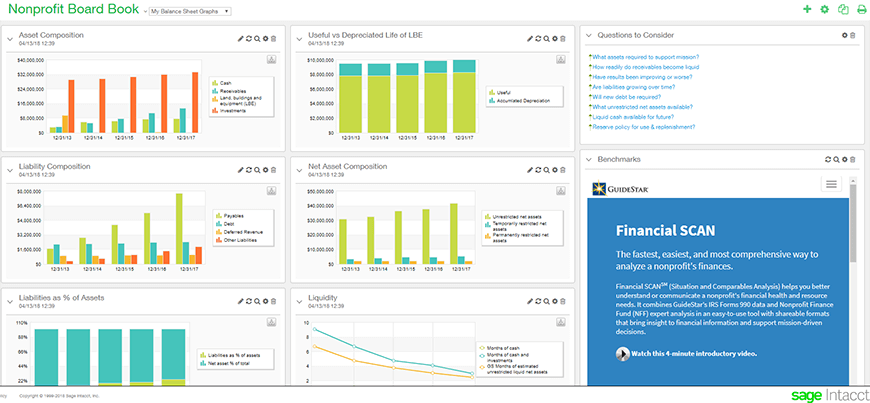
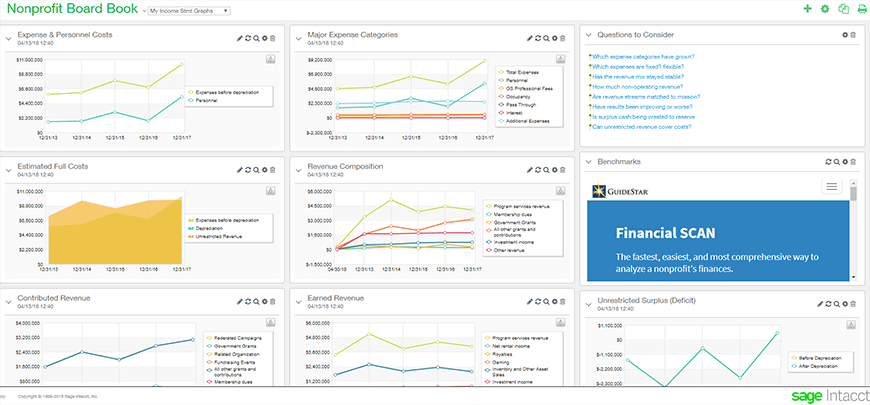
The Nonprofit Financial Board Book is a set of pre-built dashboards that automates the tracking and management of industry-wide best practice metrics to deliver real-time insights to help nonprofit organizations benchmark financial health and sustainability. Report data and dashboards are seamlessly calculated using real-time balance sheet, revenue, and expense data from Sage Intacct, and through additional operational sources from within the organization, including its Donor Management Systems, Budgeting and Planning software, Payroll, and more. The dashboards provide a graphical view of the key data as recommended by GuideStar and in alignment with GuideStar formats.

By incorporating best practices from GuideStar, the dashboards enable nonprofits to more easily keep an eye on their balance sheet performance, funding mix, and the overall composition of key revenue sources to ensure sustainability.

Best practice metrics deliver real-time insights into mission impact

Gain real-time visibility into key revenue composition and source

With real-time visibility, nonprofits gain insight to guide planning and strategy, while strengthening funding stability. The ability to instantly view reserves allows organizations to sustain any short-term gaps and expand funding diversity.

Monitor organization health with key metric visualizations

With access to visuals of key balance sheet metrics that align with GuideStar recommendations, nonprofits can easily track trend lines and changes for a more complete picture of financial health, while informing planning and strategy for proactive management.

Guide discussions with “Questions to Consider” content

Nonprofits gain peace of mind with the “Questions to Consider” capability so no stone goes unturned. With questions to consider covering both the balance sheet and income statement topics, key stakeholders can stay on top of trends and priorities – helping ensure good decision making.

Navigate directly to GuideStar for benchmarking

Nonprofits have a direct connection to GuideStar’s benchmarking tool to ensure alignment with recommended metric and best practices.

Sage Intacct Nonprofit Financial Board Book Powered by GuideStar gives real-time visibility into a nonprofit’s financial health, so that organizations can leverage data for better decision making, Together, Sage Intacct and GuideStar are raising the bar for all nonprofits by making it possible to provide instant, actionable insight to key stakeholders.

Watch the Video

Exclusive partnership with GuideStar

Sage Intacct and GuideStar share a common goal of enabling better financial stewardship and improved mission accomplishment based on a holistic view of the nonprofit organization. We’ve now teamed up through an exclusive relationship to help nonprofits achieve these goals.

“With the Sage Intacct Nonprofit Financial Board Book, organizations can get a more complete picture of their financial health and easily align their efforts with the key metrics GuideStar has identified for nonprofit success. We aim to ensure organizations have the financial capacity to deliver on their missions in an increasingly competitive funding environment.”

Adrian Bordone, VP of Strategic Partnerships for GuideStar

Filed Under: Industries, Nonprofit & Government Tagged With: Board, book, dashboard, Guidestar, intacct, nonprofit, Revenue, Sage Intacct

Article 04.2.2018 Dean Dorton

By: Jason Miller

Your business is succeeding and possibly growing, with more customers and increasing revenue streams. Congratulations! Life is good. Or is it?

A recent Aberdeen study found that 64 percent of business managers have seen their decision-making time shrink over the last year. Management information needs are now defined in terms of days and hours, not weeks and months. Does this sound like your business?

Your business is beginning to dread monthly and quarterly closings. Your accounting is inundated with decentralized payables and inter-entity transactions, turning consolidation into a nightmare. Processes you could once handle easily with spreadsheets are now slowing closings to a crawl, with inaccuracies and delays costing your company time and money. If your business has multiple locations, trying to consolidate your books can be a quagmire of multiple, complicated spreadsheets and endless headaches.

Take a step back and examine your business’ financial operations:

  • Are your team members spending hours manually manipulating data in Excel spreadsheets?
  • Is your A/R aging increasing?
  • Is your monthly financial information untimely?
  • Do you really know what your financials are telling you?
  • Is your current system taking up too much time and resources on back office accounting processes?

Everything about business is changing — how customers evaluate products, the volume of real-time data available to chart the course of your business, and the mobile access your employees have to critical systems. Whether businesses are ready for it or not, everything around you is changing fast and speeding up.

It’s time to get a competitive edge — or get left behind

As companies strive to cost-effectively scale their business, cloud-based accounting solutions are being recognized as viable and valuable solutions. The same technology driving this wave of change and challenge can also be the rising tide that propels your business forward.

It’s time to adopt financial technology designed for the digital age. Stay ahead of the competition by gaining deeper visibility into your business and accelerating processes that position your company to win today and in the future.

The time for action is nowAchieving a fast close is a change management initiative, because regardless of your approach it requires your people to have the right technology. Cloud-based applications such as Sage Intacct offer many concrete benefits that traditional on- premise solutions just can’t match. When you choose a cloud-based application you dramatically reduce – and can, in some cases – virtually eliminate many IT infrastructure costs. Not only do you eliminate the need to buy and operate servers, you can also reduce operational costs in your IT department. Suddenly, you no longer have to pay for the resources to maintain servers, conduct and secure backups, update and patch software, maintain databases, plan and execute migrations or new installations.

When evaluating your cybersecurity preparedness, there are several factors to consider. Let’s take a step back – right now, your priority is your business. You’re buying new technology, investing in new infrastructure and most likely trying to adapt to changing business models like cloud. It’s all good work but it takes time and effort.

Hackers desperately want access to your customer data, employee data, or intellectual property because it’s worth a lot. A single theft could cost your company severe financial damage. And sometimes, in the case of ransomware, all they have to do is lock it down and force you to pay to get it back as you’ve heard about in some of the latest attacks.

Why do you hear terms like “dynamic threat landscape” these days? Because you aren’t facing a group of hacktivists in a basement anymore – you are now facing professionals with a lot to gain.

Your business and the threat landscape around you are ever changing.  It is imperative that your organization conducts an annual cyber risk assessment. This allows the entire organization to consider current and future risks and put forth a plan to mitigate the identified risks.

Some businesses will run out and acquire every new solution they hear about for protecting their organization against cyber risks. While having a multi-layered approach to cybersecurity is important, it is also equally important to have an organized approach and to use tools that are designed to work together.  If your solution is designed properly, you could end up with what we call the security effectiveness gap. As you add more solutions that don’t work together, the complexity exponentially increases. So, every time you add another solution or another vendor, you add another gap – another vulnerability.

A robust cybersecurity solution will:

  1. Stop threats at the edge
  2. Protect users where they work (especially when team members are working remotely or on a personal device)
  3. Find and contain problems fast
  4. Control who gets on your network and from where
  5. Simplify network segmentation
  6. Provide compressive monitoring and detection

Streamline processing and harness the power of the cloud

Does moving to the cloud mean sacrificing functionality? Not at all. You can find the right cloud-based platform for you, like Sage Intacct which is the endorsed solution of the AICPA and designed to meet the financial accounting needs of your company. More powerful accounting; less internal resources required and lower costs; as well as anytime, anywhere access – cloud-based accounting is certainly worth a closer look.

If you or your business are looking to be successful as technologies continue to advance, your system should:

  • Provide access to data that is available anywhere, anytime (completely mobile-friendly)
  • Streamline processes so your financial statements are ready when you are, completely eliminating manual report preparation
  • Display the robust unique KPIs important to your business in a meaningful manner
  • Be completely scalable to your business size so you don’t have to invest in other IT infrastructure
  • Deliver real-time visibility into key operational metrics and streamlined processes, eliminating manual data entry and Excel-based financial reporting
  • Safeguard assets through comprehensive internal controls and segregation of duties
  • Make it easy to quickly compare performance across entities including multiple-locations
  • Let you easily switch between consolidated and local views for further insight into the figures

Whether you’re a small business, non-profit organization, mid-sized business with one or two offices in other states, or a large, global enterprise with diverse geography, it is important to contact a professional with cloud-based accounting systems expertise and experience to help you maximize your software investment by seamlessly integrating the elements and entities of your business into the right cloud-based accounting platform.

Learn more about Dean Dorton’s Cloud-based accounting solutions.

As originally featured in Louisville’s Business First

Filed Under: Accounting & Tax, Accounting Software, Sage Intacct, Services, Technology Tagged With: cloud, intacct, jason, miller, sage

Article 08.24.2017 Dean Dorton

Filed Under: Accounting and Financial Outsourcing, Accounting Software, Sage Intacct, Services Tagged With: Cloud Accounting, Customer Hours, intacct, Sage Intacct

Article 08.24.2017 Dean Dorton

Filed Under: Accounting and Financial Outsourcing, Accounting Software, Sage Intacct, Services Tagged With: Cloud Accounting, Customer Hours, intacct, Sage Intacct

Article 08.10.2017 Dean Dorton

  1. Expanded document approval capabilities. Previously, Intacct Employee users only had the capability to approve Purchase Requisitions. With Intacct’s 2017 Release 3 (effective August 18th), Employee users will now be able to approve Purchase Orders and Invoices. These changes provide the following new functionality:


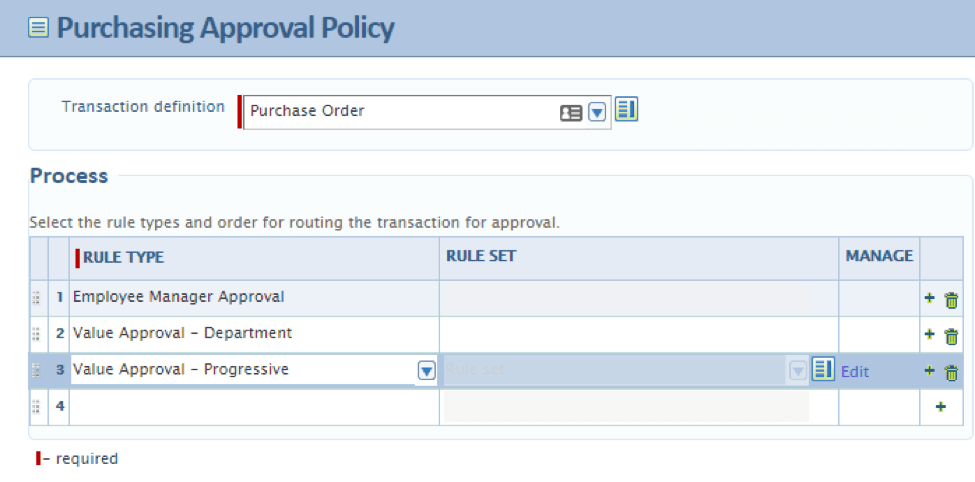
  • Different approval work flows for different transaction types: Purchase Requisitions, Purchase Orders, and Invoices can each have their own approval process defined, based on the approval needs. For instance, Requisition approvals may be delegated to an employee manager level, so that approval requests to higher level management personnel is reduced. If the Requisition passes the employee manager level, and is then converted to a Purchase Order, management can then approve the Purchase Order.   Note: for those organizations that do not want to use Purchase Order Requisitions, they can keep the functionality of Employee user approvals by using a Purchase Requisition document relabeled as a Purchase Order.


  • PO Invoice approval – Previously, PO Invoices could not be assigned an approval process. When Purchase Orders were converted into a PO Invoices, there was no approval oversight before posting.  With Invoice approvals available in Intacct’s 2017 Release 3, those people most familiar with the transaction (i.e. employees, managers, department heads) can be assigned the task of electronically approving an invoice. Gone are the days of managers manually signing off on paper documents!  The same functionality for increasing levels of value and tiered approvals can also be applied to PO Invoice approvals.  An audit trail of each approval is maintained within Intacct.


  1. Redesigned Approval Setup – with Intacct 2017 Release 2 the Approval Setup screen has been changed to provide a more graphical representation of the Approval Process. Located in the Purchase Order / Setup / Purchasing Approval Policies page, users are presented with a grid of approval steps for each transaction type – Purchase Requisition, Purchase Order, and Invoices (below).

Filed Under: Accounting and Financial Outsourcing, Accounting Software, Sage Intacct, Services Tagged With: Cloud Accounting, cloud solutions, intacct, Sage Intacct, Sage Intacct Purchase Approvals

  • Page 1
  • Page 2
  • Page 3
  • Interim pages omitted …
  • Page 11
  • Go to Next Page »
PAY INVOICE SUBMIT RFP
  • Services
    • Outsourced Accounting
    • Audit & Assurance
    • Tax
    • Consulting & Advisory
    • Technology & Cybersecurity
    • Family Office
    • Wealth Management
  • Industries
  • Company
  • Locations
  • Careers
  • Insights
  • Events
  • Contact Us
SUBSCRIBE TO INSIGHTS
email Dean Dorton - CPAs And Advisors On Email facebook Dean Dorton - CPAs And Advisors On Facebook twitter twitter linkedin Dean Dorton - CPAs And Advisors On LinkedIn youtube Dean Dorton - CPAs And Advisors On YouTube

The matters discussed on this website provide general information only. The information is neither tax nor legal advice. You should consult with a qualified professional advisor about your specific situation before undertaking any action.

© 2026 Dean Dorton Allen Ford, PLLC. All Rights Reserved

  • Privacy Policy
  • Terms Of Use
  • Accessibility