• Skip to primary navigation
  • Skip to main content
Dean Dorton – CPAs and Advisors
  • Services
        • Audit & Assurance
          • Audits, Reviews & Compilations
          • ESG Programs & Reporting
          • Internal Audit
          • International Financial Reporting
          • Lease Accounting Managed Services
          • Peer Review Services
          • SOC Reporting
        • Family Office
        • Consulting & Advisory
          • Business Valuation Services
          • Forensic Accounting
          • Litigation Support
          • Matrimonial Dissolution
          • Merger & Acquisition
          • SEC Services
          • Succession Planning
          • Transaction Advisory Services
          • Whistleblower Hotline
        • Outsourced Accounting
        • Private Wealth
        • Healthcare Consulting
          • Finance
          • Health Systems Operational Transformation
          • Medical Billing and Credentialing
          • Risk Management & Compliance
          • Strategy and Strategy Implementation
          • Technology & Data Analytics
        • Tax
          • Business Tax
          • Cost Segregation Studies
          • Credits and Incentives
          • Estates and Trusts
          • Individual Tax
          • International Tax
          • SEC Provision and Compliance
          • State and Local Tax
        • Technology & Cybersecurity
          • Accounting Software
          • Cybersecurity
            • Cybersecurity Assessments
            • Cybersecurity Scorecard Assessment
            • Security Awareness Training
            • Virtual Information Security Office
          • Data Analytics & AI
          • IT Audit & Compliance
            • Cybersecurity Maturity Model Certification (CMMC)
            • Data Privacy Laws
            • SOC Reporting
          • IT Infrastructure & Cloud Solutions
            • Automation
            • Backup and Disaster Recovery
            • Cloud Strategy
            • Data Center
            • Enterprise Network
            • Network Security
            • Phone and Video Conferencing
            • User Identity Management Solutions
            • Webex
          • Managed IT Services
  • Industries
        • Construction
        • Distilleries and Craft Breweries
        • Energy and Natural Resources
        • Equine
        • Financial Institutions
        • Government
        • Healthcare
        • Higher Education
        • Life Sciences
        • Manufacturing and Distribution
        • Nonprofit
        • Real Estate
  • Insights
    • Articles
    • Guides
    • Case Studies
  • Events
  • Company
        • News
        • Our Team
        • Experiences
        • Careers
          • College Students
          • Experienced Professionals
        • Locations
        • Lexington, KY

          250 West Main Street
          Suite 1400
          Lexington, KY 40507
          859-255-2341

        • Louisville, KY

          435 North Whittington Parkway
          Suite 400
          Louisville, KY 40222
          502-589-6050

        • Louisville, KY

          700 North Hurstbourne Parkway
          Suite 115
          Louisville, KY 40222
          502-589-6050

        • Ft. Wright, KY

          810 Wright’s Summit Parkway
          Suite 300
          Fort Wright, KY 41011
          859-331-3300

        • Cincinnati, OH

          312 Walnut Street
          Suite 3330
          Cincinnati, OH 45202
          859-331-3300

        • Blue Ash, OH

          9987 Carver Rd
          Suite 120
          Blue Ash, OH 45242
          513-891-5911

        • West Chester, OH

          9025 Centre Pointe Drive
          Suite 310
          West Chester, OH 45069
          513-985-62405

        • Indianapolis, IN

          5975 Castle Crk Pkwy Dr N
          Suite 400
          Indianapolis, IN 46250
          317-469-0169

        • Raleigh, NC

          4130 Parklake Avenue
          Suite 400
          Raleigh, NC 27612
          919-782-9265

  • Contact Us

Microsoft Dynamics 365

Article 02.10.2026 Dean Dorton

Deciding where and how to run workloads has never been more complex — or consequential — than it is in today’s modern infrastructure. The critical services that run your business  must scale on demand, recover from failures and remain secure. At the same time,  technical leaders are expected to meet business goals such as lowering costs, accelerating  time to value and reducing operational overhead.

Adding to the challenge are competing mandates  to either increase cloud adoption or repatriate workloads to address data sovereignty. Each option often requires compromising something essential, creating a perceived tradeoff between what the business needs and what your teams can realistically deliver.

This tradeoff is an artifact of how infrastructures and workloads have evolved. For years, achieving the flexibility offered by cloud-native architectures meant accepting the public cloud’s operational and cost models, or stitching together automation and overlay tools in private cloud — along with the complexity that approach introduced. What has changed is that the software overlay has finally been refined and integrated. When you can deploy a single software-defined platform across your data center, edge and public cloud, the divide between control and agility begins to dissolve. This shift simplifies the operation of global applications and services.

Nutanix Cloud Platform provides that unified, software-defined foundation by collapsing compute, storage, automation and networking into a hyperconverged platform. It operates consistently whether deployed on premises, integrated with leading compute, storage and data center networking solutions, or provisioned as Nutantix Cloud Clusters in AWS, Azure, or Google Cloud Platform.

Industries under the greatest pressure to modernize infrastructure often lack the luxury of slow migrations or managing multiple platforms and interfaces. While each industry faces unique challenges, they share a common requirement: infrastructure must support steady production cycles while adapting  to unpredictable capacity demands  without driving architectural sprawl or operational disruption.

  • Construction: Project management systems and building information modeling (BIM) applications generate multi-terabyte datasets that distributed teams need to access from job sites and remote offices. Further, project-based work often creates unpredictable demand cycles. Nutanix Cloud Infrastructure runs core applications on premises for consistent performance, then extends capacity to Nutanix Cloud Clusters in AWS, Azure, or GCP as new project phases demand additional engineering and design resources, without rearchitecting applications or retraining  teams on new management tools.
  • Manufacturing: Manufacturers must run legacy production systems alongside modern operational technology without maintaining separate stacks, all while ensuring security. Nutanix Cloud Infrastructure and Nutanix Kubernetes Platform can run and manage Virtual Machines and Kubernetes containers from the same platform (Prism), regardless of whether those workloads are localized in a private cloud, public cloud, or edge.
  • Healthcare: Healthcare organizations face compliance and operational requirements that make balancing resiliency with flexibility especially challenging. Electronic health record systems (EHR) cannot incur downtime and often do not easily support cloud-native architectures. Clinical imaging generates terabytes of data daily that requires immediate  access and long-term retention. Nutanix Cloud Clusters and Nutanix Cloud support a lift-and-shift approach to initial adoption, while remaining flexible enough to migrate workloads between cloud boundaries without requiring conversion. Nutanix Unified Storage handles block, file and object storage on a single platform eliminating the need to manage separate systems for active vs archived data.

Organizations that want to thrive in these industries can not afford for infrastructure to be the bottleneck in how quickly they respond to business demands. The architectural question facing technical leadership isn’t about choosing between cloud and on premises, or between stability and agility. It’s about whether your infrastructure platform can accommodate both the workloads you’re running today and the ones you’ll need to support going forward without requiring a fundamental redesign each time your priorities shift.

Dean Dorton Technology works with clients facing these same infrastructure challenges. We’ve built a practice around integrating and implementing solutions like Nutanix to help our clients align modern infrastructure solutions to their business needs. If your teams are spending more time managing infrastructure complexity than delivering business value, we can help evaluate opportunities to unify and optimize how you deliver workloads and services.

Contact us to discuss your infrastructure strategy.
Filed Under: Accounting Software, Infrastructure, Managed IT & Infrastructure, Microsoft Dynamics 365 Tagged With: google cloud platform, nutanix cloud platform

Article 10.20.2022 Dean Dorton

What are the signs of an unproductive accounting department? They are subtle. The important obligations still get done and major milestones get met – but never as effectively as they could or should.

The month-end close is a good indicator. Accountants have all month to plan and 12 opportunities each year to practice. It’s something that should fire on all cylinders. Yet for many, the month-end close takes days of hard work, cuts deadlines close, and never seems to improve. It’s adequate. What it’s not is a productive process that uses resources effectively.

Start looking around, and a similar problem appears everywhere. All the boxes on accounting get checked, but rarely without involving some delay, workaround, or lowered expectations. The unproductive accounting department feels like it is never caught up, fully prepared, on in control of whatever comes its way.

Adding staff or tweaking the accounting processes can help. But neither of those addresses the core problem: the accounting software. It’s either the engine that drives productivity – or, too often, the roadblock that stands in the way.

Accountants at Odds with their Software

Accounting software always starts out as a solution. It puts new tools and data in the hands of accountants, vastly improving how things are done.

But then the accounting team, company, and economy start to change. Perhaps a global pandemic breaks out. Whether slowly or suddenly, the circumstances facing accounting start to change – and yet the accounting software stays the same.

Vendors offer occasional updates (or expensive upgrades), but essentially the system in place on day one looks the same as the system years later. Meanwhile, the team using the software and the ways they are using it look drastically different. It’s that disparity – between what accountants need and what the software can deliver – that causes productivity to suffer.

The effects are small at first. But then a company takes on bigger accounting workloads as the number of employees, clients, and locations grow. Accounting needs simultaneously become more sophisticated as companies start to take on greater financial risks and responsibilities.

The disparity eventually gets so wide that the software breaks entirely. But productivity starts suffering long before that. Recognizing the problem and replacing the software (the earlier the better) is the first step. Implementing something that won’t replicate the problem is the second.

How Sage Intacct Keeps Productivity on Pace

As a leading financial management platform for mid-market and growing companies, Sage Intacct does everything. But it keeps the features updated, relevant, and productive in two ways.

First, cloud-native development means that Sage Intacct (including all accounting tools and financial data) travels anywhere and everywhere. Access never inhibits productivity. Second, free updates installed automatically every quarter bring new features, improvements, and additions to the platform on a regular basis. Stale tools never inhibit productivity, either.

Is the current accounting software pulling its weight? Contact Dean Dorton to put something more productive in place.

Stacey Neideffer| Software Services Senior Consultant
sneideffer@ddaftech.com
859.425.7739

Filed Under: Accounting and Financial Outsourcing, Accounting Software, Industries, mConnect, Microsoft Dynamics 365, Microsoft Dynamics GP, SaaS, Sage Intacct, Services Tagged With: Accounting, productivity, Sag Intacct, Software

Article 01.26.2021 Dean Dorton

What is your idea of accounting utopia? Lounging on a beach while the work is being done for you? Having time to focus on strategic projects instead of fixing spreadsheets and inputting data? The secret to finance and accounting nirvana—whatever that may be for you—is automated integrations, or “automation-in-a-box.”

Automation-in-a-box occurs when best-in-class software that automates key financial processes is integrated into your ERP system. Data and systems communicate with each other, creating efficiency and offering fast, accurate insights into your business’s financial and operational performance. Rather than scrambling to keep up, you have the power to get ahead.

Dean Dorton is proud to partner with top software solutions that both automate core business processes and integrate with leading ERP systems, such as Sage Intacct. These include:

  • Avalara offers cloud-based sales- and use-tax management solutions. Avalara’s end-to-end solutions seamlessly integrate with hundreds of ERP, accounting, e-commerce, and retail POS systems, providing accurate sales and use tax calculation, painless exemption certificate management, and effortless filing and remittance.
  • Bill.com reduces the time you spend on invoice approvals and payments by 60% or more—and significantly reduce your operating costs too. Plus, this cloud-based, fully integrated AP and payment automation solution eliminates your need for manual data entry and all the headaches that come along with it.
  • Martus Solutions is a leader in providing a collaborative budgeting platform for non-profit organizations and businesses worldwide along with flexible reporting for budget participants to create, monitor and manage their budgets.
  • Nexonia offers a flexible, cloud-based web and mobile solution that makes corporate expense reports and timesheets easy, efficient, and automatic. Built with busy financial and operations leaders in mind, Nexonia’s full product suite consolidates corporate spending and time tracking in one convenient online portal.
  • WorkForceGo! Offers a comprehensive suite of workforce management tools, available as a package or à la carte that integrate with Sage Intacct and other general ledgers. WorkforceGo! HCM lets you track and analyze payroll, human resources, time and attendance data—and stay ACA compliant—from any mobile device, laptop, or desktop.
  • Yooz provides the smartest, most powerful and easiest-to-use cloud-based Purchase-to-Pay (P2P) automation solution. Yooz’s unique solution leverages Artificial Intelligence and RPA technologies to deliver an amazing level of automation with extreme simplicity, traceability and end-to-end customizable features.

It’s time to break free from burdensome, error-prone accounting processes and experience the accuracy, insight, and efficiency that automation can bring. Whatever your business requirements, you can trust the accounting technology professionals at Dean Dorton to help you design and implement your ideal automation-in-a-box.

Learn more about Dean Dorton’s Accounting Software services and products:

Accounting Software

Dean Dorton ERP Team
erpsales@ddaftech.com

Filed Under: Accounting Software, Microsoft Dynamics 365, Sage Intacct, Services Tagged With: Accounting integration, AP automation, AR Automation, Budgeting Software, Cloud Accounting, Cloud ERP, ERP integration

Article 12.31.2020 Dean Dorton

In this article, we will be comparing various ways to process customer payments in Business Central. There are multiple ways to record payments, including Cash Receipt Journals, Register Customer Payments and Deposits. We’ll describe each of these methods and explain why you might choose one method over another.

Read Article

Filed Under: Accounting Software, Microsoft Dynamics 365, Services Tagged With: Accounting Software, Business Central, Customer payments, dynamics, Dynamics 365, Ledger, Microsoft Dynamics

Article 09.2.2020 Dean Dorton

Dynamics GP, originally known as Great Plains Software Dynamics, is an enterprise accounting software solution that started in the early 1990s and still has a large, dedicated following today.  With nearly 30 years of experience, over 50,000 companies using it and an ecosystem of thousands of companies that have developed add-on applications, Dynamics GP remains one of the statistical leaders in mid-market accounting software.  But statistics don’t tell the whole story, so let’s look a little deeper.

Dynamics GP was first born back in the early 1990s in Fargo, North Dakota under the name Dynamics, created by Great Plains Software.  It created an amazing following based on a solid product that was quickly evolving with new features and functions.  It also didn’t hurt that Great Plains was soon lead by Doug Burgum, a charismatic, intelligent extrovert who was a superb leader.  The software grew and grew, as did the customer base, and it gained awards and a stellar reputation.  So much so that soon after it went public, in the late 1990s, it was acquired by Microsoft – along with a handful of other accounting software products.

In addition to Great Plains, Microsoft also acquired Solomon (via a previous Great Plains acquisition), Navision and Axapta, giving the company a total of four lower-to-upper mid-market accounting software platforms.  For years, Microsoft tried to create one common code base, Project Green.  That effort eventually folded and Microsoft went back to the drawing board for a new project called “365.”  Over the last several years, Microsoft has devoted much of its attention to 365 products from Office to Windows to Dynamics.

So where does that leave Dynamics GP today?  In this day of cloud software with anywhere, anytime access a primary concern of most modern organizations, a primarily on-premise system isn’t what they are looking for.  Microsoft has tried to create a web client for Dynamics GP, but it’s missing many features and many of the thousands of third-party developers have not adapted their add-on solutions to work in the ill-fated web client.  You can host Dynamics GP on Amazon or Azure or many other vendors, but you still have downtime for upgrades and all the other complications that accompany and, often, the cost of hosted Dynamics GP equals or exceeds the cost of many cloud solutions, Dynamics 365 Business Central especially. Current Dynamics GP users have three options inside the Microsoft Dynamics family going forward and we explore those options briefly.

  • On-Premise
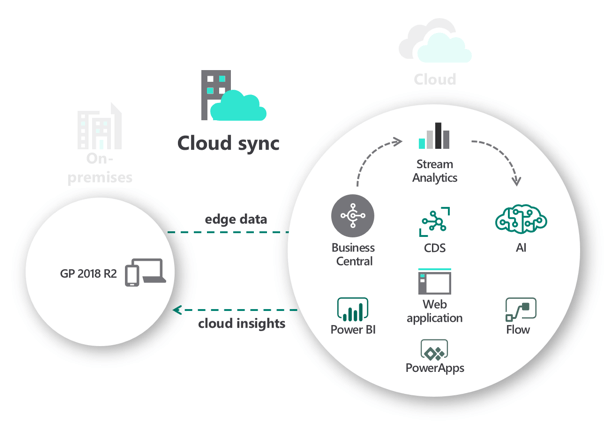
  • Cloud Sync
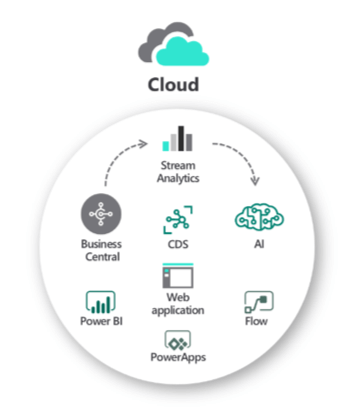
  • Cloud

First, let’s explore the most obvious choice, On-Premise.  This option is the one Dynamics GP end-users have chosen for years without even knowing it. In other words, it’s the status quo.  Microsoft has pledged a decade of support for all versions of Dynamics GP.  That means you have, as of this writing, some level of support for Dynamics GP through 2029 at a minimum, so you do not have to move off Dynamics GP if you really like it.  Many companies still have on-premise network infrastructure and technicians that manage other systems, so what’s one more?  And, on-premise data is mostly still the best when it comes to flexible, custom reporting using tools like SQL Reporting and many others.

Second, for those that want to test the waters of the cloud, there is a cloud-sync option where you keep using Dynamics GP as you always have but synchronize some data with the cloud in Dynamics 365.  With this option, you keep everything you love about Dynamics GP but you get the benefits of reports and analytics in the cloud.  Access your pertinent data from the cloud – anywhere and anytime – but skip the implementation of a new system.  This may be a perfect option for companies who want more functionality or remote information access but aren’t yet ready to leave Dynamics GP.

Third, Dynamics GP organizations have the option of fully migrating to Dynamics 365 Business Central. This is a great option, but the biggest caution is that it is NOT Dynamics GP cloud.  Business Central is based on – closely resembles – the Dynamics NAV product, a different accounting software solution as mentioned above. For Dynamics GP users, this is not a simple upgrade, but a new implementation of the software.  Business Central is, however, a great next option for Dynamics GP users as it has similar functionality and is a full cloud offering so you no longer need to worry about backups or upgrades or other maintenance.  Business Central also offers a great deal of new functionality for Dynamics GP users around inter-company, financial reporting, and inventory.  Take a look today to see if it’s the right choice for your organization.

In summary, Dynamics GP is now very much considered a “legacy” accounting system as it’s mostly targeted at companies that want to host their data at their site.  That’s NOT a bad thing by itself, though.  Many companies still have the hardware infrastructure to support an on-premise accounting system so the work involved isn’t unusual.  But, the cloud is here to stay and provides a great deal of benefits that on-premise systems will never be able to offer.  Business Central users, for example, get anywhere, anytime access and have more options for data integration and reporting tools, like Microsoft Power BI, to make data dissemination a more personal experience.

For more information about Business Central 365 or our other accounting software solutions, contact us below!

Philip Massey, CPA
Director of Software Consulting Services
erpsales@ddaftech.com • 919.875.9635

Explore Dynamics Business Central 365

Filed Under: Accounting Software, Microsoft Dynamics 365, Services, Technology Tagged With: business central 365, Cloud Accounting, dynamics gp

Article 04.16.2020 Dean Dorton

Have you found yourself or your employees scrambling to cash in checks? Are you running to the office just to manage paper invoices and process ACH payments? During these challenging times of performing work at home and keeping up with the economic turndown, it’s critical that you have the right technology tools in place to properly manage your organization’s cash flow.

Join Dean Dorton for a high-level presentation on how automation and the right tools can make your cash processing quicker and more insightful- all while letting you successfully “shelter in place” and keep it all paperless.

Anyone who plays a financial management role in their organization including (but not limited to):

  • AR/AP Specialists
  • CFOs/COOs/Controllers
  • VPs and Directors of Finance
  • Accountants, Bookkeepers, Office Managers
  • Presidents, Executive Directors

Resources:

  • Cash Management Software

Filed Under: Accounting Software, Microsoft Dynamics 365, Microsoft Dynamics GP, Sage Intacct, Services Tagged With: Accounting Software, Accounts payable, Accounts Receivable, automation, cash flow, cash management, financial management, Paperless

  • Page 1
  • Page 2
  • Page 3
  • Page 4
  • Go to Next Page »
PAY INVOICE SUBMIT RFP
  • Services
    • Outsourced Accounting
    • Audit & Assurance
    • Tax
    • Consulting & Advisory
    • Technology & Cybersecurity
    • Family Office
    • Wealth Management
  • Industries
  • Company
  • Locations
  • Careers
  • Insights
  • Events
  • Contact Us
SUBSCRIBE TO INSIGHTS
email Dean Dorton - CPAs And Advisors On Email facebook Dean Dorton - CPAs And Advisors On Facebook twitter twitter linkedin Dean Dorton - CPAs And Advisors On LinkedIn youtube Dean Dorton - CPAs And Advisors On YouTube

The matters discussed on this website provide general information only. The information is neither tax nor legal advice. You should consult with a qualified professional advisor about your specific situation before undertaking any action.

© 2026 Dean Dorton Allen Ford, PLLC. All Rights Reserved

  • Privacy Policy
  • Terms Of Use
  • Accessibility