• Skip to primary navigation
  • Skip to main content
Dean Dorton – CPAs and Advisors
  • Services
        • Audit & Assurance
          • Audits, Reviews & Compilations
          • ESG Programs & Reporting
          • Internal Audit
          • International Financial Reporting
          • Lease Accounting Managed Services
          • Peer Review Services
          • SOC Reporting
        • Family Office
        • Consulting & Advisory
          • Business Valuation Services
          • Forensic Accounting
          • Litigation Support
          • Matrimonial Dissolution
          • Merger & Acquisition
          • SEC Services
          • Succession Planning
          • Transaction Advisory Services
          • Whistleblower Hotline
        • Outsourced Accounting
        • Private Wealth
        • Healthcare Consulting
          • Finance
          • Health Systems Operational Transformation
          • Medical Billing and Credentialing
          • Risk Management & Compliance
          • Strategy and Strategy Implementation
          • Technology & Data Analytics
        • Tax
          • Business Tax
          • Cost Segregation Studies
          • Credits and Incentives
          • Estates and Trusts
          • Individual Tax
          • International Tax
          • SEC Provision and Compliance
          • State and Local Tax
        • Technology & Cybersecurity
          • Accounting Software
          • Cybersecurity
            • Cybersecurity Assessments
            • Cybersecurity Scorecard Assessment
            • Security Awareness Training
            • Virtual Information Security Office
          • Data Analytics & AI
          • IT Audit & Compliance
            • Cybersecurity Maturity Model Certification (CMMC)
            • Data Privacy Laws
            • SOC Reporting
          • IT Infrastructure & Cloud Solutions
            • Automation
            • Backup and Disaster Recovery
            • Cloud Strategy
            • Data Center
            • Enterprise Network
            • Network Security
            • Phone and Video Conferencing
            • User Identity Management Solutions
            • Webex
          • Managed IT Services
  • Industries
        • Construction
        • Distilleries and Craft Breweries
        • Energy and Natural Resources
        • Equine
        • Financial Institutions
        • Government
        • Healthcare
        • Higher Education
        • Life Sciences
        • Manufacturing and Distribution
        • Nonprofit
        • Real Estate
  • Insights
    • Articles
    • Guides
    • Case Studies
  • Events
  • Company
        • News
        • Our Team
        • Experiences
        • Careers
          • College Students
          • Experienced Professionals
        • Locations
        • Lexington, KY

          250 West Main Street
          Suite 1400
          Lexington, KY 40507
          859-255-2341

        • Louisville, KY

          435 North Whittington Parkway
          Suite 400
          Louisville, KY 40222
          502-589-6050

        • Louisville, KY

          700 North Hurstbourne Parkway
          Suite 115
          Louisville, KY 40222
          502-589-6050

        • Ft. Wright, KY

          810 Wright’s Summit Parkway
          Suite 300
          Fort Wright, KY 41011
          859-331-3300

        • Cincinnati, OH

          312 Walnut Street
          Suite 3330
          Cincinnati, OH 45202
          859-331-3300

        • Blue Ash, OH

          9987 Carver Rd
          Suite 120
          Blue Ash, OH 45242
          513-891-5911

        • West Chester, OH

          9025 Centre Pointe Drive
          Suite 310
          West Chester, OH 45069
          513-985-62405

        • Indianapolis, IN

          5975 Castle Crk Pkwy Dr N
          Suite 400
          Indianapolis, IN 46250
          317-469-0169

        • Raleigh, NC

          4130 Parklake Avenue
          Suite 400
          Raleigh, NC 27612
          919-782-9265

  • Contact Us

dynamics gp

Article 08.14.2018 Dean Dorton

It just isn’t enough to focus solely on your mission, or your expertise in today’s market. To stay relevant in business, you also need to focus on using modern technology.

If you’re still using an outdated, on-premises style system like Great Plains, you may be spending too much time and too many resources gleaning insights from your data. That outdated type of set up can, in time, leave you scrambling to keep up with competition.

If your teams suffer inputting mountains of data into Excel, or other disconnected systems, take longer to close the books, or if you don’t have updated company performance at your fingertips, there’s an easier solution.

UPLIFT YOUR MODERN ACCOUNTING TEAM

When teams move from Great Plains to Sage Intacct, a best-in-class cloud-based financial management solution, accounting teams can work faster and smarter.

Executive teams, finance, and stakeholders can work with current performance metrics and reporting data from customizable dashboards.  Sage Intacct’s flexible electronic workflows mean a lot more decision-making can happen faster, which just can’t be done with static, in-house based systems.

WORK FASTER WITH MORE AUTOMATION

Automation for a great number of manual tasks allows frees time up for more focus on strategy. Sage Intacct’s configurable architecture means your company can set up transaction tracking, electronic approvals and a number of operational processes to suit your unique structure, to save time, reduce errors, and focus on growth.

MORE VISIBILITY INTO INSIGHTS

No matter your metrics, and how frequently they change, working in the cloud means you can have access to your company or organization’s performance, with to-the-minute data accuracy, from wherever and whenever you need it.

With a powerful cloud-based financial management solution like Sage Intacct, your company can have access to not just financial, but operational data as well. This offers your key players a clearer direction for stronger growth strategies and as many performance updates as they need.

KEY EXPANSION TOOLS

As your company grows, on-premises financial management software often cannot streamline your workflow by integrating with the other software solutions you rely on. In addition, when it comes to setting up entities, working in the cloud offers a faster, easier way.

Sage Intacct offers integrations with many other key solutions, so you won’t need to reinvent the wheel to streamline your workflow and boost accuracy. And as your business grows, Sage Intacct’s fast entity setup feature means your solution will scale with your business today, and in the days to come.

“With Sage Intacct, we have a true cloud system that streamlines our financial processes and gives a wide variety of people in our organization real-time visibility into key financial metrics from anywhere.” – Jennifer Sharp, Senior Accounting Manager, IslandWood

If your business is growing and you’re still using Great Plains, contact us for help in more easily scaling your financial processes with your business.

9 REASONS SAGE INTACCT BEATS DYNAMICS GP

Looking to accelerate growth for your business, but your on-premise solution is stifling those possibilities? Check out our free whitepaper to discover 9 reasons Sage Intacct is blazing past Dynamics GP when it comes to financial management capabilities.
download it here

Filed Under: Accounting Software, Microsoft Dynamics GP, Sage Intacct, Services Tagged With: automation, choosing ERP, dynamics gp, nonprofits, on-premise vs. cloud, Sage Intacct

Article 07.23.2018 Dean Dorton

If you maintain inventory in Dynamics GP, then you have likely needed to use the built-in reconcile routine at some point. The reconcile routines in Dynamics GP are used to check the tables and transactions and confirm that the totals are correct. This is especially useful in the inventory module because it interacts with the purchasing and sales modules. Say, for example, you were posting a purchase receipt and GP crashed- you could then use the inventory reconcile tool to correct any balances.

That being said, it is always a good idea to run the reconcile routines on a regular basis. The problem a lot of customers run into is that all the users need to be out of the system for it to run and just the inventory reconcile piece by itself can take more than 24 hours.  If you are running other maintenance and reconcile routines over a weekend, you may run out of time.

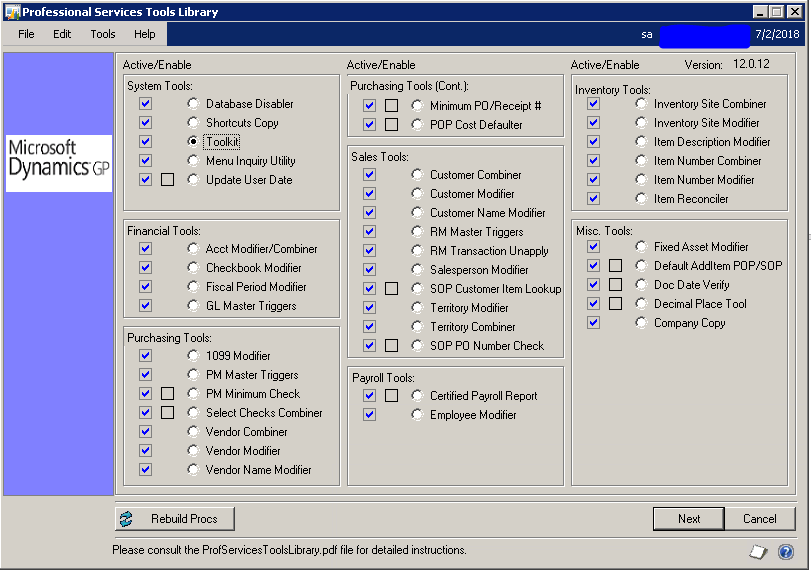
The best way I have found to save time is to use the free Inventory Reconcile tool from Professional Services Tools Library, or PSTL as it is commonly referred to, instead of the one built into Dynamics GP. PSTL is a free set of tools that help you complete various tasks in Dynamics GP.   Under the inventory tools section you will find the Item Reconciler (Example 1).

reconcile inventory dynamics gp

Ex. 1

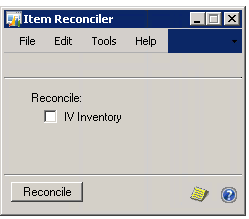
To use the inventory Reconciler mark the circle next to Inventory Reconciler under the Inventory Tools section and select next at the bottom right of the PSTL  window. This will bring up the Item Reconciler window (Example 2). On this window, you will select IV Inventory and then reconcile.

reconcile inventory dynamics gp

Ex. 2

The PSTL reconcile tool will now run and normally completes in 10 minutes.  I have seen one case where it took a little over an hour but the customer had such a large database that they hadn’t been able to run a reconcile in over 10 years.  One key difference between the PSTL inventory reconcile tool and the one found under the tools menu in GP is that the PSTL reconciler only runs for items that don’t reconcile whereas the GP one runs for every item in the range of numbers selected.  

If you are looking to speed up your inventory reconciling process then this is definitely worth looking into.  Please feel free to reach out to the Dean Dorton team with any questions.

Filed Under: Accounting Software, Microsoft Dynamics GP, Services Tagged With: Accounting Software, Best practices, dynamics gp, Inventory reconcile, Microsoft, Reconcile, Tips and tricks

Article 06.5.2018 Dean Dorton

mConnect: Automating the Sage Intacct and ConnectWise Integration Experience

Managed service providers, or MSP’s, work hard to provide their clients and customers with the best quality work and productive outcomes. As companies work hard to improve their operational functionality to increase efficiency and get the most value out of the company, programs such as those found in Massey Consulting’s Sage Intacct, ConnectWise and mConnect, is the key to keeping both of these goals in sight.

mConnect enables companies to avoid having to manually import or export information between their systems, facilitating an efficient workflow and bringing positive contributions to the company’s bottom line. mConnect bridges the gap between aspects of the business by synchronizing information between ConnectWise and either Sage Intacct or Dynamics GP. This is done in real time, and as a result, higher quality information is delivered at a faster rate.

Fields of application:

Accounting

When it comes to running accounting integrations on your system, mConnect can facilitate this operation automatically across accounts.
Also, it can capture additional relevant information that can be pertinent to the way you handle your accounting operations. Once an invoice has been verified and paid, mConnect will mark it down and make a note in your records.

Accounts Payable

Making payments and managing invoices is essential for every company and mConnect makes this efficient. With the mConnect customer portal, you can keep all invoices organized and up-to-date and be able to act upon actionable data from these invoices to make smarter acquisition and purchasing decisions. mconnect allows you to track all invoices from a specific point, giving you a better idea of your payments as a whole on a format that can be reviewed quickly resulting in a simplified payment process and much happier vendors.

Sales

The sales industry thrives on data, particularly when it comes to correctly handling customer data and quickly providing your sales department with accurate information, which increases the chances of closing deals and bringing in profit. With mConnect, all sales data can be processed and updated at a rapid rate, keeping employees in the sales department cognizant of changes and operations. This is bolstered by the accurate analysis of up-to-date information, as well as processing real-time sales numbers. As a result, mconnect leads to more reliable income forecasting and sales numbers, allowing every department to anticipate their next move more precisely.

Inventory

The benefits of mConnect for inventory purposes are primarily based on its ability to centralize all data to a single location. In this way, you can measure inventory directly and efficiently. mConnect enables you to create a more accurate outlook of your stock levels without using elaborate estimation methods.

Customer and vendor relationships

In the network that is the business world, most companies are a central point between their vendors and the customers and mConnect makes it more efficient to operate between these two polar opposite groups. The integration of the system is customizable, making interruptions between working with vendors and customers less common.

Along with this reduced friction comes the ability to completely map your fields in the ConnectWise system. This feature gives companies an added amount of agility when working with the customer and vendor relationships. mConnect also gives you the option of integrating only the most essential records of your choice allowing you to take control of your data and use it to improve your business.

Looking for More Information?

We’re happy to offer you a free consultation to discuss your integration needs!

request a consultation

Filed Under: Accounting Software, mConnect, Microsoft Dynamics GP, Sage Intacct, Services Tagged With: connectwise, dynamics gp, integration, mConnect, Sage Intacct

Article 03.19.2018 Dean Dorton

Microsoft Dynamics GP users may think they are doing fine with their current system, but with another software update around the corner, now is the time to weigh the risks involved in hanging onto outdated software.

So what might the future look like if you stay with an on-premises financial management system and what do the potential risks mean for your growing company?

Time and Expense-Related Risk

Accounting runs a lot of reports and as your company grows, so does reporting and its complexity.  With GP, reports need to be cleaned up, then emailed, and that takes time too. Growing companies face the risk of stagnant growth because with outdated on-premises systems because extra reporting tasks take time away from other growth tasks.  

Resource-Related Risk

While Dynamics GP has Microsoft’s Management Reporter for reporting functions, that add-on is no longer being modified for growth – and hasn’t been since 2016, outside of patch updates. Most important, however, it is difficult to use. Because Dynamics GP requires add-ons for custom fields, multi-entity processes, and many other reporting needs, users spend more money to do necessary reporting jobs than they would with a strong cloud-based system.

Accuracy-Related Risk

Any native reporting direct from GP won’t import directly into Excel, so these reports require re-entry, manual modifying leaving room for growing error margins. Companies that hang onto Microsoft Dynamics GP with manual data management.

Sage Intacct, a best-in-class cloud financial management solution, eliminates the risks that come with outdated and on-premises-based systems.

A True Cloud System:

While Dynamics GP offers cloud hosting, updates and many processes still happen in-house.

Sage Intacct offers a true cloud experience which means:

  • Systems update automatically for every entity, location and computer. No extra effort on your part.
  • Users can access company data from wherever they work.
  • Data is always current, which means accurate reports and inventories, client details and projects. No waiting or manual re-entries.

Streamlined reporting:

  • Sage Intacct Dashboards allow users to customize their unique metrics views, for fast decision-making and strategy.
  • Dimensions, use tags to create a detailed chart of accounts and simplify your accounting.
  • Over 120 reports drill back to the originating transaction for deep examination.
  • Reports transfer directly into excel. Users quickly run and deliver reports in minutes with up-to-date data, without spending countless hours cleaning up a CSV or tab-delimited report as with Microsoft Dynamics GP.

Growth-focused Design:

  • Unlike Dynamics GP which requires a consultant or add-on to create custom fields, Sage Intacct offers custom fields already built into the software so users make modifications without consultants or extra expense.  
  • Sage Intacct system integrates with many other cloud software solutions work seamlessly behind the scenes to reduce or even eliminate manual entry and delayed updates.

Rather than an increased workload just to hang onto static, inflexible, on-premises system, consider a better way.

Contact us. We can help your teams work faster and smarter, to take your business further.

Filed Under: Accounting Software, Microsoft Dynamics GP, Sage Intacct, Services Tagged With: Cloud Accounting, dynamics gp

Article 03.9.2018 Dean Dorton

Written by Billie Grigg, Senior Dynamics GP Consultant

I’m going to introduce you to one of my favorite Dynamics GP tools, the Reconcile to GL tool.  This powerful tool can save you lots of time and headaches when it comes to reconciling your A/R, A/P or cash sub-ledger to your General Ledger.  The Reconcile to GL tool will show you which transactions are unmatched, potentially matched and matched.

The Reconcile to GL tool is found by going to Financial>Routines>Financial>Reconcile to GL.  The first time you use this tool you will have to add it to your GL account(s) that you are reconciling to, the date range, the module, and the output file location.   

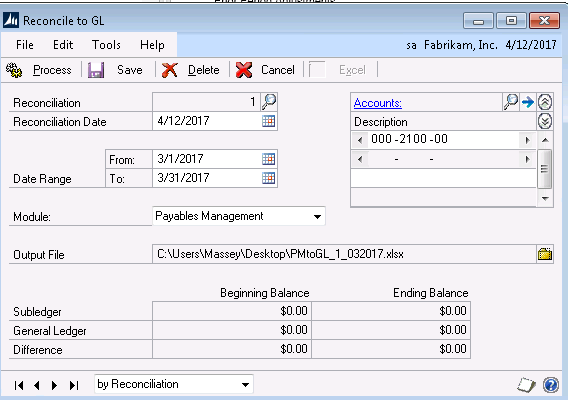
In this example, I’m reconciling my accounts payable from 3/1/2017-3/31/2017 using my AP GL account 000-2100-00.  I have selected the Payable Management module and have selected where I want my output file to go.

Figure 1

gp tips

Once we have filled out the information shown in the screenshot above, we can now hit

Process in the upper left-hand corner. Once we select Process, three things will happen:

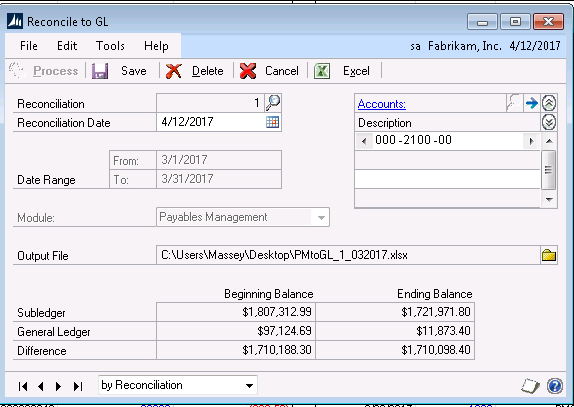
  • The bottom part of the Reconcile to GL window will be populated with our Beginning and Ending Balances (see figure 2)
  • The file will be saved to the output location we selected
  • The file will open in Excel.  

Figure 2

Output File

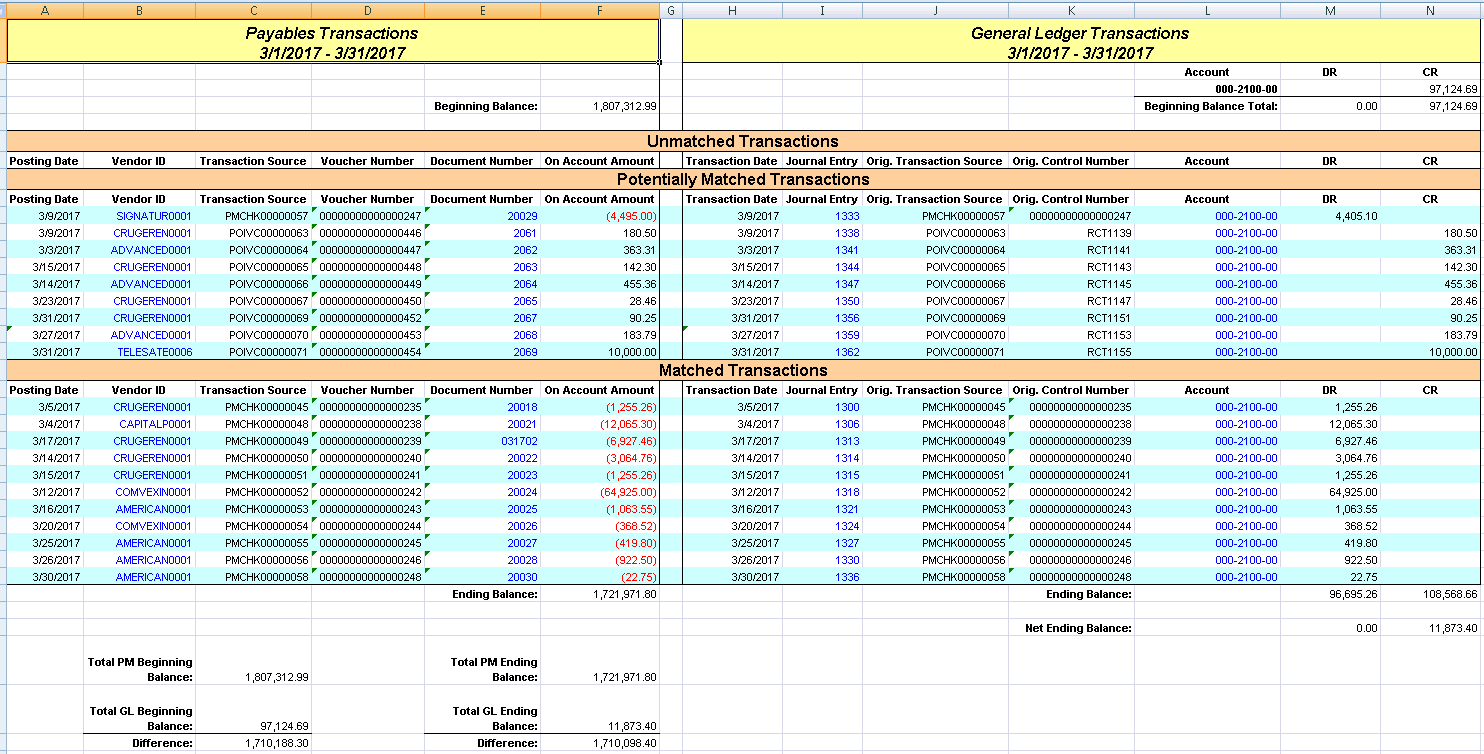
The Output file is divided into three sections:  Unmatached, Potentially Matched and Matched. For reconciliation purposes, you will want to focus on the unmatched and potentially matched transactions.  

Unmatched Transactions are transactions that are in the GL but not in purchasing or vice versa.  The potentially matched transactions often contain transactions that match, but because of items like discounts that weren’t coded to the Discount GL properly, the matched transactions mean that everything matches between the ledger and sub-ledgers.

The output file contains hyperlinks in blue font that allow you to drill back into GP.  In the example below, you can see that we could drill back to a vendor, a vendor document, a journal entry or a GL Account.  

Troubleshooting tips:

  1. Have you included all the GL accounts associated with this subledger?
  2. Are there any unposted batches?
  3. Check your posting setup for the module and confirm that both check marks are in for Post to and Post thru.
  4. Check your dates and make sure something wasn’t posted to the wrong period.
  5. Check your voids to see if something was voided in a period other than when it was originally posted.

Filed Under: Accounting Software, Microsoft Dynamics GP, Services Tagged With: dynamics gp, General Ledger, how to guide, Microsoft Dynamics, reconciliation

Article 03.1.2018 Dean Dorton

Underwhelming. Pressure. Security.

Those were the three words that headline predictions for Microsoft Dynamics GP for the year 2018. Certainly not words that you might expect to hear from a long-time proponent of Dynamics GP, but maybe these are the times we live in now.  This post and more include the most prolific proponents of Dynamics GP questioning Microsoft’s direction and potential prospects evaluating multiple solutions.

The first 40 days of 2018 have actually given us three major, interesting Dynamics GP news items.  For months now, many partners and insiders have wondered what effect Dynamics 365 would have on the existing product bases, including Dynamics GP and SL.  Founded or unfounded, those fears have left doubt in some people’s minds at a time when the cloud is picking up steam for accounting and finance professionals.  More and more end users are asking for cloud solutions, so they can focus on their business, not their servers.  Could Microsoft be heading in that direction as well?

Public-facing champion gone

First, let’s examine the latest news item, the termination of Pam Misialek. Pam was the Product Marketing Manager for Dynamics GP but her employment was terminated by Microsoft on January 21, 2018. Her responsibilities will be absorbed by Gordon Macdonald, the current Marketing Manager for all of Dynamics.  Layoffs happen all the time, but in one single move, Microsoft has eliminated the single biggest, public-facing champion for Microsoft Dynamics GP and put the job in the hands of a person already managing other products.

Product development behind the curve

Second, consider that – as Mariano Gomez exposed – Microsoft Dynamics GP is still dependent on TLS 1.0.  TLS 1.0 is a technology that has been mandated by PCI compliance authorities to be deprecated in favor of newer versions. To be fair, Microsoft has now stated that they are working on a fix but won’t commit to a timeline other than by June 30, 2018 – the mandated deadline.  Even if they make the fix in time for the PCI mandated deadline (already delayed two years), what does it say about product development that the ERP system has not already met the standard?

Only non-accounting features generating buzz

And last, but not least, the blog post from early 2018 in which Marc Polino lamented on the underwhelming feature set of Dynamics GP 2018.  Even msdynamicsworld.com editor, Jason Gumpert, noted reaction from many partners is good, but that it seems more iterative than anything else.  Only the non-accounting features like Azure, Power BI and Workflow are generating buzz. It’s also relevant to note that Polino predicts the pressure around Dynamics 365 will shift from customers to partners by offering partners incentives to get customers to transition.  But, how good is the transition?  Time will tell.

Impact of change

A new year typically brings new possibilities, but for Dynamics GP, it only seems to bring questions.  How will product direction change with the loss of its greatest public champion?  Will other issues like TLS 1.0 that have yet to be uncovered be exposed? And, will predictions ring true to the extent that the real buzz around Dynamics GP is not Dynamics GP at all, but other products that make up for GP shortcomings?  Only time will tell.

You have a lot to consider

You might be concerned about what all of this means for you. If you are interested in talking to us about your instance of Dynamics GP we’d be happy to help you assess the situation.  We can help itemize the risks and benefits of solution options for you.  If current developments have you more strongly considering the cloud, we’d especially recommend a consultation.  We have helped many companies move from Dynamics GP to cloud-based, AICPA-endorsed Sage Intacct.  Don’t hesitate to contact us: we’ll be happy to assess your situation for free.

Need Some More Convincing?

Check out our free white paper “9 Reasons Why Sage Intacct Beats Dynamics GP” to see why a cloud-based ERP software might be the best solution for the future of your business.

get the whitepaper

Filed Under: Accounting Software, Microsoft Dynamics GP, Sage Intacct, Services Tagged With: Accounting Software, cloud solutions, dynamics gp, Sage Intacct, TLS 1.0

  • « Go to Previous Page
  • Page 1
  • Page 2
  • Page 3
  • Page 4
  • Page 5
  • Go to Next Page »
PAY INVOICE SUBMIT RFP
  • Services
    • Outsourced Accounting
    • Audit & Assurance
    • Tax
    • Consulting & Advisory
    • Technology & Cybersecurity
    • Family Office
    • Wealth Management
  • Industries
  • Company
  • Locations
  • Careers
  • Insights
  • Events
  • Contact Us
SUBSCRIBE TO INSIGHTS
email Dean Dorton - CPAs And Advisors On Email facebook Dean Dorton - CPAs And Advisors On Facebook twitter twitter linkedin Dean Dorton - CPAs And Advisors On LinkedIn youtube Dean Dorton - CPAs And Advisors On YouTube

The matters discussed on this website provide general information only. The information is neither tax nor legal advice. You should consult with a qualified professional advisor about your specific situation before undertaking any action.

© 2026 Dean Dorton Allen Ford, PLLC. All Rights Reserved

  • Privacy Policy
  • Terms Of Use
  • Accessibility