• Skip to primary navigation
  • Skip to main content
Dean Dorton – CPAs and Advisors
  • Services
        • Audit & Assurance
          • Audits, Reviews & Compilations
          • ESG Programs & Reporting
          • Internal Audit
          • International Financial Reporting
          • Lease Accounting Managed Services
          • Peer Review Services
          • SOC Reporting
        • Family Office
        • Consulting & Advisory
          • Business Valuation Services
          • Forensic Accounting
          • Fractional CFO
          • Litigation Support
          • Matrimonial Dissolution
          • Merger & Acquisition
          • SEC Services
          • Succession Planning
          • Transaction Advisory Services
          • Whistleblower Hotline
        • Outsourced Accounting
        • Private Wealth
        • Healthcare Consulting
          • Finance
          • Health Systems Operational Transformation
          • Medical Billing and Credentialing
          • Risk Management & Compliance
          • Strategic Growth for Private Practices
          • Strategy and Strategy Implementation
          • Technology & Data Analytics
        • Tax
          • Business Tax
          • Cost Segregation Studies
          • Credits and Incentives
          • Estates and Trusts
          • Individual Tax
          • International Tax
          • SEC Provision and Compliance
          • State and Local Tax
        • Technology & Cybersecurity
          • Accounting Software
          • Cybersecurity
            • Cybersecurity Assessments
            • Cybersecurity Scorecard Assessment
            • Security Awareness Training
            • Virtual Information Security Office
          • Data Analytics & AI
          • IT Audit & Compliance
            • Cybersecurity Maturity Model Certification (CMMC)
            • Data Privacy Laws
            • SOC Reporting
          • IT Infrastructure & Cloud Solutions
            • Automation
            • Backup and Disaster Recovery
            • Cloud Strategy
            • Data Center
            • Enterprise Network
            • Network Security
            • Phone and Video Conferencing
            • User Identity Management Solutions
            • Webex
          • Managed IT Services
  • Industries
        • Construction
        • Distilleries and Craft Breweries
        • Energy and Natural Resources
        • Equine
        • Financial Institutions
        • Government
        • Healthcare
        • Higher Education
        • Life Sciences
        • Manufacturing and Distribution
        • Nonprofit
        • Real Estate
  • Insights
    • Articles
    • Guides
    • Case Studies
  • Events
  • Company
        • News
        • Our Team
        • Experiences
        • Careers
          • College Students
          • Experienced Professionals
        • Locations
        • Lexington, KY

          250 West Main Street
          Suite 1400
          Lexington, KY 40507
          859-255-2341

        • Louisville, KY

          435 North Whittington Parkway
          Suite 400
          Louisville, KY 40222
          502-589-6050

        • Louisville, KY

          700 North Hurstbourne Parkway
          Suite 115
          Louisville, KY 40222
          502-589-6050

        • Ft. Wright, KY

          810 Wright’s Summit Parkway
          Suite 300
          Fort Wright, KY 41011
          859-331-3300

        • Cincinnati, OH

          312 Walnut Street
          Suite 3330
          Cincinnati, OH 45202
          859-331-3300

        • Blue Ash, OH

          9987 Carver Rd
          Suite 120
          Blue Ash, OH 45242
          513-891-5911

        • West Chester, OH

          9025 Centre Pointe Drive
          Suite 310
          West Chester, OH 45069
          513-985-6240

        • Indianapolis, IN

          5975 Castle Crk Pkwy Dr N
          Suite 400
          Indianapolis, IN 46250
          317-469-0169

        • Raleigh, NC

          4130 Parklake Avenue
          Suite 400
          Raleigh, NC 27612
          919-782-9265

  • Contact Us

dynamics gp

Article 02.5.2018 Dean Dorton

For years, Geotechnologies, Inc. has been a highly-valued Microsoft Dynamics GP customer of Massey Consulting’s. However, after 12 years on Dynamics GP, they decided that their growing company was outgrowing their current software and chose to power ahead with the cloud.

A full-service geotechnical engineering firm located in Raleigh, NC and founded in 1992, Geotechnologies, Inc. is built on the foundation of technical expertise and cost-effective projects for clients. Their services come with preliminary site assessments and project testing across a diverse realm of market sectors.

As an industry where successful data analysis, project management, and customer relationship management is paramount, Geotechnologies, Inc. could not afford a financial management system with frail capabilities.

After using Microsoft Dynamics GP on-premise solution continuously for years, the firm was ready to adopt a more automated, real-time solution that would allow the finance team and business leaders to better analyze revenue, profitability, and project accounting.
Once the decision was made to move to Sage Intacct, a leading cloud-based financial management solution, Geotechnologies, Inc. has seen prominent changes within the company.

“Sage Intacct has delivered significant cost savings by allowing us to eliminate SQL servers and smaller custom systems for things like time sheets, invoices, and other workflows. It also allows our employees who spend a majority of their work week away from the office to input their time and expenses from anywhere, anytime,” said Debora Hester, Controller at Geotechnologies, Inc.
Geotechnologies, Inc. has also been able to embrace full financial visibilities across multi-operational dimensions. Sage Intacct’s project visibility through dashboards allows business users, markets, and their clients to merge in real-time, which leads to more efficient business decisions.

Additionally, the transition to Sage Intacct has been a smooth one, as the solution automates a variety of financial processes such as monthly closes, accounts receivable and accounts payable, and has led to more robust and customized reporting.
“The team from Massey provides great service, and is very accessible and prompt in replying to any questions.”

Read the Full Story Here 

Check out the full customer success story here or contact us to learn how you can revitalize your reporting and financial capabilities, too.
learn more

Filed Under: Accounting Software, Microsoft Dynamics GP, Sage Intacct, Services Tagged With: Accounting Software, automated accounts payable, automated accounts receivable, Cloud Accounting, cloud solutions, dynamics gp, ERP, GP Switcher, Reporting, Sage Intacct, saving time

Article 01.12.2018 Dean Dorton

Managing your customer’s credit limit in Dynamics GP became even easier with the Dynamics GP 2015 R2 release.  Two new options were introduced that now give you the ability to display an over the credit limit warning icon as well as set up a warning pop-up window if a customer is over their credit limit.

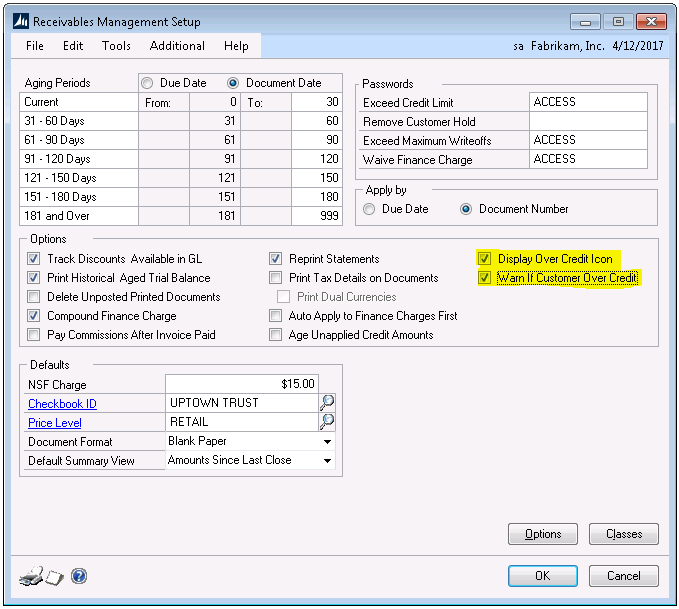
To access these two new options, Display Over Credit Icon and Warn if Customer Over Credit,  you will need to be on Dynamics GP 2015 R2 and also enable the options on the Receivables Management Setup (Tools>Setup>Sales>Receivables) window (Figure 1).

dynamics gp

Figure 1

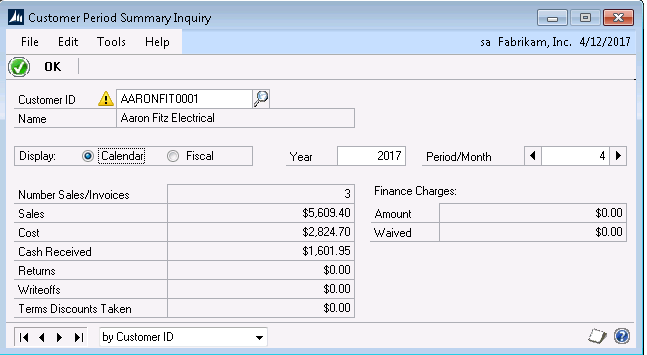
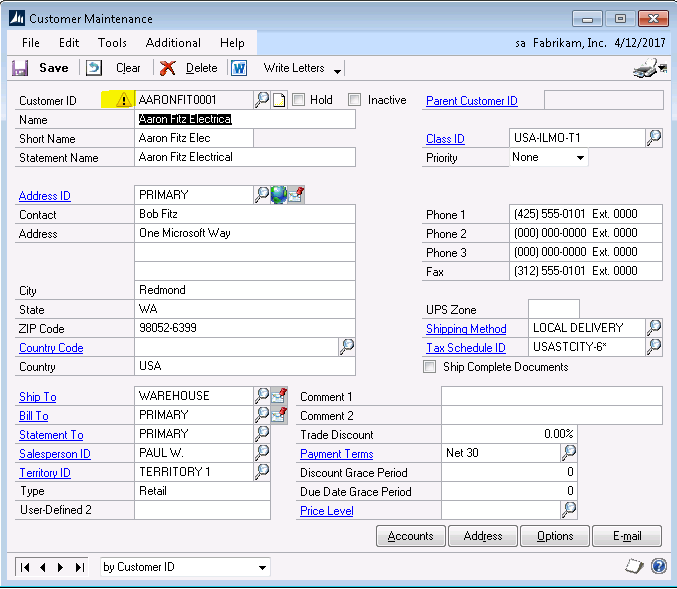
The Display over Credit Icon option will display a visual icon in multiple windows to alert you that the customer is over their credit limit.  Notice in Figure 2 below there is a yellow warning icon next to the customer number on the customer card.  This warning icon will show up throughout GP when the customer number is entered (see Figure 3).

Figure 2

Figure 3

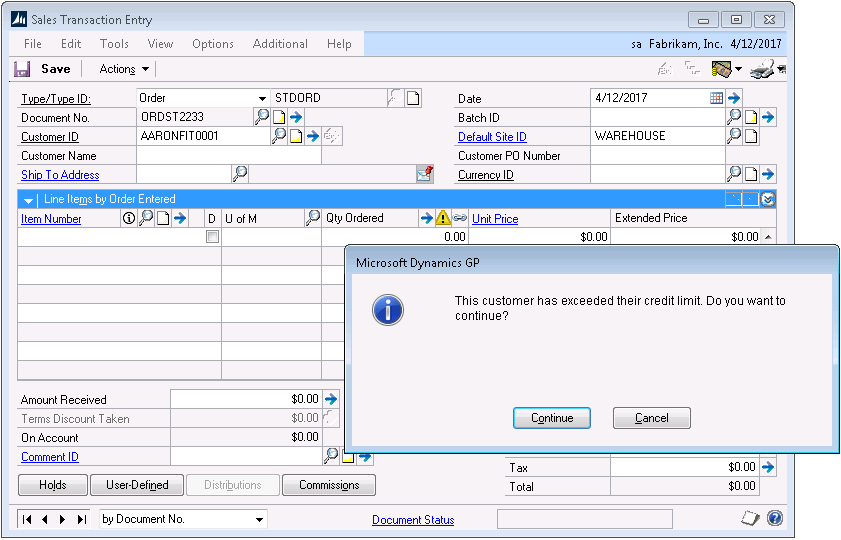
The second option, Warn if Customer Over Credit, will allow a warning message box to pop up once a credit limit is passed.  As shown in Figure 4 below the warning message is displayed as soon as the customer ID is entered in Sales Transaction Entry.  

Figure 4

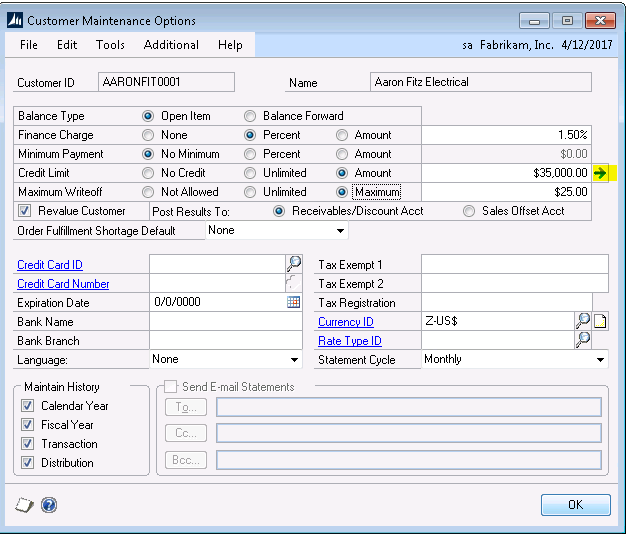
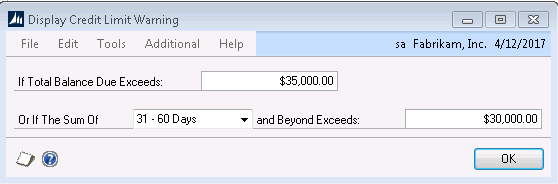
You also have the option to configure the credit limit warning window to warn you if a new transaction that is being entered would put a customer over their credit limit once that transaction amount is added to the open balances for that customer.  To configure the credit limit warning, click the blue arrow to the right of the customer credit limit amount on the customer maintenance options window (Figure 5). On the Display Credit Limit Warning window, you can choose to set up a warning if the total balance exceeds the customer’s credit limit OR if the sum of receivables in a particular aging bucket and beyond exceeds a dollar amount.  In the example shown in Figure 6, we have set the alert to notify us if the customer exceeds their $35,000 credit limit OR if the sum of their transactions exceeds $30,000 in the 31-60 and beyond aging buckets.

Figure 5

Figure 6

Both credit limits warnings options by default are not enabled.  Once enabled, it is a system-wide option that can be turned on and off at any time.  

If you have additional questions on how to setup and configure the credit limit warning options, please reach out to Support@MasseyConsulting.net

Filed Under: Accounting Software, Microsoft Dynamics GP, Services Tagged With: accounting solutions, alerts, credit limits, dynamics gp, Microsoft Dynamics GP

Article 11.27.2017 Dean Dorton

Finding software that will work best for your company’s financials can be overwhelming. Choose the right solution, and your teams will thrive, feeling supported. Choose the wrong one and your teams may forever feel like they are working against the grain.  

At first, a choice between Microsoft Dynamics and Sage Intacct may not be so clear. Between two leading software solutions in the industry, how do you choose?

As experts in right-fitting software options for growing companies, we can often see some tell-tale signs that a company has outgrown their current systems:

  • Invoicing takes more time to complete.
  • Productivity bottlenecks where systems buckle under a growing workload.
  • Decision-makers have to wait longer for reports, or can’t get the metrics they need to make timely decisions.
  • Teams spend too much time on duplicate manual entry to transfer critical data into disconnected systems.
  • Accounting and sales rely more and more on spreadsheets and workarounds for their information.

When companies see these growing risks in their business, they need a solution that will address them.

These companies need the cloud.

THE CLOUD PROPELS PRODUCTIVITY: Data automatically updates in cloud-based systems. Teams can handle a bigger workload because more of their tasks are automated. Data re-entering disappears. Importing and exporting vanishes. Processes are more streamlined through automation. No on-the-fly reports to run. Everyone gets current data, wherever and whenever they need it.

THE CLOUD FOSTERS CONNECTION AND COLLABORATION: Cloud-driven systems often integrate well with other cloud-based solutions. Teams connect through the cloud to get quick answers from other team members and clients. Deals close faster. More happens in less time.

THE CLOUD REDUCES COSTS: Systems in the cloud often send updates and boost security automatically through the cloud. Your business can focus on your expertise, and reduce costs spent on someone else handling your IT and security.

For fast-growing companies, systems flexibility is key. These companies need a solution that will grow with them, to accommodate the product and service changes they will experience over time.

THE SOLUTION IS CLEAR

Microsoft Dynamics GP’s on-premises software system may fit your company now, but an on-premises software like this requires manual updates, and supplemental add-ons just to keep up with growth. If your company plans to grow and change over time, you should expect that it will outgrow this software too.

Sage Intacct, a best-in-class cloud accounting solution, provides the flexibility that growing companies need:

  • Accounting teams can close books faster with flexible reporting options designed for compliance.
  • Teams can collaborate under one roof, or on the other side of the world, any time of day, on multiple devices with the same high-level of security.
  • Stakeholders and decision-makers get real-time visibility into their business metrics, to build strategies based on real data and to-the-minute product and service success.

“After evaluating several top financial systems, including Microsoft Dynamics, (Sage) Intacct was the clear choice for us because of its pure cloud approach and seamless best-in-class integration.” –Reggie Alexis, Controller, Potential Church

We know the decision to grow your systems is an important one.

Contact us to feel confident in choosing the right solution that will fit your company’s needs now and in the future.

Learn more in our free whitepaper: 7 Reasons to Move to Cloud Financials Now

Filed Under: Accounting Software, Microsoft Dynamics 365, Microsoft Dynamics GP, Sage Intacct, Services Tagged With: cloud solutions, dynamics gp, Sage Intacct

Article 10.5.2017 Dean Dorton

Have you ever realized that after a journal entry was posted that it had the wrong GL account or that it was for the wrong amount?  

If so, did you know that you don’t have to void it and re-enter the whole journal entry? Instead, you can correct it.

WHAT SHOULD YOU DO?

In order to correct a journal entry in GP, you will need to know the original journal entry number.  You will also want to make sure that the Audit Trail Code begins with GLTRX.  If the transaction doesn’t begin with GLTRX, then it most likely originated in another module, such as payables or receivables, and you would want to correct the entry in that module in order to stay in balance with your subledger.

The next thing that you will need to look at is the date of the original journal entry.  You are only allowed to correct open-year journal entries and journal entries from the most recent historical year. Additionally, it is vital that you make sure that the journal entry wasn’t created as part of the system year-end closing process.  If it was created as part of the system year-end closing, you will not be able to correct it.  

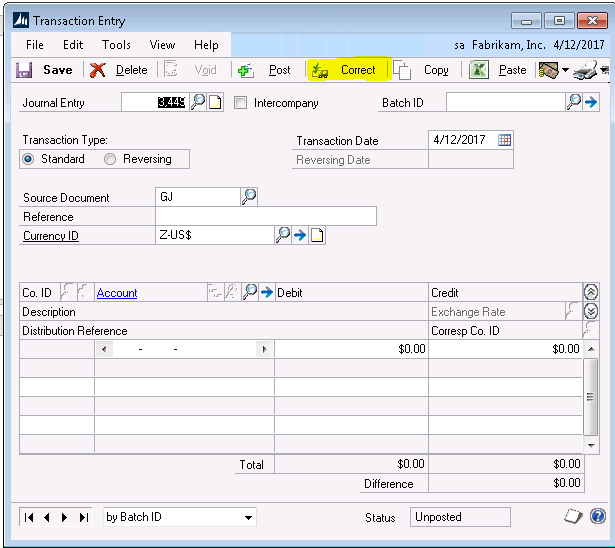
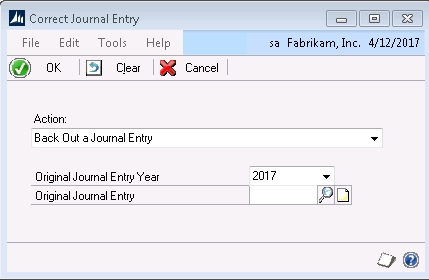
To correct a journal entry, you will go to Dynamics GP>Financial>Transactions>General and select the Correct button, which can be found at the top of the window near the Post button.  This will bring up the Correct Journal Entry window, where you will have a choice to back out a journal entry or back out and correct.  

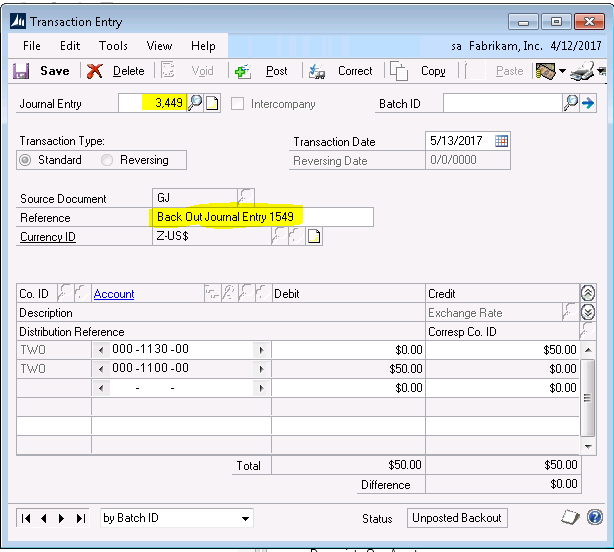
The Back out of a journal entry option means that it will create one journal entry, which in turn, will reverse the original journal entry.  

Back out and correct will create one journal entry to reverse the original journal entry and another journal entry for you to modify.  If you select back out and correct, you won’t see the correcting journal entry until you save or post the reversing journal entry.  

Once you decide between back out and back out and correct, you will be prompted to enter the original journal entry year and journal entry number that you want to correct.  Clicking OK on this window will bring up the reversing journal entry with a reference that has been prefilled “Back Out of Journal Entry XXXXX” with the XXXXX representing the original journal entry number.  You may now post or save the reversing journal entry.  If you had selected back out and correct on the previous window, a correcting journal entry will now appear.  You can then make your changes and save or post that transaction as well.  

Keep in mind, once a journal entry has been corrected, you cannot correct it again. You also cannot correct journal entries that were previously voided.

Filed Under: Accounting Software, Industry Solutions, Microsoft Dynamics GP, Services Tagged With: dynamics gp

Article 08.30.2017 Dean Dorton

Filed Under: Accounting and Financial Outsourcing, Accounting Software, Microsoft Dynamics GP, Services Tagged With: dynamics gp, Microsoft Dynamics GP

Article 08.16.2017 Dean Dorton

Business is booming. Your company is expanding, in what seems like no time at all.

Amidst the growth however, you’ve been noticing that it takes longer to close the books, that your team scrambles to mess with pivot tables and endless static excel spreadsheets to get answers today that you needed yesterday, and often, you can’t help but wonder how the competition is faring with their teams amidst their growth, too.

You know you that the right solutions for your company are out there.  But, as you stand in the dark with new problems and demands as a result of growth, you may not know just what solutions will best address them because your priorities look so different from even just a few years ago when your company was preparing for growth.

It wasn’t all that long ago when financial teams considered it more prudent to stick with tried-and-true systems in order to avoid risk, but now, with the advent of ever-changing technology, we are in a different age, and those same belief systems applied to an information-based market no longer apply.

In today’s market, to provide the best, most-up-to-date service, your business systems not only need to satisfy customers and compete with other industry leaders in your market but also must live up to your standards to offer fast, detailed, accurate information to make the most informed decisions needed to manage growth.

Yet with so many variables, it can be difficult for companies to make an informed decision as they aim to modernize their outdated systems. Making matters worse, many companies opt to stick to their current systems for fear of making an unwise tech decision for their company.

But playing it safe can be placing their businesses at risk in more ways than they might think.

According to Saugatuck Tech, 90% of all businesses are applying some cloud-related tech to change, improve and innovate their businesses.

GET THE FACTS

Just because you are entering into unexplored territory doesn’t mean that you have to push ahead uninformed.

We know the risks and we find solutions for companies that are blazing trails in their technical fields.  We know what the most tech-savvy businesses face as they grow.

“Finance at a Crossroads – The Risks of Standing Still” offers expert advice and risk factors involved in your company’s response to growth during this critical time of change for your business.

If you’re at a crossroads, switching to Sage Intacct-a best-in-class cloud accounting solution, can boost your business to be the best version of itself that it can be.  

Filed Under: Accounting & Tax, Accounting and Financial Outsourcing, Accounting Software, Microsoft Dynamics GP, Sage Intacct, Services Tagged With: Cloud Accounting, cloud solutions, dynamics gp, GP Switcher, Sage Intacct

  • « Go to Previous Page
  • Page 1
  • Page 2
  • Page 3
  • Page 4
  • Page 5
  • Go to Next Page »
  • Services
    • Outsourced Accounting
    • Audit & Assurance
    • Tax
    • Consulting & Advisory
    • Technology & Cybersecurity
    • Family Office
    • Wealth Management
  • Industries
  • Company
  • Locations
  • Careers
  • Insights
  • Events
  • Contact Us
facebook Dean Dorton - CPAs And Advisors On Facebook twitter twitter linkedin Dean Dorton - CPAs And Advisors On LinkedIn youtube Dean Dorton - CPAs And Advisors On YouTube

The matters discussed on this website provide general information only. The information is neither tax nor legal advice. You should consult with a qualified professional advisor about your specific situation before undertaking any action.

© 2026 Dean Dorton Allen Ford, PLLC. All Rights Reserved