• Skip to primary navigation
  • Skip to main content
Dean Dorton – CPAs and Advisors
  • Services
        • Audit & Assurance
          • Audits, Reviews & Compilations
          • ESG Programs & Reporting
          • Internal Audit
          • International Financial Reporting
          • Lease Accounting Managed Services
          • Peer Review Services
          • SOC Reporting
        • Family Office
        • Consulting & Advisory
          • Business Valuation Services
          • Forensic Accounting
          • Fractional CFO
          • Litigation Support
          • Matrimonial Dissolution
          • Merger & Acquisition
          • SEC Services
          • Succession Planning
          • Transaction Advisory Services
          • Whistleblower Hotline
        • Outsourced Accounting
        • Private Wealth
        • Healthcare Consulting
          • Finance
          • Health Systems Operational Transformation
          • Medical Billing and Credentialing
          • Risk Management & Compliance
          • Strategic Growth for Private Practices
          • Strategy and Strategy Implementation
          • Technology & Data Analytics
        • Tax
          • Business Tax
          • Cost Segregation Studies
          • Credits and Incentives
          • Estates and Trusts
          • Individual Tax
          • International Tax
          • SEC Provision and Compliance
          • State and Local Tax
        • Technology & Cybersecurity
          • Accounting Software
          • Cybersecurity
            • Cybersecurity Assessments
            • Cybersecurity Scorecard Assessment
            • Security Awareness Training
            • Virtual Information Security Office
          • Data Analytics & AI
          • IT Audit & Compliance
            • Cybersecurity Maturity Model Certification (CMMC)
            • Data Privacy Laws
            • SOC Reporting
          • IT Infrastructure & Cloud Solutions
            • Automation
            • Backup and Disaster Recovery
            • Cloud Strategy
            • Data Center
            • Enterprise Network
            • Network Security
            • Phone and Video Conferencing
            • User Identity Management Solutions
            • Webex
          • Managed IT Services
  • Industries
        • Construction
        • Distilleries and Craft Breweries
        • Energy and Natural Resources
        • Equine
        • Financial Institutions
        • Government
        • Healthcare
        • Higher Education
        • Life Sciences
        • Manufacturing and Distribution
        • Nonprofit
        • Real Estate
  • Insights
    • Articles
    • Guides
    • Case Studies
  • Events
  • Company
        • News
        • Our Team
        • Experiences
        • Careers
          • College Students
          • Experienced Professionals
        • Locations
        • Lexington, KY

          250 West Main Street
          Suite 1400
          Lexington, KY 40507
          859-255-2341

        • Louisville, KY

          435 North Whittington Parkway
          Suite 400
          Louisville, KY 40222
          502-589-6050

        • Louisville, KY

          700 North Hurstbourne Parkway
          Suite 115
          Louisville, KY 40222
          502-589-6050

        • Ft. Wright, KY

          810 Wright’s Summit Parkway
          Suite 300
          Fort Wright, KY 41011
          859-331-3300

        • Cincinnati, OH

          312 Walnut Street
          Suite 3330
          Cincinnati, OH 45202
          859-331-3300

        • Blue Ash, OH

          9987 Carver Rd
          Suite 120
          Blue Ash, OH 45242
          513-891-5911

        • West Chester, OH

          9025 Centre Pointe Drive
          Suite 310
          West Chester, OH 45069
          513-985-6240

        • Indianapolis, IN

          5975 Castle Crk Pkwy Dr N
          Suite 400
          Indianapolis, IN 46250
          317-469-0169

        • Raleigh, NC

          4130 Parklake Avenue
          Suite 400
          Raleigh, NC 27612
          919-782-9265

  • Contact Us

Microsoft Dynamics GP

Article 11.6.2017 Dean Dorton

When companies transition to a more innovative financial solution like Sage Intacct, they are often eager to get started on streamlining their books.  However, when they take time to follow expert guidance on their new systems, they get a lot more value from their solutions than by going it alone.

When forward-thinking businesses follow good advice on how to work with their cloud accounting solutions they do more in less time. They also boost their efficiency and accuracy by using strong setup practices, right from the start.

Sage Intacct – a best-in-class cloud accounting solution, is designed to provide deep insights into your company’s chart of accounts, general ledger, and budget comparisons. This makes your monthly processes and global consolidations fast and clean.

What’s in it for me?

In this Cloud Bytes session on managing your company’s budgets, you’ll learn all about how to customize your unique systems to streamline how you handle your budgets. You also learn strong reporting practices to save time going forward. In our November webinar, you will learn:

  • Requirements and prerequisites for creating and managing budgets, and how to best format, enter and modify your data to ensure efficiency and accuracy in your budget vs. actual comparisons and reporting.
  • How to create reporting periods and the mapping and naming conventions necessary to construct templates and headers for those periods.
  • Budget considerations for project accounting and global consolidations.

To offer value to all our participants, we will take attendee questions at the end, so be sure to write down any questions you have and bring them with you to the session. 

It’s the start of a new fiscal year, so whether you’ve just signed on with Sage Intacct, have been using their expert-designed systems for a while now, or are looking to make a change soon, now is the ideal time to learn everything you need to know about how to start your books off right.

Sign up now to join us for our next Cloud Bytes session happening on November 16 at 2P ET, to learn how to expertly manage your budgets and master reporting in Sage Intacct.
Reserve your seat today!

Filed Under: Accounting Software, Microsoft Dynamics GP, Sage Intacct, Services Tagged With: budget, cloud bytes, Sage Intacct

Article 10.30.2017 Dean Dorton

Repost from Budget Maestro.

If your organization is still using spreadsheets for budgeting and planning, it might be time to start rethinking things. Excel is fine for very small businesses just getting started or for brands that need little by way of advanced features. But for most organizations, the cold fact of the matter is, if you’re sticking with spreadsheets, you’re likely already behind your competitors.

Today’s businesses look beyond the simple solutions of the past. They want budgeting and forecasting systems that can help them be more agile and make better decisions. Because of that, many embrace automated budgeting systems.

These systems can provide incredible benefits to your organization, not to mention, modernize your processes and outcomes.

In this post, we want to highlight a few of the many reasons why your brand should embrace automated budgeting. If your organization has been on the fence about making the switch, keep reading!

1) Enhanced Reporting

One of the real benefits of switching to automated budgeting and forecasting is the advanced reporting available. Macros can only take your organization so far in giving you detailed reports.

If you want to understand how the business is operating on a deeper level, you need better reporting. Running ‘what if’ scenarios and having custom dashboards that highlight your KPIs are just a few examples.

CFOs are garnering more strategic roles on management teams, making concise, accurate and easy-to-read dashboards and reports crucial

2) More Reliability

Ask any CFO or budget manager and they’ll tell you that trying to create a budget using spreadsheets can turn into a disaster with just one misplaced number or bad equation. Any system that relies so heavily on manual entry and calculations can end up with real problems down the line.

Automated systems remove these issues from the equation. They help to improve budget accuracy. When data is automatic, there are far fewer chances for errors. That means your budget and forecasts will be more reliable.

3) Increased Productivity

The last thing any organization wants is to have valued employees wasting time and energy on projects that don’t push the business forward.

Automated budgeting systems can help improve productivity in a few ways. First, rather than having employees spend time manually entering data or chasing down errors on spreadsheets, they can spend their time doing more analysis. Additionally, it allows staff time to proactively respond to any challenges or opportunities instead of playing catch-up because the budget process took so long.

4) Guesswork Removed

All too often, by the time a budget or forecast is ready to go, it’s already obsolete. When that happens, it could mean year-end decisions are being made by guessing at the numbers. As you might expect, even the most educated guess on something as important as available cash flow, for example, can be disastrous.

No organization wants key decision makers guessing in making strategic or operational choices. Having a system with always accurate real-time data that can quickly create reports helps to remove the guesswork.

5) Improved Compliance

Compliance is a fact of life in running any business. And this doesn’t apply just to paying taxes. Every industry faces regulations and required reporting, otherwise, an organization might face an audit. With manual entries and tracking, it becomes difficult to find and fix every error accurately. Automated systems let you drill down, see variations and find discrepancies quickly, saving resources.

Also, automated systems can help generate regulatory reporting, making compliance easier.

Final Thoughts

Organizations today need to be agile to best competitors, respond to market demands and seize opportunities. It’s hard to do that without having the systems to help make it happen easily. That’s why so many businesses have embraced automated budgeting systems. You’ve read about just a few of the benefits. But they can make all difference in improving your budgeting and forecasting processes.

To learn more about automated budgeting, planning and forecasting systems and how Centage can help you, contact us.
 

Filed Under: Accounting Software, Industry Solutions, Microsoft Dynamics GP, Sage Intacct, Services Tagged With: automated budget, automation, Budget Maestro, budgeting, Budgeting Software, centage

Article 10.25.2017 Dean Dorton

Whether you just went paperless, or have been relying on the cloud for years to support your business, you understand that with multiple systems comes redundant re-keying.  You also know that with every duplicate manual entry, your company faces a greater potential for human error to erode the accuracy of your most critical data.

As experts in accounting and the cloud, we understand the pains of duplicate work and how it can wreak havoc in your reports, client relations, and audits.  In response to this common problem, the Massey team designed mConnect.

ABOUT mCONNECT

The mConnect solution unites two best-in-class cloud platforms, ConnectWise and Sage Intacct, by creating a seamless pathway for behind-the-scenes automated integration.  With mConnect, data can travel back and forth between ConnectWise and Sage Intacct quickly and effortlessly, which means your company saves time, reduces frustration, conserves resources, and ensures accuracy.

Some additional benefits of mConnect include:

  • Harness critical data and transfer it with one click.
  • Gather stock counts in real time, everywhere your team works.
  • Track invoicing quickly and accurately, as soon as an order is placed.
  • Up-to-date sales numbers anytime, anywhere.
  • Eliminate running your own integrations. mConnect does it for you.

mConnect’s customizable options allow for less manual entries and redundant filtering and synchronized or automatic data transfers. This means your team can do more, worry less and get the critical answers they need when they need them.

At this year’s IT Nation, happening November 8-10 in Orlando, FL, members from our team will be there to talk with other sponsors, presenters and attendees about mConnect’s features that showcase and uplift the two best-in-class cloud solutions.

Get the most you can from your cloud solutions in a way that will uplift your teams and make the best use of their time.

Let’s meet up at IT Nation, so we can show you everything that mConnect can do for you! Massey Consulting will be at Booth 704. Don’t miss out on our wonderful prizes- we will be giving away goodies each day, including 2 Amazon Echoes on Wednesday and Thursday!

Register now!

Filed Under: Accounting Software, mConnect, Microsoft Dynamics 365, Microsoft Dynamics GP, Sage Intacct, Services Tagged With: connectwise, IT Nation, mConnect, Microsoft Dynamics, Microsoft Dynamics GP, Sage Intacct

Article 10.5.2017 Dean Dorton

Have you ever realized that after a journal entry was posted that it had the wrong GL account or that it was for the wrong amount?  

If so, did you know that you don’t have to void it and re-enter the whole journal entry? Instead, you can correct it.

WHAT SHOULD YOU DO?

In order to correct a journal entry in GP, you will need to know the original journal entry number.  You will also want to make sure that the Audit Trail Code begins with GLTRX.  If the transaction doesn’t begin with GLTRX, then it most likely originated in another module, such as payables or receivables, and you would want to correct the entry in that module in order to stay in balance with your subledger.

The next thing that you will need to look at is the date of the original journal entry.  You are only allowed to correct open-year journal entries and journal entries from the most recent historical year. Additionally, it is vital that you make sure that the journal entry wasn’t created as part of the system year-end closing process.  If it was created as part of the system year-end closing, you will not be able to correct it.  

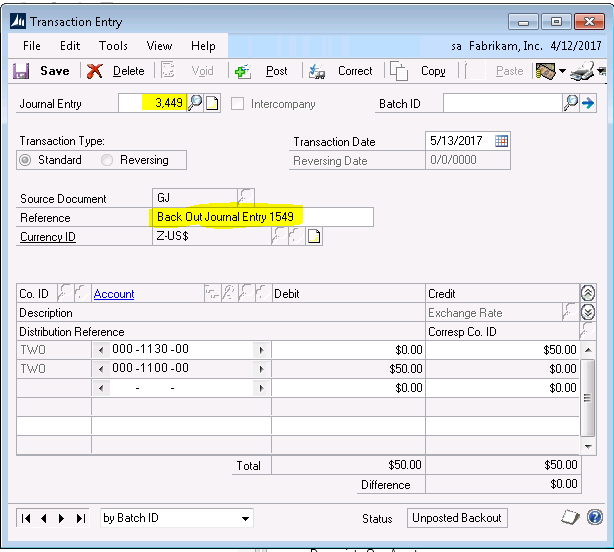
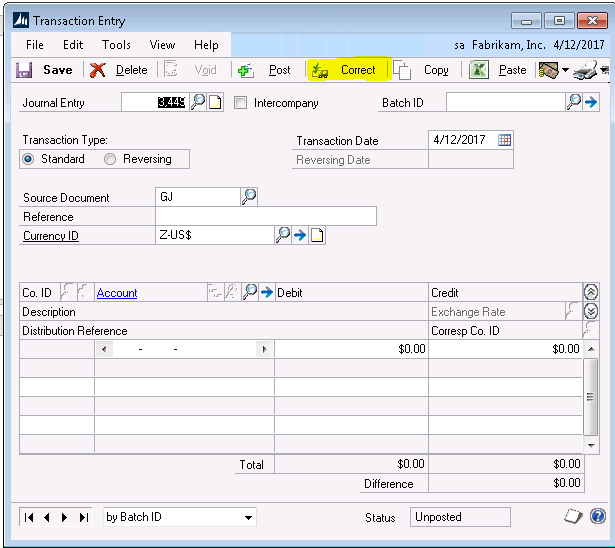
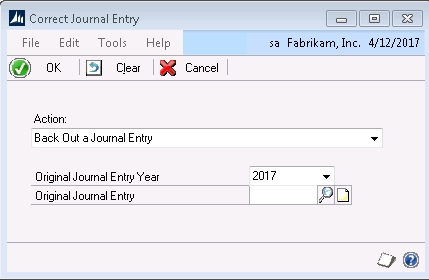
To correct a journal entry, you will go to Dynamics GP>Financial>Transactions>General and select the Correct button, which can be found at the top of the window near the Post button.  This will bring up the Correct Journal Entry window, where you will have a choice to back out a journal entry or back out and correct.  

The Back out of a journal entry option means that it will create one journal entry, which in turn, will reverse the original journal entry.  

Back out and correct will create one journal entry to reverse the original journal entry and another journal entry for you to modify.  If you select back out and correct, you won’t see the correcting journal entry until you save or post the reversing journal entry.  

Once you decide between back out and back out and correct, you will be prompted to enter the original journal entry year and journal entry number that you want to correct.  Clicking OK on this window will bring up the reversing journal entry with a reference that has been prefilled “Back Out of Journal Entry XXXXX” with the XXXXX representing the original journal entry number.  You may now post or save the reversing journal entry.  If you had selected back out and correct on the previous window, a correcting journal entry will now appear.  You can then make your changes and save or post that transaction as well.  

Keep in mind, once a journal entry has been corrected, you cannot correct it again. You also cannot correct journal entries that were previously voided.

Filed Under: Accounting Software, Industry Solutions, Microsoft Dynamics GP, Services Tagged With: dynamics gp

Article 09.14.2017 Dean Dorton

Every year, tech industry leaders from around the globe come together to share their knowledge and offer insights into the most up-and-coming solutions in the tech industry.

The IT Nation Conference, hosted by ConnectWise, draws partners, executives, consultants and leaders from a wide range of industries, large and small, to meet, learn, find solutions, and grow their businesses.

In our August 8 press release, we announced our sponsorship and demonstration. At the conference, we will be featuring our real-time integration product, mConnect, that works between your operating system, ConnectWise, and Sage Intacct to bridge the gap between software solutions.  This highly customizable integration solution creates a seamless pathway between platforms to streamline your company workflow, improve data accuracy, and reduce manual re-entry and productivity bottlenecks.

At the IT Nation Conference – a three-day event happening November 8-10 – members from our team of experts will be available to meet with IT Nation attendees to answer questions and offer personalized insights into how mConnect can help their company or organization.

“ConnectWise is one of our top customers and we enjoy being able to offer a solution that benefits their customers as well.” – Phillip Massey, President of Massey Consulting

Why Your Company Needs to Attend

At this conference, you will gain access to the most innovative tools available to uplift your company or organization – from onboarding to sales flow – learn how to get the most out of your software solutions, and get valuable takeaways for everyone in your company.

Every attendee and presenter can walk away with something valuable to bring back to their company or organization.

Other highlights of the event include unique opportunities to:

  • Network and collaborate with other ConnectWise and Sage Intacct users.
  • Discover vendors that can support and enhance your business growth.
  • Get answers to pressing questions about topics relevant to your industry.
  • Build relationships with partners, solutions experts or potential clients from around the world.
  • Find directly applicable tips and skills through sessions and labs, that support your specialty and extend beyond the software.

Whether you’re a business owner, in sales, operations or service, you can bring back shareable value to boost your company and support its growth. Register for ConnectWise’s IT Nation Conference, happening on November 8-10, 2017 in Orlando, FL.

We will see you there!

Filed Under: Accounting Software, mConnect, Microsoft Dynamics GP, Sage Intacct, Services Tagged With: Accounting, ConnectWise Integrations, IT Nation, mConnect

Article 09.7.2017 Dean Dorton

Nothing drowns the fires of business growth quite like busy work. It holds back how much your team can accomplish, rains on the can-do attitude they need to roll up their sleeves when you need them, and it stifles creative problem solving and morale.  Most of all, it absorbs precious hours that are better spent on proactive strategies for business growth.

Growing businesses that value innovation inevitably reach a point in their expansion when the processes and systems they have been using are no longer a good fit, and taking on ERP cloud accounting solution is an important one.  
When these companies leave behind spreadsheets to step into the more efficient and productive world of automation, they experience more. Their workflows get more flexible approval processes, more streamlined corporate policy procedures and more accurate and intuitive mobile applications that help boost team momentum and productivity.

Nexonia knows the value of automations. In our upcoming webinar on September 14, at 2 PM ET, Nexonia brings in their expense expertise to show you how to get the most out of your Sage Intacct best-in-class solutions with automation.

In this webinar you’ll learn how to:

  • Recognize your unique time and expense management business challenges.
  • Gain the full benefits of automating your reporting process.
  • Discover time and money-saving specialized integrations with Sage Intacct.

Your team probably didn’t begin their careers with grand dreams of sifting through spreadsheets and countless hours of duplicate data entry. That busy work can drown your team’s passion for their work and it certainly isn’t helping drive the company mission, or your business success.

Ignite the fires of growth again. Put down the spreadsheets, and take your biggest proactive step toward growing your business the right way by freeing your teams to start working proactively for your business to make more happen, and to dream bigger

Filed Under: Accounting and Financial Outsourcing, Accounting Software, Industry Solutions, Microsoft Dynamics GP, Sage Intacct, Services Tagged With: Expense Solutions, Intacct and AvaTax, Nexonia, Nexonia and Intacct, Nexonia Raleigh

  • « Go to Previous Page
  • Page 1
  • Interim pages omitted …
  • Page 4
  • Page 5
  • Page 6
  • Page 7
  • Page 8
  • Interim pages omitted …
  • Page 12
  • Go to Next Page »
  • Services
    • Outsourced Accounting
    • Audit & Assurance
    • Tax
    • Consulting & Advisory
    • Technology & Cybersecurity
    • Family Office
    • Wealth Management
  • Industries
  • Company
  • Locations
  • Careers
  • Insights
  • Events
  • Contact Us
facebook Dean Dorton - CPAs And Advisors On Facebook twitter twitter linkedin Dean Dorton - CPAs And Advisors On LinkedIn youtube Dean Dorton - CPAs And Advisors On YouTube

The matters discussed on this website provide general information only. The information is neither tax nor legal advice. You should consult with a qualified professional advisor about your specific situation before undertaking any action.

© 2026 Dean Dorton Allen Ford, PLLC. All Rights Reserved