• Skip to primary navigation
  • Skip to main content
Dean Dorton – CPAs and Advisors
  • Services
        • Audit & Assurance
          • Audits, Reviews & Compilations
          • ESG Programs & Reporting
          • Internal Audit
          • International Financial Reporting
          • Lease Accounting Managed Services
          • Peer Review Services
          • SOC Reporting
        • Family Office
        • Consulting & Advisory
          • Business Valuation Services
          • Forensic Accounting
          • Fractional CFO
          • Litigation Support
          • Matrimonial Dissolution
          • Merger & Acquisition
          • SEC Services
          • Succession Planning
          • Transaction Advisory Services
          • Whistleblower Hotline
        • Outsourced Accounting
        • Private Wealth
        • Healthcare Consulting
          • Finance
          • Health Systems Operational Transformation
          • Medical Billing and Credentialing
          • Risk Management & Compliance
          • Strategic Growth for Private Practices
          • Strategy and Strategy Implementation
          • Technology & Data Analytics
        • Tax
          • Business Tax
          • Cost Segregation Studies
          • Credits and Incentives
          • Estates and Trusts
          • Individual Tax
          • International Tax
          • SEC Provision and Compliance
          • State and Local Tax
        • Technology & Cybersecurity
          • Accounting Software
          • Cybersecurity, IT Audit, & Compliance
            • Cybersecurity Assessments
            • Cybersecurity Maturity Model Certification (CMMC)
            • Cybersecurity Scorecard Assessment
            • Data Privacy Laws
            • Security Awareness Training
            • SOC Reporting
            • Virtual Information Security Office
          • Data Analytics & AI
          • IT Infrastructure & Cloud Solutions
            • Automation
            • Backup and Disaster Recovery
            • Cloud Strategy
            • Data Center
            • Enterprise Network
            • Network Security
            • Phone and Video Conferencing
            • User Identity Management Solutions
            • Webex
          • Managed IT Services
  • Industries
        • Construction
        • Distilleries and Craft Breweries
        • Energy and Natural Resources
        • Equine
        • Financial Institutions
        • Government
        • Healthcare
        • Higher Education
        • Life Sciences
        • Manufacturing and Distribution
        • Nonprofit
        • Real Estate
  • Insights
    • Articles
    • Guides
    • Case Studies
  • Events
  • Company
        • News
        • Our Team
        • Experiences
        • Careers
          • College Students
          • Experienced Professionals
        • Locations
        • Lexington, KY

          250 West Main Street
          Suite 1400
          Lexington, KY 40507
          859-255-2341

        • Louisville, KY

          435 North Whittington Parkway
          Suite 400
          Louisville, KY 40222
          502-589-6050

        • Louisville, KY

          700 North Hurstbourne Parkway
          Suite 115
          Louisville, KY 40222
          502-589-6050

        • Ft. Wright, KY

          810 Wright’s Summit Parkway
          Suite 300
          Fort Wright, KY 41011
          859-331-3300

        • Cincinnati, OH

          312 Walnut Street
          Suite 3330
          Cincinnati, OH 45202
          859-331-3300

        • Blue Ash, OH

          9987 Carver Rd
          Suite 120
          Blue Ash, OH 45242
          513-891-5911

        • West Chester, OH

          9025 Centre Pointe Drive
          Suite 310
          West Chester, OH 45069
          513-985-6240

        • Indianapolis, IN

          5975 Castle Crk Pkwy Dr N
          Suite 400
          Indianapolis, IN 46250
          317-469-0169

        • Raleigh, NC

          4130 Parklake Avenue
          Suite 400
          Raleigh, NC 27612
          919-782-9265

  • Contact Us

budgeting

Article 02.20.2018 Dean Dorton

Written by Barbara Raess, Sage Intacct Consultant at Massey Consulting

You have done your due diligence to complete budgeting for your company. You have held working sessions with the management team for each department/location over the last several months about your business goals and creating next year’s budget. The sales team has presented their revenue estimates. Each manager has come to you with their wish list of expenditures they believe are needed to be successful in the coming year.  You have diligently worked with all involved to present a budget that has been accepted by the Company Executives and the Board of Directors.  

Now, how do you get the information into Sage Intacct in a timely and accurate manner? Lucky for you, we’ve outlined the steps to efficiently keying in your financial planning so you can enjoy Sage Intacct’s pre-built functionality without the time-consuming search for how to get it done quickly.

A) Create your Budget ID and Name. Keep it simple.  Think of the Budget ID and Name as a container, not the data in the container used on financial reports.  Creating a budget called “Operating” or “Annual” will allow you to add multiple years to a Budget ID and Name, thus eliminating the need to update the budget column on financial reports year over year.

B) Next, create your reporting periods: There are three ways to add reporting periods in Sage Intacct. (Companies using custom accounting periods will need to add new accounting periods via Company >> Accounting periods setup)

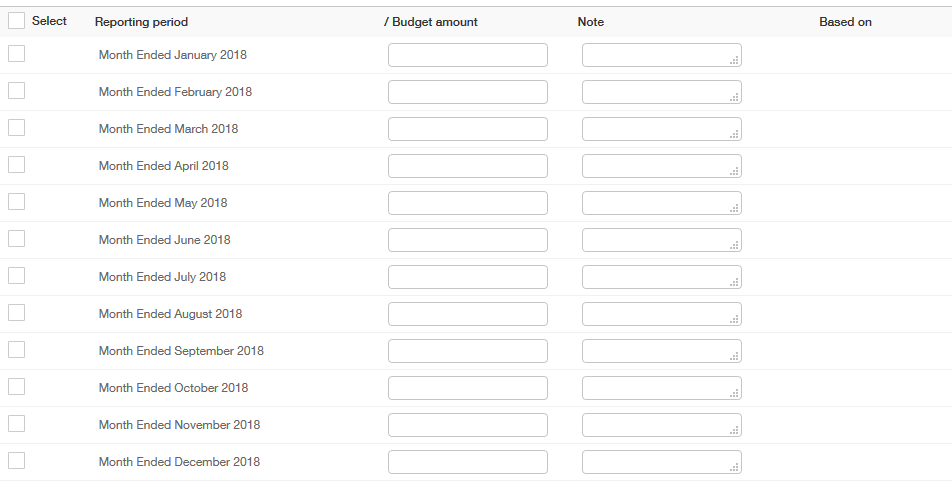
  1. Manually – you will need to create a reporting period for each period on your budget. Make sure to check the box next to “Use for budgeting.”
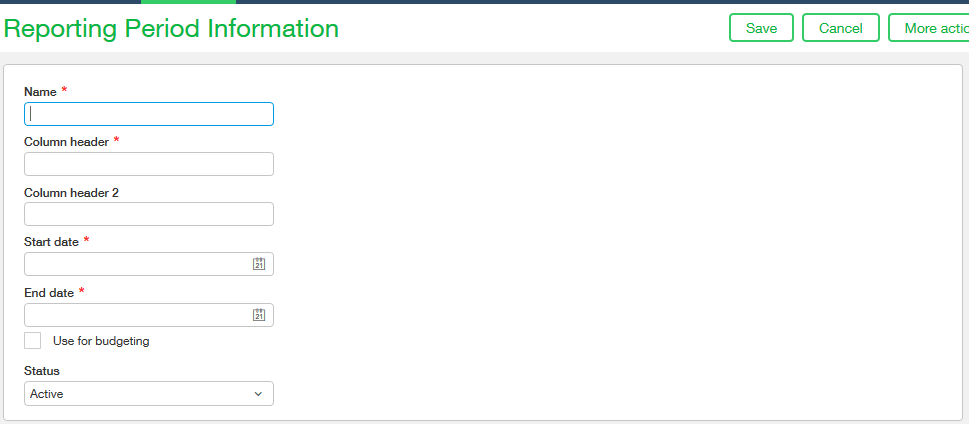
Sage Intacct reporting period screenshot

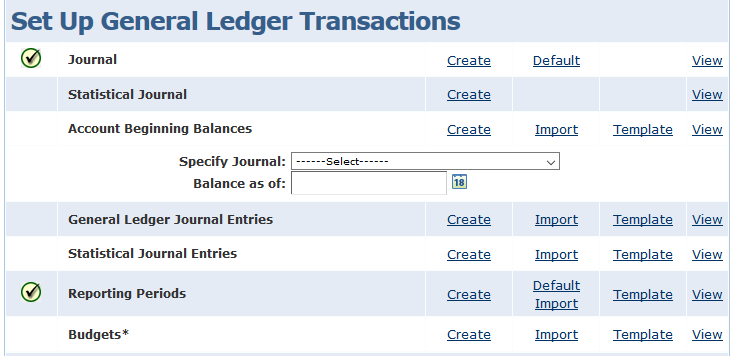
2.  Import via a template from the import company setup
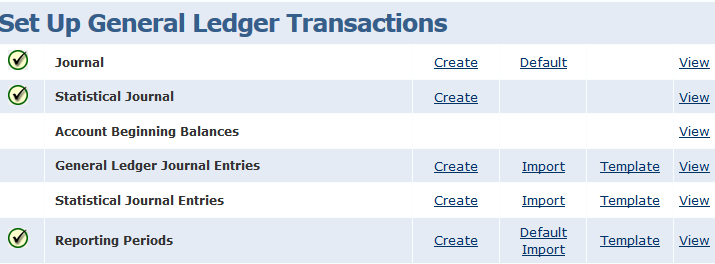
Sage Intacct - setting up general ledger transactions

3. “Default Import” from the import company setup. Sage Intacct will look at the reporting periods in the system and determine if prior year periods, current year periods or future year periods are needed.  If only future year periods are needed, Intacct will create only future periods.
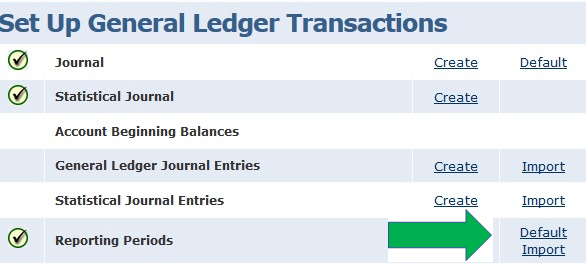
Sage Intacct - setting up general ledger transactions, part 2

C. Finally, add your Budget data.  You have two options for adding your budget data:

  1. Manually is best used with small data sets
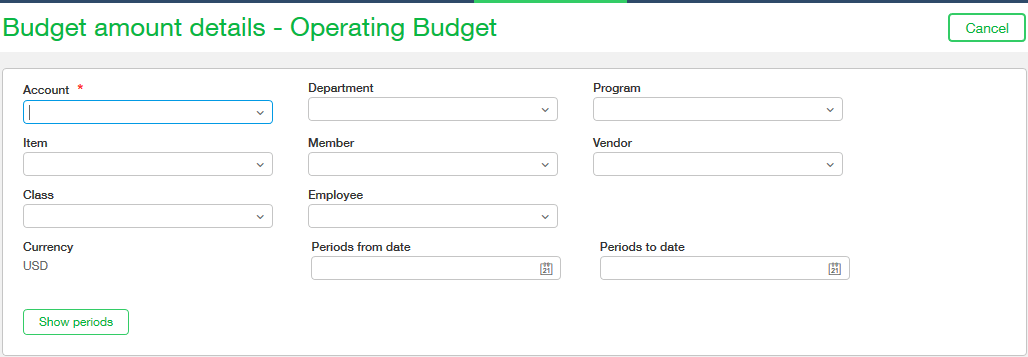
Sage Intacct - budget amount details

Sage Intacct - selecting your reporting period

2. Import your data using the budget template.  There are two options for obtaining the budget template.

                 a) Download the template from “import company data”.  If you are using the template from “import company data”, you will be required to input the reporting periods for your budget. The template inserts “Budgetable Period” in the column header.
Sage Intacct - choosing the correct information

Budget Template Example:

DONOTIMPORT BUDGET_ID ACCT_NO DEPT_ID LOCATION_ID (BUDGETABLE PERIOD1) (BUDGETABLE PERIOD2)

b. Download the template by creating a budget report.   Entering the budget start and end periods and exporting as a csv importable format from the budget report will create a budget template with the reporting periods already added.
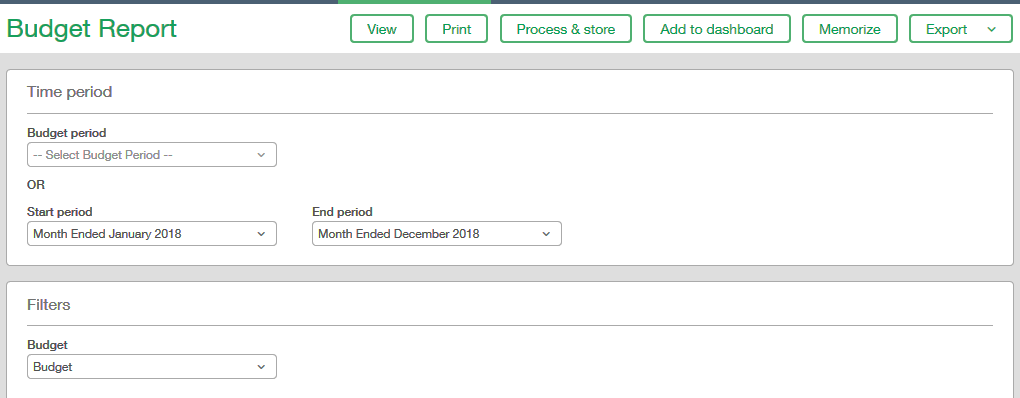
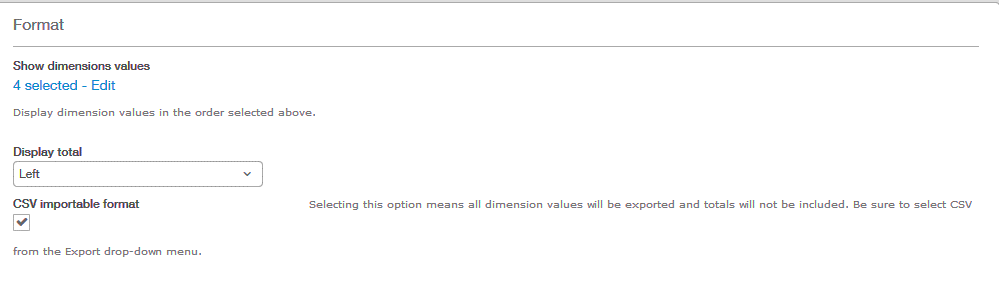
Example of a Budget template created using the budget report:

BUDGET_ID       ACCT_NO      DEPT_ID      LOCATION_ID      Month Ended January 2018      Month Ended February 2018  

As always, if you ever need help with something in Sage Intacct, check out our learning and training opportunities!

Filed Under: Accounting Software, Sage Intacct, Services Tagged With: budgeting, budgets, financial reporting, Reporting, Sage Intacct, Sage Intacct training

Article 10.30.2017 Dean Dorton

Repost from Budget Maestro.

If your organization is still using spreadsheets for budgeting and planning, it might be time to start rethinking things. Excel is fine for very small businesses just getting started or for brands that need little by way of advanced features. But for most organizations, the cold fact of the matter is, if you’re sticking with spreadsheets, you’re likely already behind your competitors.

Today’s businesses look beyond the simple solutions of the past. They want budgeting and forecasting systems that can help them be more agile and make better decisions. Because of that, many embrace automated budgeting systems.

These systems can provide incredible benefits to your organization, not to mention, modernize your processes and outcomes.

In this post, we want to highlight a few of the many reasons why your brand should embrace automated budgeting. If your organization has been on the fence about making the switch, keep reading!

1) Enhanced Reporting

One of the real benefits of switching to automated budgeting and forecasting is the advanced reporting available. Macros can only take your organization so far in giving you detailed reports.

If you want to understand how the business is operating on a deeper level, you need better reporting. Running ‘what if’ scenarios and having custom dashboards that highlight your KPIs are just a few examples.

CFOs are garnering more strategic roles on management teams, making concise, accurate and easy-to-read dashboards and reports crucial

2) More Reliability

Ask any CFO or budget manager and they’ll tell you that trying to create a budget using spreadsheets can turn into a disaster with just one misplaced number or bad equation. Any system that relies so heavily on manual entry and calculations can end up with real problems down the line.

Automated systems remove these issues from the equation. They help to improve budget accuracy. When data is automatic, there are far fewer chances for errors. That means your budget and forecasts will be more reliable.

3) Increased Productivity

The last thing any organization wants is to have valued employees wasting time and energy on projects that don’t push the business forward.

Automated budgeting systems can help improve productivity in a few ways. First, rather than having employees spend time manually entering data or chasing down errors on spreadsheets, they can spend their time doing more analysis. Additionally, it allows staff time to proactively respond to any challenges or opportunities instead of playing catch-up because the budget process took so long.

4) Guesswork Removed

All too often, by the time a budget or forecast is ready to go, it’s already obsolete. When that happens, it could mean year-end decisions are being made by guessing at the numbers. As you might expect, even the most educated guess on something as important as available cash flow, for example, can be disastrous.

No organization wants key decision makers guessing in making strategic or operational choices. Having a system with always accurate real-time data that can quickly create reports helps to remove the guesswork.

5) Improved Compliance

Compliance is a fact of life in running any business. And this doesn’t apply just to paying taxes. Every industry faces regulations and required reporting, otherwise, an organization might face an audit. With manual entries and tracking, it becomes difficult to find and fix every error accurately. Automated systems let you drill down, see variations and find discrepancies quickly, saving resources.

Also, automated systems can help generate regulatory reporting, making compliance easier.

Final Thoughts

Organizations today need to be agile to best competitors, respond to market demands and seize opportunities. It’s hard to do that without having the systems to help make it happen easily. That’s why so many businesses have embraced automated budgeting systems. You’ve read about just a few of the benefits. But they can make all difference in improving your budgeting and forecasting processes.

To learn more about automated budgeting, planning and forecasting systems and how Centage can help you, contact us.
 

Filed Under: Accounting Software, Industry Solutions, Microsoft Dynamics GP, Sage Intacct, Services Tagged With: automated budget, automation, Budget Maestro, budgeting, Budgeting Software, centage

  • Services
    • Outsourced Accounting
    • Audit & Assurance
    • Tax
    • Consulting & Advisory
    • Technology & Cybersecurity
    • Family Office
    • Wealth Management
  • Industries
  • Company
  • Locations
  • Careers
  • Insights
  • Events
  • Contact Us
facebook Dean Dorton - CPAs And Advisors On Facebook twitter twitter linkedin Dean Dorton - CPAs And Advisors On LinkedIn youtube Dean Dorton - CPAs And Advisors On YouTube

The matters discussed on this website provide general information only. The information is neither tax nor legal advice. You should consult with a qualified professional advisor about your specific situation before undertaking any action.

© 2026 Dean Dorton Allen Ford, PLLC. All Rights Reserved