• Skip to primary navigation
  • Skip to main content
Dean Dorton – CPAs and Advisors
  • Services
        • Audit & Assurance
          • Audits, Reviews & Compilations
          • ESG Programs & Reporting
          • Internal Audit
          • International Financial Reporting
          • Lease Accounting Managed Services
          • Peer Review Services
          • SOC Reporting
        • Family Office
        • Consulting & Advisory
          • Business Valuation Services
          • Forensic Accounting
          • Fractional CFO
          • Litigation Support
          • Matrimonial Dissolution
          • Merger & Acquisition
          • SEC Services
          • Succession Planning
          • Transaction Advisory Services
          • Whistleblower Hotline
        • Outsourced Accounting
        • Private Wealth
        • Healthcare Consulting
          • Finance
          • Health Systems Operational Transformation
          • Medical Billing and Credentialing
          • Risk Management & Compliance
          • Strategic Growth for Private Practices
          • Strategy and Strategy Implementation
          • Technology & Data Analytics
        • Tax
          • Business Tax
          • Cost Segregation Studies
          • Credits and Incentives
          • Estates and Trusts
          • Individual Tax
          • International Tax
          • SEC Provision and Compliance
          • State and Local Tax
        • Technology & Cybersecurity
          • Accounting Software
          • Cybersecurity
            • Cybersecurity Assessments
            • Cybersecurity Scorecard Assessment
            • Security Awareness Training
            • Virtual Information Security Office
          • Data Analytics & AI
          • IT Audit & Compliance
            • Cybersecurity Maturity Model Certification (CMMC)
            • Data Privacy Laws
            • SOC Reporting
          • IT Infrastructure & Cloud Solutions
            • Automation
            • Backup and Disaster Recovery
            • Cloud Strategy
            • Data Center
            • Enterprise Network
            • Network Security
            • Phone and Video Conferencing
            • User Identity Management Solutions
            • Webex
          • Managed IT Services
  • Industries
        • Construction
        • Distilleries and Craft Breweries
        • Energy and Natural Resources
        • Equine
        • Financial Institutions
        • Government
        • Healthcare
        • Higher Education
        • Life Sciences
        • Manufacturing and Distribution
        • Nonprofit
        • Real Estate
  • Insights
    • Articles
    • Guides
    • Case Studies
  • Events
  • Company
        • News
        • Our Team
        • Experiences
        • Careers
          • College Students
          • Experienced Professionals
        • Locations
        • Lexington, KY

          250 West Main Street
          Suite 1400
          Lexington, KY 40507
          859-255-2341

        • Louisville, KY

          435 North Whittington Parkway
          Suite 400
          Louisville, KY 40222
          502-589-6050

        • Louisville, KY

          700 North Hurstbourne Parkway
          Suite 115
          Louisville, KY 40222
          502-589-6050

        • Ft. Wright, KY

          810 Wright’s Summit Parkway
          Suite 300
          Fort Wright, KY 41011
          859-331-3300

        • Cincinnati, OH

          312 Walnut Street
          Suite 3330
          Cincinnati, OH 45202
          859-331-3300

        • Blue Ash, OH

          9987 Carver Rd
          Suite 120
          Blue Ash, OH 45242
          513-891-5911

        • West Chester, OH

          9025 Centre Pointe Drive
          Suite 310
          West Chester, OH 45069
          513-985-6240

        • Indianapolis, IN

          5975 Castle Crk Pkwy Dr N
          Suite 400
          Indianapolis, IN 46250
          317-469-0169

        • Raleigh, NC

          4130 Parklake Avenue
          Suite 400
          Raleigh, NC 27612
          919-782-9265

  • Contact Us

Accounting Software

Article 08.2.2018 Dean Dorton

MSPs and professional services companies that work heavily in project management are constantly juggling complex and detailed tasks.

By sending out bids, multiple ongoing projects to manage, and more in the pipeline, your company needs to work as efficiently and cost-effectively as possible.  However, in this environment, team members can easily become overloaded with tasks.

To work smart, you and your teams need the perfect lineup of resources and tools at your company’s disposal to make the most of everyone’s time and effort.

The biggest drain on project management resources comes from searching for information you need to do your job and populating data into multiple disconnected systems.

Project management teams spend countless hours digging up who’s best for the task at hand, inputting key details into CRM, documenting where projects are in the process, or sleuthing out new ways to save on already tight margins.

These tasks create productivity bottlenecking weaknesses and that eats into your budget.

High productivity MSPs and professional services companies that work with subscription models see the most benefit from using project management tools that can automate as many tasks as possible to keep costs within margins.

Sage Intacct, a best-in-class cloud-based financial management solution, helps service-based companies manage the complexities of subscriptions with design features that also support project management. Sage Intacct offers:

Strong integrations with your CRM solutions to see into financial and non-financial data in one place, without having to re-enter it into multiple systems.

Automated subscription support for billing by offering detailed customization options for unique billing formats and tracking milestones, schedules, and upcoming renewals, to speed the process and eliminate spreadsheets.

Fast revenue recognition with easy click-of-the-button contract modification, templates to simplify the recognition process, and entire transaction history tracking for cleaner audits.

Resource management tools like automated talent and schedule tracking, and routing rules to notify team members of pending actions, placeholder resources for standardized bids, and T&E report notifications that go straight to team member dashboards.

Deep insights using the cloud from your dashboard, featuring customized KPIs and a comprehensive look into the quote-to-cash project cycle, with reporting wizards for financial statements, operational reports, and utilization reports.

Sage Intacct handles your project management accounting from beginning to end and all of the fine, but important details in-between.

We are here to help you find the right solution to bring more zen to streamline the way you do things.

Contact us to learn about the best resources that will help calm the chaos to support productivity and growth.

how service businesses benefit from cloud-based project accounting
Filed Under: Accounting Software, Biotechnology, Industries, Professional Services, Sage Intacct, Services Tagged With: Accounting Software, cloud financials, MSPs, professional services, Project Accounting, Project-based companies, Sage Intacct

Article 07.27.2018 Dean Dorton

We all strive for perfection, especially when it comes to our financials. Outdated and on-premises systems that at one time were lifesavers are now growing liabilities for today’s modern businesses.

Outdated reporting systems can wreak havoc on your data accuracy, productivity, and your team’s sanity.

The Horror is Real

We hear about accounting teams spending countless hours on Excel spreadsheets. One company had to compile and work from a master Excel spreadsheet with no less than 56 tabs – one for each entity, spanning 3 alphabets wide.

We’ve seen productivity bottleneck to a halt as one company struggled to manage 300 financial statements per month.

The nightmares of cascading errors threading through a company’s data are very real.

They happen all the time and are almost always due to manual entry and re-entry on Excel spreadsheets, most often relied upon by companies managing their financials with on-premises systems.

While on-premises systems may work in theory, in practice they can cause productivity, accuracy, and data integrity breakdown:

  • Data on spreadsheets are prone to errors from heavy manual sorting, and data entry.  This kind of reporting only offers one snapshot in time. Reporting that relies heavily on Excel spreadsheets does not have the accuracy and real-time visibility of reporting done in the cloud.
  • Multi-entity companies require workarounds to manage all of the data between them, forcing accounting departments to spend endless hours clicking between entities, managing their transactions, then performing global consolidations manually each month.
  • Productivity grinds to a halt when your teams need to navigate tedious workarounds and endless checking and double-checking, wondering at night if they made a mistake.

Don’t let these horror stories happen to you…

Write Your Own Ending

Sage Intacct, a best-in-class cloud-based financial management solution streamlines, integrates and customizes your accounting processes for greater speed, accuracy, and productivity.

  • According to a recent case study on one Sage Intacct customer, Tandem HR, they saved 500 labor hours by eliminating their reporting workarounds.
  • Because it integrates with other popular solutions, like Nexonia, HRPyramid, and SalesForce, Sage Intacct significantly reduces manual entry and increases data accuracy.
  • Teams can use customizable reporting features to create and send current-to-the-minute data with deep drill-down capability to the source transaction, and options to add notes on journal entries for faster closings and cleaner audits.
  • Sage Intacct’s unique chart of accounts tagging system means faster organizing in the GL, and less manual entries.
  • One-click consolidations. Skip tedious manual consolidations, regardless of how many entities your company has.

If your company is still relying on Excel and manual entries for reporting, don’t wait until you encounter a data disaster. Re-write your story now! We can help you find the right solution to make your financials work for you.

You’ll gain a clear understanding of:

  • The risks and limitations of spreadsheets within financial processes
  • How cloud ERP software accelerates the monthly close, improves time and expense management, and automates revenue recognition processes including preparation for the transition to ASC 606
  • Practical steps organizations can take to eliminate spreadsheets and operate more efficiently

Good Riddance to Spreadsheets

Download our free whitepaper “Eliminating the Cost of Spreadsheet Errors”

get the whitepaper

Filed Under: Accounting Software, Sage Intacct, Services Tagged With: Accounting Software, automation, ERP, manual data entry, QuickBooks, Reporting, Sage Intacct, spreadsheets

Article 07.25.2018 Dean Dorton

From initiating funding to product and project management, biotech companies require a unique strategy to gather funding, and flexibility to accommodate fast expansion. If today’s biotech companies want to stay successful, they need to scale growth and still manage to assert control over time and resources.

They can begin to do that with these 5 accounting tips:

1. Apply Project Accounting to Track Costs

For commercializing biotech research, having deep insight into project costs helps keep your projects lean and profitable, satisfies funders and allows for continued research, and innovation down the road.

Growing beyond Quickbooks to adopt a more responsive and project-minded financial management solution can provide real-time visibility and deep insights on project metrics with reporting dashboards.

2. Ensure traceability with automated batch/lot tracking

Traceability in your batches and lots mitigates risk for business continuity and safety and assures investors.

Adopt a system with more automation and integrations, to further eliminate the risks generated from paper-based system errors, and to streamline departmental efficiency.

3. Support reporting, forecasts, and budgeting with collaborative systems

Forecasting and budgeting can protect funding and drive growth. Biotech companies that collaborate see their funding stretch further and have more control over where that funding goes.

From clarifying policies to resolving exceptions, when teams put their heads together with a strong cloud-based financial management solution that supports collaboration, their company can move more quickly to new funding rounds and get the most out of their current support.

4. Streamline business processes

Biotech companies that automate and streamline their processes are better able to keep administration costs lean for faster-paced growth when they can ensure information accuracy and compliance.

A best-in-class financial management solution can automate mundane tasks that inflate labor hours and potential for error.

5. Use technology to its fullest to scale business

When companies work from the cloud for their accounting, they can leverage data availability and accuracy to support growth beyond the capability of outdated, on-premises software.

For your biotech business to remain agile, using systems that reduce personnel and IT costs, improve security, boost collaboration and improve accuracy can help them scale their business as quickly as growth happens.

Sage Intacct, a strong cloud-based financial management solution, offers strong integration and collaboration options right into the transaction, real-time visibility on metrics from reporting dashboards, and offers traceability in the details for powerful risk management.

We want to help you drive your biotech company’s success with the right tools to fit your changing needs.

Is your biotech company facing these pain points?

Filed Under: Accounting Software, Biotechnology, Industries, Sage Intacct, Services Tagged With: Accounting, Accounting Software, Biotechnology, Clinical Trials, Cloud technology, ERP, Forecasting and Budgeting, Project Accounting, Sage Intacct

Article 07.23.2018 Dean Dorton

If you maintain inventory in Dynamics GP, then you have likely needed to use the built-in reconcile routine at some point. The reconcile routines in Dynamics GP are used to check the tables and transactions and confirm that the totals are correct. This is especially useful in the inventory module because it interacts with the purchasing and sales modules. Say, for example, you were posting a purchase receipt and GP crashed- you could then use the inventory reconcile tool to correct any balances.

That being said, it is always a good idea to run the reconcile routines on a regular basis. The problem a lot of customers run into is that all the users need to be out of the system for it to run and just the inventory reconcile piece by itself can take more than 24 hours.  If you are running other maintenance and reconcile routines over a weekend, you may run out of time.

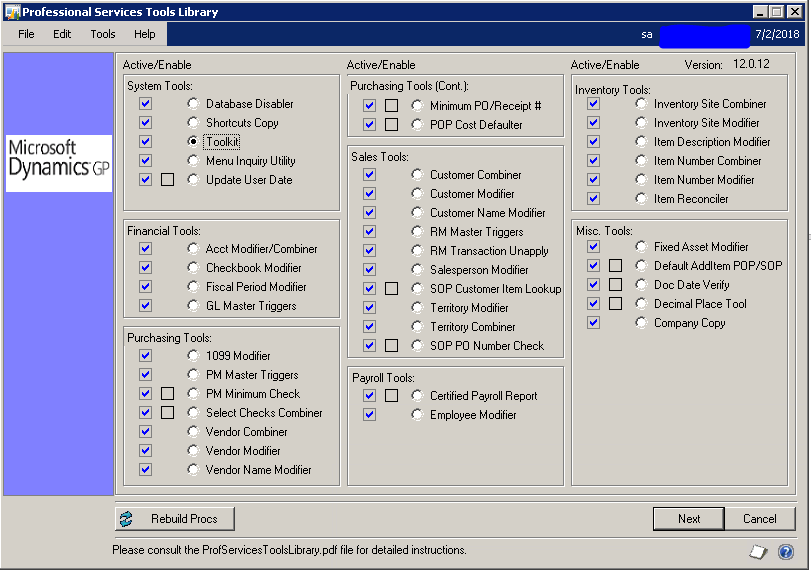
The best way I have found to save time is to use the free Inventory Reconcile tool from Professional Services Tools Library, or PSTL as it is commonly referred to, instead of the one built into Dynamics GP. PSTL is a free set of tools that help you complete various tasks in Dynamics GP.   Under the inventory tools section you will find the Item Reconciler (Example 1).

reconcile inventory dynamics gp

Ex. 1

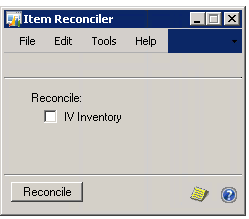
To use the inventory Reconciler mark the circle next to Inventory Reconciler under the Inventory Tools section and select next at the bottom right of the PSTL  window. This will bring up the Item Reconciler window (Example 2). On this window, you will select IV Inventory and then reconcile.

reconcile inventory dynamics gp

Ex. 2

The PSTL reconcile tool will now run and normally completes in 10 minutes.  I have seen one case where it took a little over an hour but the customer had such a large database that they hadn’t been able to run a reconcile in over 10 years.  One key difference between the PSTL inventory reconcile tool and the one found under the tools menu in GP is that the PSTL reconciler only runs for items that don’t reconcile whereas the GP one runs for every item in the range of numbers selected.  

If you are looking to speed up your inventory reconciling process then this is definitely worth looking into.  Please feel free to reach out to the Dean Dorton team with any questions.

Filed Under: Accounting Software, Microsoft Dynamics GP, Services Tagged With: Accounting Software, Best practices, dynamics gp, Inventory reconcile, Microsoft, Reconcile, Tips and tricks

Article 06.15.2018 Dean Dorton

Planning is important, but taking action is critical for subscription-based companies if they want to be ready for the upcoming ASC 606 revenue allocation guidelines.

Forward-thinking subscription-based companies have it right by acting now. “But this far ahead?” you may be thinking.  We say, “Yes.” Your company cannot afford to wait. Here’s why:

If companies wait too long to make changes in the way they do their tracking, internal controls, and revenue allocation processes, they can anticipate major obstacles and overwhelming workloads.

By waiting until the last minute, companies that wait will burn out their teams, run into cascading errors in tracking and billing, and ultimately, face the risk of non-compliance.

Expenses, fees, collectability, payment terms, and contracts are all affected by the changes coming for ASC 606.  

Because the changes will affect revenue recognition from beginning to end, that means your current processes will change significantly, from beginning to end, as well.  Also, ASC 606 compliance expectations will not only affect contracts coming in, but also current contracts for future and past revenue.

But here’s the bright side:  Companies that are setting up new processes now will be in a much better position when the ASC 606 changes take effect. These companies realize that not being ready could result in productivity bottlenecking, increased costs, and errors in reporting, billing, or allocations. All of this adds up to a compromise in business success, overall.

Sage Intacct is a best-in-class financial management solution, and the first of its kind that is designed to accommodate the new ASC 606 guidelines, where subscription-based companies need the most help.

Sage Intacct supports finance teams to streamline the upcoming revenue recognition complexities with:

  • Automated reporting that eliminates the headaches of more spreadsheets, helps track collectability thresholds, and flags subscriptions changes or ones coming up for renewal.
  • Deep visuals into revenue and expense forecasts that reflect current guidelines against the new guidelines for more accurate projections, and enhanced views into performance.
  • Billing, both in subscriptions and usage-based, to speed invoicing processes and save time when your workload is already at max capacity.

Don’t get caught off guard. Start planning now with a strong financial management solution so your teams can be armed with the right tools.

Feeling overwhelmed? Reach out! We can help make the adjustment process easier, so your company keeps growing strong even in the face of increased compliance expectations.

Filed Under: Accounting Software, Sage Intacct Tagged With: Accounting Software, ASC 606, Compliance, ERP software, Sage Intacct

Article 03.21.2018 Dean Dorton

Change is inevitable as your company expands, and if you’re still using Quickbooks for your financials, it might be time to ask yourself whether it’s still the best fit for navigating growth’s tricky course. Here are 5 signs that your company is treading water with outdated systems and processes.

1. You’re having trouble remembering when you last updated your systems.

If you’re using outdated software that has since released new versions, or sticking with an older system because it’s what you know, you may be doing your business more harm than good. Running your financials on outdated software sets your business up for system reliability and data accuracy risks.

2. Your systems don’t integrate.

If Quickbooks isn’t integrating with the other software solutions you use, your teams are doing more work than they need to, while also risking data accuracy. Re-keying data into your other systems invites data errors. Relying on spreadsheets for critical reporting also invites data errors and consumes your team’s time. Trudging through tedious workarounds slows productivity too. These are all unnecessary risks your company can avoid with integration-based automation.

3. You can’t track your business like you once could.

The data you’ve always worked with in the past may not be the data you need now. Fast-growing businesses also have fast-changing metrics. However, on-premises systems can’t produce inventories, marketing conditions, or location and entity performance metrics with the speed or accuracy the way a cloud-based solution can.

4. Growth and compliance demands seem harder and harder to meet.

Modern businesses – especially subscription-based businesses, need to meet modern customer demands. With the increasingly complex product or subscription models come more complicated customer tracking and revenue recognition that meets the new ASC 606 and IFRS 15 compliance requirements. Outdated on-premises Quickbooks versions just can’t meet those demands without headaches, costly software retrofits, or less-than-perfect workarounds.

5. Your financial processes aren’t adequately scaling to your company’s financial needs.

It’s only a matter of time until your growing company needs something from your Quickbooks software that on-premises software just can’t do. Growing companies – especially fast-growing companies need to work in the cloud for growth tasks like adding new entities, or locations, quickly performing global consolidations, or converting multiple currencies.

A cloud-based financial management system like Sage Intacct supports today’s growing businesses:

  • Automatic, behind-the-scenes updates and maintenance happen for reliability and performance confidence.
  • Seamless integration with other best-in-class cloud-based solutions ensures data accuracy, and team collaboration to give fast answers to potential and existing customers, and to streamline accounting processes and project management.
  • Real-time 24/7 updated visibility into key metrics and reporting on your personal dashboard means no waiting or guesswork when it comes strategic data analysis.
  • ASC 606 and IFRS 15 compliant software makes revenue allocations for contracts faster, easier and more automated.
  • Growth-focused features speed new entity set-up, GL entries, currency conversions, and global consolidations.
View our free on-demand webinar “You’ve Outgrown QuickBooks, How Do You Make the Switch?” to learn how Peter Nesbitt, Director of Finance at Bit.ly, the category leader in link management, managed their spectacular growth by moving from QuickBooks to Sage Intacct.
Think You’ve Outgrown QuickBooks?
View our free on-demand webinar “You’ve Outgrown QuickBooks, How Do You Make the Switch?” to learn how Peter Nesbitt, Director of Finance at Bit.ly, the category leader in link management, managed their spectacular growth by moving from QuickBooks to Sage Intacct.
watch now

Filed Under: Accounting Software, Sage Intacct, Services Tagged With: Accounting Software, automation, cloud financials, Compliance, Life After QuickBooks, outdated systems, QuickBooks, Sage Intacct

  • « Go to Previous Page
  • Page 1
  • Page 2
  • Page 3
  • Page 4
  • Page 5
  • Go to Next Page »
  • Services
    • Outsourced Accounting
    • Audit & Assurance
    • Tax
    • Consulting & Advisory
    • Technology & Cybersecurity
    • Family Office
    • Wealth Management
  • Industries
  • Company
  • Locations
  • Careers
  • Insights
  • Events
  • Contact Us
facebook Dean Dorton - CPAs And Advisors On Facebook twitter twitter linkedin Dean Dorton - CPAs And Advisors On LinkedIn youtube Dean Dorton - CPAs And Advisors On YouTube

The matters discussed on this website provide general information only. The information is neither tax nor legal advice. You should consult with a qualified professional advisor about your specific situation before undertaking any action.

© 2026 Dean Dorton Allen Ford, PLLC. All Rights Reserved