• Skip to primary navigation
  • Skip to main content
Dean Dorton – CPAs and Advisors
  • Services
        • Audit & Assurance
          • Audits, Reviews & Compilations
          • ESG Programs & Reporting
          • Internal Audit
          • International Financial Reporting
          • Lease Accounting Managed Services
          • Peer Review Services
          • SOC Reporting
        • Family Office
        • Consulting & Advisory
          • Business Valuation Services
          • Forensic Accounting
          • Fractional CFO
          • Litigation Support
          • Matrimonial Dissolution
          • Merger & Acquisition
          • SEC Services
          • Succession Planning
          • Transaction Advisory Services
          • Whistleblower Hotline
        • Outsourced Accounting
        • Private Wealth
        • Healthcare Consulting
          • Finance
          • Health Systems Operational Transformation
          • Medical Billing and Credentialing
          • Risk Management & Compliance
          • Strategic Growth for Private Practices
          • Strategy and Strategy Implementation
          • Technology & Data Analytics
        • Tax
          • Business Tax
          • Cost Segregation Studies
          • Credits and Incentives
          • Estates and Trusts
          • Individual Tax
          • International Tax
          • SEC Provision and Compliance
          • State and Local Tax
        • Technology & Cybersecurity
          • Accounting Software
          • Cybersecurity, IT Audit, & Compliance
            • Cybersecurity Assessments
            • Cybersecurity Maturity Model Certification (CMMC)
            • Cybersecurity Scorecard Assessment
            • Data Privacy Laws
            • Security Awareness Training
            • SOC Reporting
            • Virtual Information Security Office
          • Data Analytics & AI
          • IT Infrastructure & Cloud Solutions
            • Automation
            • Backup and Disaster Recovery
            • Cloud Strategy
            • Data Center
            • Enterprise Network
            • Network Security
            • Phone and Video Conferencing
            • User Identity Management Solutions
            • Webex
          • Managed IT Services
  • Industries
        • Construction
        • Distilleries and Craft Breweries
        • Energy and Natural Resources
        • Equine
        • Financial Institutions
        • Government
        • Healthcare
        • Higher Education
        • Life Sciences
        • Manufacturing and Distribution
        • Nonprofit
        • Real Estate
  • Insights
    • Articles
    • Guides
    • Case Studies
  • Events
  • Company
        • News
        • Our Team
        • Experiences
        • Careers
          • College Students
          • Experienced Professionals
        • Locations
        • Lexington, KY

          250 West Main Street
          Suite 1400
          Lexington, KY 40507
          859-255-2341

        • Louisville, KY

          435 North Whittington Parkway
          Suite 400
          Louisville, KY 40222
          502-589-6050

        • Louisville, KY

          700 North Hurstbourne Parkway
          Suite 115
          Louisville, KY 40222
          502-589-6050

        • Ft. Wright, KY

          810 Wright’s Summit Parkway
          Suite 300
          Fort Wright, KY 41011
          859-331-3300

        • Cincinnati, OH

          312 Walnut Street
          Suite 3330
          Cincinnati, OH 45202
          859-331-3300

        • Blue Ash, OH

          9987 Carver Rd
          Suite 120
          Blue Ash, OH 45242
          513-891-5911

        • West Chester, OH

          9025 Centre Pointe Drive
          Suite 310
          West Chester, OH 45069
          513-985-6240

        • Indianapolis, IN

          5975 Castle Crk Pkwy Dr N
          Suite 400
          Indianapolis, IN 46250
          317-469-0169

        • Raleigh, NC

          4130 Parklake Avenue
          Suite 400
          Raleigh, NC 27612
          919-782-9265

  • Contact Us

Accounting Software

Article 05.5.2021 Dean Dorton

For many small and mid-sized businesses, Intuit QuickBooks is usually the first choice for financial software in the organization’s early days – and for good reasons. QuickBooks is well-known and very easy to use, and it offers the basic functionality that almost any business can use to get off the ground.

Unfortunately, growing businesses soon realize that the early value of the management software is soon overtaken by its limitations.

Top 5 Limitations of QuickBooks

1. Over-Reliance of Spreadsheets to Support Financial Processes and Reporting

“After spending over one week sifting through massive spreadsheets, we discovered that we have a calculation error in how we had been recognizing revenue for the past three years.”

Sound familiar? Hopefully not – but many organizations naturally and gradually develop sophisticated accounting requirements (such as revenue recognition and multi-entity consolidation). And if QuickBooks is the financial foundation, that often means cumbersome workarounds because QuickBooks doesn’t provide the built-in capabilities for these complex processes.

  • Are you exporting data to multiple spreadsheets?
  • Are you creating additional journal entries each month?
  • Have you created home-grown applications for recording revenue or expenses outside of QuickBooks?

These workarounds lead to entry errors, incorrect or outdated data, process inefficiencies, wasted time and resources, and a lack of control and compliance.

2. Excess Manual Data Entry and Re-Entry

“How do I import customer order data into QuickBooks? I currently spend many hours manually creating invoices in QuickBooks, and there should be a better way.”

Most companies don’t integrate QuickBooks with other key business applications, opting instead to just manually integrate the systems (think: flat files, CSV dumps, and rekeying). That might suffice when volumes are small. But ask anyone who’s endured these workarounds and you’ll see it’s a real productivity killer as the business grows. Who has time to manually research, re-enter, and verify data that’s already captured elsewhere? Instead of automating your business, these manual integrations are invitations to errors and wasted time.

3. Limited Access to Reports and Information to Drive Decision-Making

“Rather than constantly struggling to keep up with incoming requests for data and specific reports, Sage Intacct lets us consistently report financials in a timely manner and feel confident that we can easily respond to any new request.”

Real-time visibility into business metrics is essential for timely decisions that boost performance. QuickBooks offers canned reports – and no dashboards – so your visibility is limited and you’re often forced to make decisions based on outdated data. By leveraging a financial system that incorporates both a multi-dimensional general ledger and report writer, you can transform your analysis and become a strategic partner who generates insights that answer the bigger questions facing management.

4. Difficulty in Adapting to New Business Requirements

“QuickBooks continues to crash, and I lose all our payroll data. I don’t have time to re-enter data for 350 hourly employees…”

Maybe you’ve seen a couple of the classic signs that you’ve outgrown QuickBooks. Those menus and screens – that used to be so quick and responsive – now have lengthy delays as the system struggles to keep up with data volume and calculations intensity. Report-printing takes forever. And queries seem to dim the lights.

This critical limitation is risky at best. It can force you to periodically shut down QuickBooks – just to maintain data files. In a worst-case scenario, you’re looking at potentially disastrous results: system crashes and the loss of crucial data. That’s no way to run a business.

5. Inadequate Controls Around Financial Processes

“Errors caused by manual processes and a lack of control resulted in $180,000 of improper expense reimbursements within a six-month period.”

Manual process is a fact of life with QuickBooks. Unfortunately, they increase the probability of data duplication and data entry errors, making it difficult to gain an integrated, real-time financial view of a company’s end-to-end operations.

Despite its popularity as a business application for small business, QuickBooks simply wasn’t designed for growing organizations that need advanced functionality for manage sophisticated processes.

The Next Wave of Financial Management Technology – Moving Past QuickBooks

Dean Dorton has helped many businesses make the move from QuickBooks to Sage Intacct. The accounting features on this product are simple and easy to use.

These companies now enjoy real-time data and processes, flexible reporting, and role-based dashboards. We’ve helped organizations increase productivity through accounting automation, extensive integration and user-defined workflows. And, these companies can scale with Sage Intacct – as the business grows they can increase transaction volume and easily add new entities.

Give us a call or shoot us an email if you’d like to explore Sage Intacct as your future financial accounting solution. If you’d like to see the software – join us for a quick daily demo.

Daily Demo

Philip Massey, CPA
Software Consulting Director
pmassey@ddaftech.com • 919.508.6062

Filed Under: Accounting and Financial Outsourcing, Accounting Software, Industries, SaaS, Sage Intacct, Services Tagged With: Accounting, Accounting Software, book keeping, business growth, Finance, financial management, QuickBooks, Sage Intacct

Article 12.31.2020 Dean Dorton

In this article, we will be comparing various ways to process customer payments in Business Central. There are multiple ways to record payments, including Cash Receipt Journals, Register Customer Payments and Deposits. We’ll describe each of these methods and explain why you might choose one method over another.

Read Article

Filed Under: Accounting Software, Microsoft Dynamics 365, Services Tagged With: Accounting Software, Business Central, Customer payments, dynamics, Dynamics 365, Ledger, Microsoft Dynamics

Article 11.12.2020 Dean Dorton

With a robust set of transaction approval functionality built into its Core modules (that means everyone can have them day one), Sage Intacct is ready to help you digitize your transaction approval processes and rest assured in the confidence that transactions won’t be showing up on your books without the right say-so.

Sage Intacct offers varied approval workflows depending on the module. Look forward to the following possibilities, and read on to learn more about each approval type:

  • Value-based approval
  • Manager-based approval
  • User-based approval
  • Transaction type-specific approval
  • Alternate approver functionality

Value-Based Approval

Available in: Accounts Payable Bills, Accounts Payable Payments, Purchasing Transactions, Employee Expense Reports, and Employee Expense Reimbursements

Value-based approval lets you set an approval workflow based on the transaction’s value. There are a couple different “flavors” of value-based approval. You can have Value based approval driven by Levels, where, for instance, a Level 1 approver can approve up to $500, a Level 2 approver can approve up to $1,000, etc. You can also set a number of approvers required at each level (i.e. a Level 2 transaction requires at least 2 approvers). Generally speaking, Sage Intacct handles most payment-type approvals as value-based with levels.

There are also value-based approval rules that let you define a “from” value and a “to” value. For instance, you can create a value approval rule saying any transaction from $0.01 to $499.99 can be approved by a Level 1 approver.

Value-based approvals are especially useful when you want thresholds around how much each person can approve. They are also beneficial when you have a group of approvers that can approve by level and any approver at that level is an acceptable approver. For more information on value-based approvals, see the Sage Intacct help center.

Manager-Based Approval

Available in: Accounts Payable Bills, Purchasing Transactions, Employee Expense Reports, General Ledger Journal Entries, Employee Expense Reports

A common request financial system users have is for approvals to happen by manager. So, we call this next option “Manager-based approval” (no, that’s not a technical term). In certain approval setup screens, you’ll see the option to select a Manager-type approval. The options for Manager-type approvals can be any of the following depending on the transaction type and the approval area:

  • Employee Manager Approval
  • Department Approval/Transaction Department Approval
  • Transaction Location Approval
  • Transaction Project Manager Approval

All the above approval workflows will refer to the appropriate manager to route an approval. There’s a subtle difference in some options – the transaction aspect for certain approvals. If you choose a transaction approval (i.e. Transaction Department Approval, Transaction Location Approval, Transaction Project Manager Approval), Sage Intacct looks at the manager for the dimension (i.e. Department, Location, Project) tagged in the transaction. For transaction approvals, you can’t mix and match Locations, Departments, or Projects on a transaction – each transaction must use only one.

If you do not choose a transaction approval (i.e. Employee Manager Approval, Department Approval), Sage Intacct looks at the manager of the Employee or the manager of the Department to which the employee submitting the transaction is assigned. Further information describing these different approval types can be found in the Sage Intacct help center.

User-Based Approval

Available in: Accounts Payable Bills, Purchasing Transactions, Employee Expense Reports, General Ledger Journal Entries

In many ways one of the simplest workflow options, and potentially a great fit for smaller companies, you have the ability to utilize a specific named user for approvals. If you’re setting up an Approval Policy, your Rule type is simply choosing a Sage Intacct user. All transactions will go to that user for approval. You can have multiple named users in a specified order (i.e. Step 1 – John Smith, Step 2 – Jane Doe). This is really as simple as it gets – choose the user who you want as the approver. An example of how to use this is available in the Sage Intacct help center.

Transaction Type-Specific Approval

Available in: Purchasing Transactions

Unique to the Purchasing module (as far as Core modules go, as least), Sage Intacct allows you to have different approval policies per Transaction Type (or, as Sage Intacct calls them, Transaction Definitions). This means that, in the Purchasing module, you can have a unique approval workflow on a document-by-document basis. You can mix and match all the different types of approval workflows discussed previously to construct your perfect set of approval policies in Purchasing. Sage Intacct’s Purchasing module affords you a great deal of approval power and flexibility. Learn more in the Sage Intacct help center.

Alternate Approver Functionality

Available in: Purchasing Transactions, General Ledger Journal Entries

At some point, it’s inevitable that a team member will go on vacation, get a cold, or be unavailable for any variety of reasons. When this happens, you want your business to keep going. You want that team member to have a backup approver who can temporarily take over the approval responsibilities.

Sage Intacct’s alternate approver capabilities allow you to do just that. In General Ledger, you can configure journal entry approval options, by journal, for a main and alternate approver. In Purchasing, you can enable delegates so that a user can approve Purchasing transactions on behalf of another user. When the main approver turns on out-of-office delegation, approval requests will automatically go to the delegate. Learn more about approval delegation in the Sage Intacct help center.

In Summary

Looking for more help with approvals? Searching for approval on something else (like approval of Vendor creation)? Always feel free to contact us for help by reaching out to erpsupport@ddaftech.com.

Below, observe a summary table of the approval types covered and where you can use them:

Approval Type AP Bill AP Pymt Purchasing EE Exp Rpt EE Exp Reimb GL Entry
Value-based X X X X X
Manager-based X X X X
User-based X X X X
Transaction type – specific X
Alternate approver X X

X

Filed Under: Accounting Software, Sage Intacct, Services, Technology Tagged With: Accounting Software, digitize, modules, Sage Intacct, transaction approval

Article 04.21.2020 Dean Dorton

Multi-entitities and inter-entities are extremely important and useful components inside of Sage Intacct. It’s crucial to know the inter-entity setup best practices, along with the recent changes that have come with that setup. Check out our tips and tricks below for inter-entity setup.

  • Changes might be pushed down the line due to interruption in service
  • Centralized IET Setup
    • Two options (compared to just the one option now) Included in Multi-Entity
    • Option1: Simple & clean
    • No break out by entity pair
    • Easy to maintain

Option 1

Entity IER IEP
Entity 1 A B
Entity 2 C D
Entity 3 E F

Option 2 (IET setup per entity pair)

Entity A Entity B Entity  IER Entity A IEP Entity B IER Entity B IEP # of GL Accounts
Entity 1 Entity 2 A B C D 4
Entity 1 Entity 3 E E F F 2 (recommended)
Entity 2 Entity 3 G G G G 1

Combined IET Journal

    • For existing customers, Sage Intacct will use the first journal
  • Should not switch inter-entity setup as it will delete all of the prior setup
  • New centralized mapping screen
    • Will require permission to be enabled
  • Updates to Dynamic Allocations will come after Inter-Entity logic is consolidated

Define IET Relationship

  • Export template will allow you to import all of the relationships (will make updating and managing this setup much easier)
  • Centralized IET Mapping
    • Moved IET setup from tab within Entity setup to separate Inter-entity accounting mapping
    • New screen new permission
  • IET is not required when setting up multiple entities

Migration

  • All active entities are migrated
  • Will be done by Sage when this update rolls out

Release Recommendation

  • Original timeline May 2020
  • May be pushed back due to COVID-19 and interruption to users

Inter-Entity Enhancements

  • Automate IET Journal Entries across multiple base currencies (required IGC)
  • Combined IET with source transaction
    • Ease of reconciliation
    • IET custom report drill down to IET & source
  • Unify IET dimension to location only
    • IET triggered by entity, but unify tracking for location only
    • Remove all other dimensions for simplicity (Drill down will only keep Location, errors caused by maintaining multiple dimensions)
  • Automated IET JE when entering transactions
    • No longer need to manually create the IET
    • Only keeps Location dimension

Inter-entity Drill Down

  • Linked IET with the source transaction
    • Bill
    • Payment
    • Source + IET
    • IET Report
  • Ability to view IET directly in the Journals with the original payments
  • Will only affect new transactions after release

How this will affect Dimension Relationships

    • IET will ignore Dimension Relationships when posting
    • No plans to include more dimensions into the IET postings for now

Inter-entity Report

  • In Drill Down report there is a Record number and it will drill into the individual transactions
  • It is a Custom Report that will need to be built.
  • Include the OET object and Record number field

If you’d like to learn more about Sage Intacct’s capabilities for your company’s financial management, visit our Sage Intacct Overview page.

Filed Under: Accounting Software, Sage Intacct, Services Tagged With: Accounting Software, inter-entity setup, Sage Intacct

Article 04.16.2020 Dean Dorton

Have you found yourself or your employees scrambling to cash in checks? Are you running to the office just to manage paper invoices and process ACH payments? During these challenging times of performing work at home and keeping up with the economic turndown, it’s critical that you have the right technology tools in place to properly manage your organization’s cash flow.

Join Dean Dorton for a high-level presentation on how automation and the right tools can make your cash processing quicker and more insightful- all while letting you successfully “shelter in place” and keep it all paperless.

Anyone who plays a financial management role in their organization including (but not limited to):

  • AR/AP Specialists
  • CFOs/COOs/Controllers
  • VPs and Directors of Finance
  • Accountants, Bookkeepers, Office Managers
  • Presidents, Executive Directors

Resources:

  • Cash Management Software

Filed Under: Accounting Software, Microsoft Dynamics 365, Microsoft Dynamics GP, Sage Intacct, Services Tagged With: Accounting Software, Accounts payable, Accounts Receivable, automation, cash flow, cash management, financial management, Paperless

Article 07.11.2019 Dean Dorton

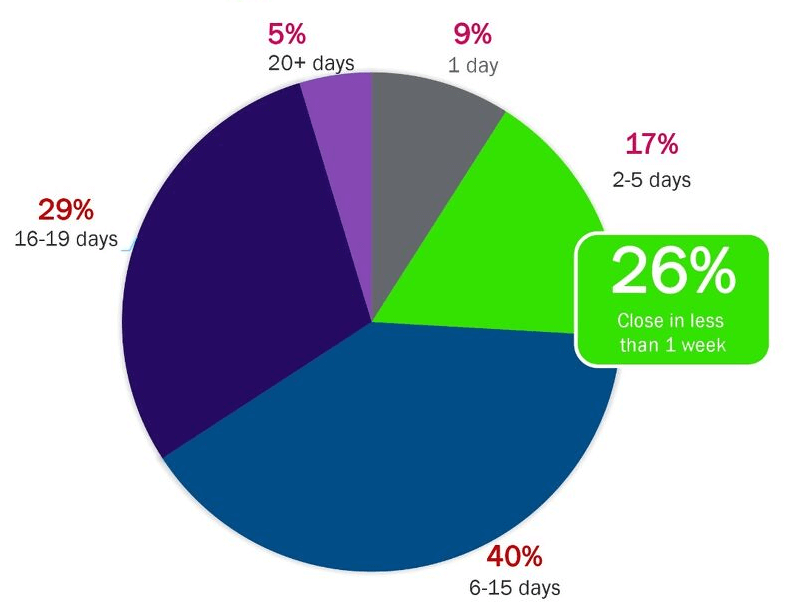
The monthly close is a dreaded task for many finance teams….what should take days often drags on for more than a week or two, especially for multi-entity businesses. A recent survey by Sage Intacct, providers of best-in-class financial management software, found that only 26% of respondents complete their close in less than one week—a length of time considered to be a best practice. However, 40% close in six to 15 days, and another 29% take 16 to 19 days. close the books survey

The “Close the Books” survey from Sage Intacct also revealed some common frustrations when it comes to closing the books:

  • Time-consuming, manual processes
  • Short turnaround time
  • Lack of systems integration
  • Inadequate reporting
  • Manual entity consolidations

These all-too-familiar stresses may be impeding you from doing real, value-added work. Instead of manually shifting data around from system to system and struggling with outdated information, you and your team want to stay focused on strategic activities—such as analyzing data to forecast the future of your business and plan for growth.  

What if you could cut your close by 25% or more simply by moving to the cloud?

If your close is taking too long or you’re adding entities, it may be time to re-evaluate how you’re using your current solution or investigate alternatives. According to the survey, “The greatest influence for the length of the close was the solution that was used.”

Shifting their financials from an on-premise solution to the cloud has transformed the close for many businesses. The survey revealed that high availability, better reporting, and lower cost were the top reasons for moving to the cloud. Respondents wanted an instant, highly automated close that delivered faster visibility and insights.

The most satisfying parts of the close among respondents included:

  • Reconciling out-of-balance accounts
  • Greater efficiency, low stress
  • Better systems integration shortening the time to close
  • Real-time reports that track the right metrics and provide instant insights
  • Automated global consolidations

According to the survey, “Respondents on modern cloud solutions tended to be  more satisfied with reporting and automation than those with legacy or on-premise solutions.” And it’s no wonder…Sage Intacct users have cut their monthly close by 25%, 50%, even by two-thirds.

Image from Sage Intacct Close the Books Survey

Cut your time to success with Dean Dorton and Sage Intacct

So that’s it—the best advice you’ll ever get for a faster monthly close is using a cloud-based financial management system such as Sage Intacct. Since cloud solutions typically deploy more rapidly than on-premise ones, you can enjoy the benefits of a faster close sooner than you may have thought possible: balanced accounts, automation, better efficiency, and real-time insights to the people that matter. 

Don’t waste another precious second on a clunky, slow monthly close. The accounting technology experts at Dean Dorton can help you transition your financials to the cloud today so be sure to contact us today!

Filed Under: Accounting Software, Biotechnology, Franchises, Healthcare, Industries, Nonprofit & Government, Professional Services, SaaS, Sage Intacct, Services Tagged With: Accounting Software, ERP, monthly close, reduce close, Sage Intacct

  • « Go to Previous Page
  • Page 1
  • Page 2
  • Page 3
  • Page 4
  • Page 5
  • Go to Next Page »
  • Services
    • Outsourced Accounting
    • Audit & Assurance
    • Tax
    • Consulting & Advisory
    • Technology & Cybersecurity
    • Family Office
    • Wealth Management
  • Industries
  • Company
  • Locations
  • Careers
  • Insights
  • Events
  • Contact Us
facebook Dean Dorton - CPAs And Advisors On Facebook twitter twitter linkedin Dean Dorton - CPAs And Advisors On LinkedIn youtube Dean Dorton - CPAs And Advisors On YouTube

The matters discussed on this website provide general information only. The information is neither tax nor legal advice. You should consult with a qualified professional advisor about your specific situation before undertaking any action.

© 2026 Dean Dorton Allen Ford, PLLC. All Rights Reserved