• Skip to primary navigation
  • Skip to main content
Dean Dorton – CPAs and Advisors
  • Services
        • Audit & Assurance
          • Audits, Reviews & Compilations
          • ESG Programs & Reporting
          • Internal Audit
          • International Financial Reporting
          • Lease Accounting Managed Services
          • Peer Review Services
          • SOC Reporting
        • Family Office
        • Consulting & Advisory
          • Business Valuation Services
          • Forensic Accounting
          • Fractional CFO
          • Litigation Support
          • Matrimonial Dissolution
          • Merger & Acquisition
          • SEC Services
          • Succession Planning
          • Transaction Advisory Services
          • Whistleblower Hotline
        • Outsourced Accounting
        • Private Wealth
        • Healthcare Consulting
          • Finance
          • Health Systems Operational Transformation
          • Medical Billing and Credentialing
          • Risk Management & Compliance
          • Strategic Growth for Private Practices
          • Strategy and Strategy Implementation
          • Technology & Data Analytics
        • Tax
          • Business Tax
          • Cost Segregation Studies
          • Credits and Incentives
          • Estates and Trusts
          • Individual Tax
          • International Tax
          • SEC Provision and Compliance
          • State and Local Tax
        • Technology & Cybersecurity
          • Accounting Software
          • Cybersecurity
            • Cybersecurity Assessments
            • Cybersecurity Scorecard Assessment
            • Security Awareness Training
            • Virtual Information Security Office
          • Data Analytics & AI
          • IT Audit & Compliance
            • Cybersecurity Maturity Model Certification (CMMC)
            • Data Privacy Laws
            • SOC Reporting
          • IT Infrastructure & Cloud Solutions
            • Automation
            • Backup and Disaster Recovery
            • Cloud Strategy
            • Data Center
            • Enterprise Network
            • Network Security
            • Phone and Video Conferencing
            • User Identity Management Solutions
            • Webex
          • Managed IT Services
  • Industries
        • Construction
        • Distilleries and Craft Breweries
        • Energy and Natural Resources
        • Equine
        • Financial Institutions
        • Government
        • Healthcare
        • Higher Education
        • Life Sciences
        • Manufacturing and Distribution
        • Nonprofit
        • Real Estate
  • Insights
    • Articles
    • Guides
    • Case Studies
  • Events
  • Company
        • News
        • Our Team
        • Experiences
        • Careers
          • College Students
          • Experienced Professionals
        • Locations
        • Lexington, KY

          250 West Main Street
          Suite 1400
          Lexington, KY 40507
          859-255-2341

        • Louisville, KY

          435 North Whittington Parkway
          Suite 400
          Louisville, KY 40222
          502-589-6050

        • Louisville, KY

          700 North Hurstbourne Parkway
          Suite 115
          Louisville, KY 40222
          502-589-6050

        • Ft. Wright, KY

          810 Wright’s Summit Parkway
          Suite 300
          Fort Wright, KY 41011
          859-331-3300

        • Cincinnati, OH

          312 Walnut Street
          Suite 3330
          Cincinnati, OH 45202
          859-331-3300

        • Blue Ash, OH

          9987 Carver Rd
          Suite 120
          Blue Ash, OH 45242
          513-891-5911

        • West Chester, OH

          9025 Centre Pointe Drive
          Suite 310
          West Chester, OH 45069
          513-985-6240

        • Indianapolis, IN

          5975 Castle Crk Pkwy Dr N
          Suite 400
          Indianapolis, IN 46250
          317-469-0169

        • Raleigh, NC

          4130 Parklake Avenue
          Suite 400
          Raleigh, NC 27612
          919-782-9265

  • Contact Us

Franchises

Article 06.15.2017 Dean Dorton

Over the years, Intacct has continued to evolve the look-and-feel of their user interface.  Effecting May 11th, Intacct is providing the users with a Beta release of the new and updated user interface (UI), called the “Intacct Action UI”.  But the new UI is not just a new and pretty face you see when you start Intacct!

The first feature that is apparent is that you can toggle the new interface on and off clicking “Enable Beta UI”.  If you don’t like the new look and feel, you can simply turn it off with one click!  Previous versions required that you go into the User Preferences, change the settings, and refresh the browser.  And because it is controlled on a user-by-user basis, users can elect when they are ready to start using the new interface.  If you like the old interface and feel comfortable with it, you don’t have to use the new interface right now.

Once you starting using the Action UI, one of the first things you’ll notice is that the interface is more open and readable so that your eyes can more easily read the screen and move around the menus.  The colors and fonts have been adjusted to make the screens easier to read.

Here are some new features to check out!

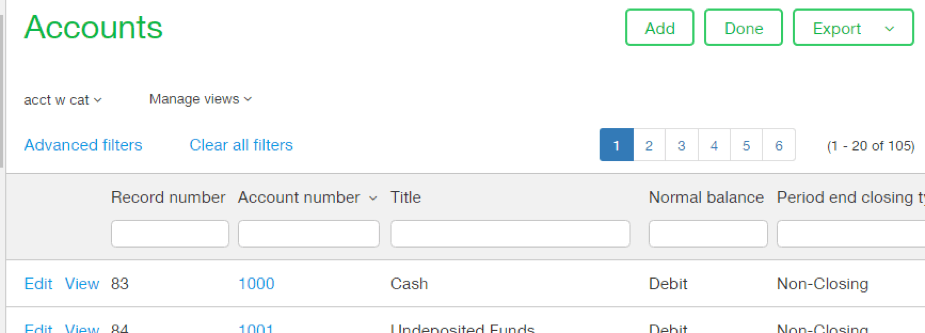
  • Action buttons are now consistently located at the top each screen so that you can easily add a new record or post a document without having to scroll down to the bottom of the screen!Intacct New Auction UI
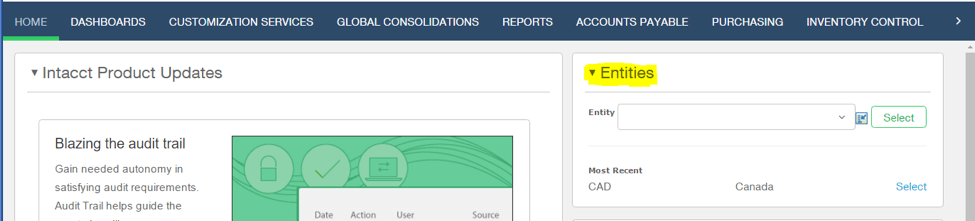
  • For multi-entity users, switching companies becomes much easier with a convenient Entity picklist on the right side of the screen for easy access.
Intacct New Auction UI

  • Customizable application bar now allows you to re-arrange the module listing with your mouse, rather than changing under User Preferences.
  • Entity colors can be assigned to help identify which entity you are working in Expanded pop-up boxes during data entry users can now expand their view the dialog boxes, making it easier to enter data for instance when creating a new customer or vendor on the fly.


The new Action Navigation pane provides a new way to move around Intacct:

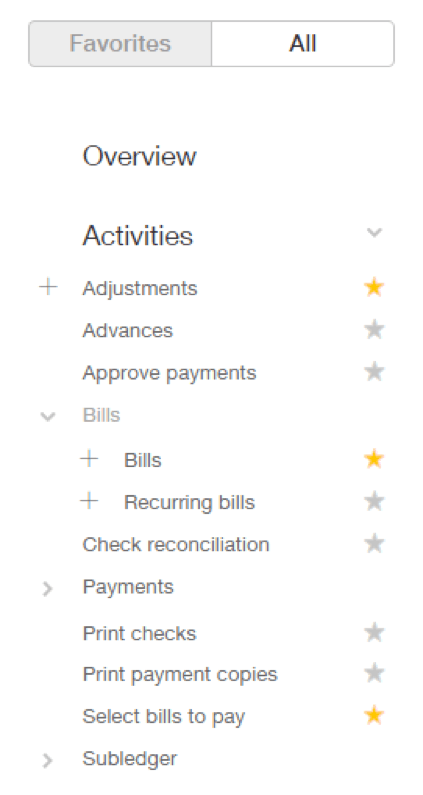
  • A new “Action All” tab is now visible on the left side of all modules and allows users to pick from the “All actions” list and easily add items to the Favorites list. This allows users to set up their most frequently used screens in Favorites, saving time navigating to individual screens.Intacct New Auction UI
  • Favorites selections can now be reorganized and sorted
  • The “Action All” can be used to access all of the data entry screens, rather than navigate from the pulldown menus, speeding data entry.
  • The Setup menus now include the building blocks for module setup such as vendor & customer records, Groups, and Types.


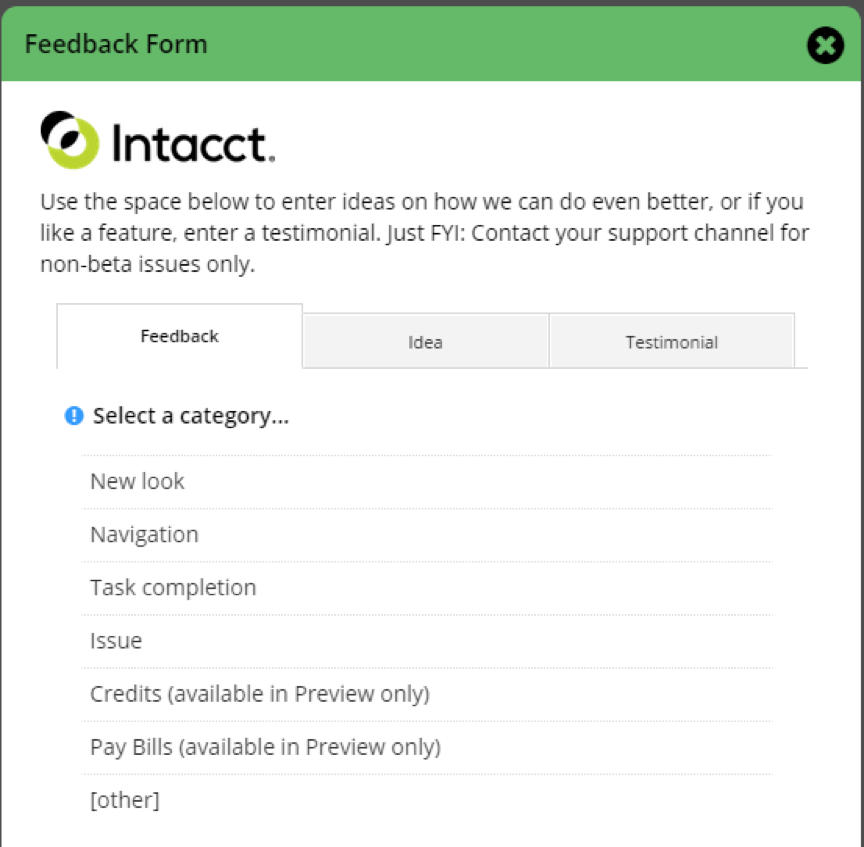
Probably the very best part of the new UI is the ability to provide Intacct with feedback and ideas for making the product even better.  By clicking “Send us feedback” link adjacent to the UI Enable button, you can share your thoughts about the new UI with Intacct Development team, so that they can improve the UI based on user experience.  Within the Feedback Form, users can provide feedback on the new interface, suggest ideas for improvement, or even provide a testimonial based on their experience.
Intacct Auction UI

Filed Under: Accounting Software, Franchises, Industries, Nonprofit & Government, Professional Services, SaaS, Sage Intacct, Services Tagged With: Cloud Accoutning, Cloud-based ERP, intacct

Article 06.13.2017 Dean Dorton

For many businesses, generating invoices and customer documents is not a one-size-fits-all task. While your standard invoice may work with one customer, others may require highly specialized documents that are tailored to their unique needs.  Once you factor in a company’s rapid growth and continual customizations for new clients, the whole process can slow productivity to a crawl, consuming time slated for other critical responsibilities.  

If you’ve seen this situation in your office, you know it have a cascading effect, inviting potential for billing or contract errors down the line by overloading your team.

Because you can’t skip invoicing, and those documents aren’t going to customize themselves, Intacct’s come up with time-saving options for Custom Documents honed in on invoicing to retain the look of your company’s documents in Intacct’s platform.  

Even better, we’ve got all the tips and tricks that will help you get the most out of your cloud accounting software to make modifying these documents a snap, to streamline the customization process, and to get a leg up on your company’s growth.  

Join us for our new Intacct Cloud Byte session on June 15, to learn the everything you need to know about using Intacct’s Custom Documents to save time and unify your company’s brand in all of your communications. In this web session you’ll learn:

  • All the characteristics of custom documents
  • How to shuttle Invoice and Word documents over to Intacct and convert them to PDFs
  • Ways to expertly modify documents using Intacct options
  • Common Custom Documents areas of focus, and how to navigate them

Whether you have several tailored invoices, or just a few, this session will help support your brand and your team’s productivity by showing you the quickest ways to retain cohesiveness across platforms, and everything you need to know to make document modifications a breeze.

Filed Under: Accounting and Financial Outsourcing, Accounting Software, Franchises, Industries, Nonprofit & Government, Professional Services, SaaS, Sage Intacct, Services Tagged With: Cloud Accounting, custom documents, intacct

Article 12.20.2016 Dean Dorton

Have you been thinking about cloud accounting and wondering why more and more companies are adopting it every day?

Are you also wondering: What is the cloud anyway?Is it safe? Is it expensive? What will I gain and lose with it?

We know the subject can be overwhelming and there is never enough time in the day to learn all you need to learn. But we are here to help. We know the cloud inside out, so let’s start by answering those questions.

Q: What is the cloud?

The cloud is a network of computers hosting systems and data that are accessed through the Internet.

Let’s say you decide to move your accounting to the cloud. Once you are up and running everybody in the company can access the accounting system from any computer that has Internet access. This brings a lot of flexibility to everybody in the organization. And some systems—like Intacct—even provide mobile access through smartphones and tablets. Imagine your management team approving payments, contracts or invoices on the go!

Q: Is it safe?

Yes, it is. Just make sure you select a reliable provider that proves to you that for their cloud they use encrypted communications, the servers are in a secure location, the data is backed up frequently and they have established procedures for any server changes.

Q: Is it expensive?

No, it is usually cheaper than on-premise solutions. When you are in the cloud you save on IT costs including personnel, software, and infrastructure. You know your costs up front, the monthly or annual fee is agreed at the time you sign a contract with the solution provider.

Q: What do I gain?

In addition to the ease of access to the accounting system from anywhere you also release valuable IT resources to concentrate on more important things. The accounting software provider takes care of all the maintenance for you. Your system is always up to date.

Q: Do I lose anything?

You may think that you won’t have access to your data anymore and that your solution in the cloud will be isolated from other systems. Again, with a good software provider, you won’t have these problems. Intacct for example gives you pre-built pieces of software (APIs) that will let you create interfaces between the accounting solution and other solutions—cloud or not.

With those first few questions out of the way, you must be eager to learn more about the cloud. Click here and learn about the 11 Reasons Companies Will Move to Cloud Accounting This Year. In this easy to understand whitepaper, we bring you up-to-speed on the cloud and tell you why it is a good idea to move your accounting to the cloud now.

Filed Under: Accounting and Financial Outsourcing, Accounting Software, Franchises, Industries, Microsoft Dynamics 365, Nonprofit & Government, Professional Services, SaaS, Sage Intacct, Services Tagged With: Cloud Accounting, cloud solutions, intacct

Article 12.6.2016 Dean Dorton

With the year-end around the corner, your heart is probably already racing in anticipation of all the tasks ahead. I know you’ll be ok and you’ll finish everything on time, but here are a few things that you can start doing now to make your life easier in January.

Prepare for 1099 Printing

It doesn’t matter when your fiscal year ends, you must print and mail the calendar year 1099 forms by January 31.

You’ll also have to file all 1099s with the IRS. Be aware the filing date changed this year! If you’re filing 1099-Misc with amounts in Box 7: Nonemployee Compensation—and most likely you are–the new filing deadline is January 31. If you don’t have amounts in Box 7, then the deadline is still February 28th for paper filing or March 31 for electronic filing.

To get ahead of the game you can run a preliminary 1099 report and review it to make sure all your 1099 vendors are set up as such in your system and their payable invoices are marked as 1099 transactions.

Prepare for W2 Printing

You also have to print and mail Wage and Tax Statements (W-2 form) to all your employees by January 31st and file the forms with the Social Security Administration by the same date. The new due date of January 31st applies to W2s for both paper and electronic filing.

To prepare for the W2 printing process, make sure you have all your workers classified correctly. Sometimes workers are classified as independent consultants when they are really employees and this is important because employees are issued a W-2 form while independent consultants are issued a 1099 form.

In addition, check your Employee’s Withholding Allowance Certificates (W-4 forms). Make sure you have one on file for each employee and that they show current employee information including marital status, a number of dependents and other tax related information.

Start gathering information for the auditors

Another task that may fall in your lap when you are working on year-end is preparing for the annual audit. To get a jump start ask the auditors for a to-do list so you can gather as many documents as you can now.

One thing the auditors will check is that all the sub ledgers match the trial balance. Check this before you close the books. A mismatch will raise a lot of questions from the auditors and create a ton of additional work for you. Now is the time to reconcile your accounts receivable and accounts payable aging reports against the corresponding balances in your trial balance. Do the same with every sub ledger.
And since the auditors will most likely ask you for testing samples, ask them if you can have the requirements now. If you start pulling invoices and payroll files for months that are already closed, you’ll only have to extract a couple of months’ worth of data in January.

Install and Test Software Updates for Year-End

If you have on-premise accounting or payroll solutions, you should install and test all year-end related software updates as soon as possible. But if you have a cloud accounting solution like Intacct this is not a reason to be concerned. The team of experts at Intacct will make all changes, test them and install them for you.

Also, with Intacct, you have custom fields that allow you to organize and sort transactions for analysis. You can also upload external or complex journal entries. And Intacct dashboards and standard and custom reports reduce the time you spend producing reports and answering questions.

Contact us so we can give you more tips to prepare for year end and show you how Intacct can save you a lot of time in the process.

Filed Under: Accounting & Tax, Accounting and Financial Outsourcing, Accounting Software, Franchises, Industries, Microsoft Dynamics 365, Microsoft Dynamics GP, Nonprofit & Government, Professional Services, SaaS, Sage Intacct, Services Tagged With: Accounting, Cloud Accounting, year end

Article 10.5.2016 Dean Dorton

For those companies dealing with international sales and multicurrency management, the multicurrency capability is a necessity. Intacct provides multicurrency in a real-time environment throughout the ERP system. By enabling Multicurrency in Intacct, users can create and process transactions in an unlimited number of currencies. Intacct accounting transactions can be recorded against any currency, and because Intacct is a real-time processing system, financials are automatically converted to base currency for on-demand reporting.

Behind the scenes, Intacct derives its currency information from OANDA – an internationally recognized organization that provides live currency translation. Activity recorded in Accounts Payable and Accounts Receivable can be recorded against any currency, and when payments are recorded, currency adjustments are automatically calculated by Intacct. Cash transfers between bank accounts of differing currencies are also automatically adjusted for differences in exchange rates at the time of transfer.

Intacct’s multicurrency capability is also compliant with GAAP, as well as Sox, GAPP, IFRS, FAS52, FAS141R, and EITF 87-12. With the additional of the IGC (Intacct Global Consolidations) module, Intacct extends the capability of Multicurrency to reporting consolidated financials in base currency for multiple business entities, as well as overall consolidation of a business enterprise whose subsidiaries are operating in differing currencies.

For more information on Intacct Multicurrency module and how it can make your global business operations more efficient, contact us.

Filed Under: Accounting Software, Franchises, Industries, Professional Services, SaaS, Sage Intacct, Services Tagged With: Easy Management, Global Currency, intacct

Article 09.6.2016 Dean Dorton

Intacct Collaborate can help a company that suffers from any of the problems in the following common scenarios: 

  • An upset customer asks his sales rep to get an invoice corrected because it does not reflect the terms they agreed. The sales rep then has to dig up all the emails that show the finance team approved the terms so the incorrect invoice can be fixed.  
  • A credit and collections person puts a customer on credit hold without realizing there was a problem with the shipping of a big order for that customer. Now all new orders for that customer are incorrectly held up.
  • A frustrated accounts receivable person struggles to reconcile invoices that appear to be short paid because the customer has deducted a discount that does not appear on the order or the invoice.

Fortunately, the days of sales, finance and services teams working on separate systems and using email to keep track of decisions affecting customers and their transactions can be a thing of the past. Situations like those described above can now be avoided.

Intacct, the best-in-class ERP solution, in an effort to remove barriers to fast execution, introduced Intacct Collaborate into its financial system. Intacct Collaborate embeds Salesforce Chatter, the leading enterprise social network, into Intacct to create a secure social layer across all finance processes and across all devices.

The partnership of Intacct Collaborate and Salesforce Chatter means that communications on accounts, projects, orders, invoices, requisitions and more can appear simultaneously in the Salesforce Sales Cloud and in Intacct. This allows the sales, finance and services teams to ask and answer questions, take actions and resolve issues in the system they use daily.  

Intacct Collaborate incorporates many other useful features.

  • With Dashboard snapshots you can create conversations that flag issues or discuss trends.   
  • Collaboration groups can promote communication amongst teams focusing on specific tasks or events such as month-end-close or an audit.
  • Relevant documents that belong to a specific customer or transaction can be uploaded directly into the corresponding conversation.  
  • Individuals can set alerts to receive notifications on tasks or actions and when new comments are posted on followed items.

Intacct Collaborate lets you communicate faster and smarter.  Gone are the days of missing out on important decisions, asking around for a supporting document, having to read endless email chains to understand what is happening with a customer or having your inbox flooded with unwanted emails.

Better communication facilitates teamwork across the entire company and expedites processes and decision-making.  When everyone knows the context, it is much easier to clarify policies, manage exceptions and speed approvals.

Contact us to now to learn more about how Intacct Collaborate can improve communication between your sales, finance and services teams, increasing their productivity and your customers’ satisfaction.

Filed Under: Accounting and Financial Outsourcing, Accounting Software, Franchises, Industries, Nonprofit & Government, Professional Services, SaaS, Sage Intacct, Services Tagged With: intacct, Intacct and Salesforce.com, Intacct Collaborate

  • « Go to Previous Page
  • Page 1
  • Interim pages omitted …
  • Page 3
  • Page 4
  • Page 5
  • Services
    • Outsourced Accounting
    • Audit & Assurance
    • Tax
    • Consulting & Advisory
    • Technology & Cybersecurity
    • Family Office
    • Wealth Management
  • Industries
  • Company
  • Locations
  • Careers
  • Insights
  • Events
  • Contact Us
facebook Dean Dorton - CPAs And Advisors On Facebook twitter twitter linkedin Dean Dorton - CPAs And Advisors On LinkedIn youtube Dean Dorton - CPAs And Advisors On YouTube

The matters discussed on this website provide general information only. The information is neither tax nor legal advice. You should consult with a qualified professional advisor about your specific situation before undertaking any action.

© 2026 Dean Dorton Allen Ford, PLLC. All Rights Reserved